1.安装
- #wget http://haproxy.1wt.eu/download/1.4/src/haproxy-1.4.22.tar.gz
- #tar zxvf haproxy-1.4.22.tar.gz
- #cd haproxy-1.4.22
- #uname -r
- #make TARGET=linux26 PREFIX=/usr/local/haproxy
- #make install PREFIX=/usr/local/haproxy
- #mkdir conf
- #/usr/local/haproxy/sbin/haproxy -f haproxy.cfg
haproxy.cfg配置
- ###########全局配置#########
- global
- chroot /usr/local/haproxy
- daemon
- nbproc 1
- group nobody
- user nobody
- pidfile /usr/local/haproxy/logs/haproxy.pid
- ulimit–n 65536
- #spread-checks 5m
- #stats timeout 5m
- #stats maxconn 100
- ########默认配置############
- defaults
- mode tcp #默认的模式mode { tcp|http|health },tcp是4层,http是7层,health只会返回OK
- retries 3 #两次连接失败就认为是服务器不可用,也可以通过后面设置
- option redispatch #当serverId对应的服务器挂掉后,强制定向到其他健康的服务器
- option abortonclose #当服务器负载很高的时候,自动结束掉当前队列处理比较久的链接
- maxconn 32000 #默认的最大连接数
- timeout connect 5000ms #连接超时
- timeout client 30000ms #客户端超时
- timeout server 30000ms #服务器超时
- #timeout check 2000 #心跳检测超时
- log 127.0.0.1 local0 err #[err warning info debug]
- ########smtp配置#################
- listen smtp 192.168.1.68:25
- # bind 0.0.0.0:25
- mode tcp
- balance roundrobin
- server s1 192.168.1.118:25 weight 1 maxconn 10000 check inter 10s
- server s2 192.168.1.240:25 weight 1 maxconn 10000 check inter 10s
- ########pop3配置#################
- listen pop3 192.168.1.68:110
- # bind 0.0.0.0:25
- mode tcp
- balance roundrobin
- server s1 192.168.1.118:110 weight 1 maxconn 10000 check inter 10s
- server s2 192.168.1.240:110 weight 1 maxconn 10000 check inter 10s
- ########imap配置#################
- listen imap 192.168.1.68:143
- # bind 0.0.0.0:25
- mode tcp
- balance roundrobin
- server s1 192.168.1.118:143 weight 1 maxconn 10000 check inter 10s
- server s2 192.168.1.240:143 weight 1 maxconn 10000 check inter 10s
- ########统计页面配置########
- listen admin_stats 192.168.1.68:8099
- # bind 0.0.0.0:8099 #监听端口
- mode http #http的7层模式
- option httplog #采用http日志格式
- #log 127.0.0.1 local0 err
- maxconn 5
- stats refresh 30s #统计页面自动刷新时间
- stats uri /stats #统计页面url
- stats realm XingCloud\ Haproxy #统计页面密码框上提示文本
- stats auth admin:admin #统计页面用户名和密码设置
- stats hide–version #隐藏统计页面上HAProxy的版本信息
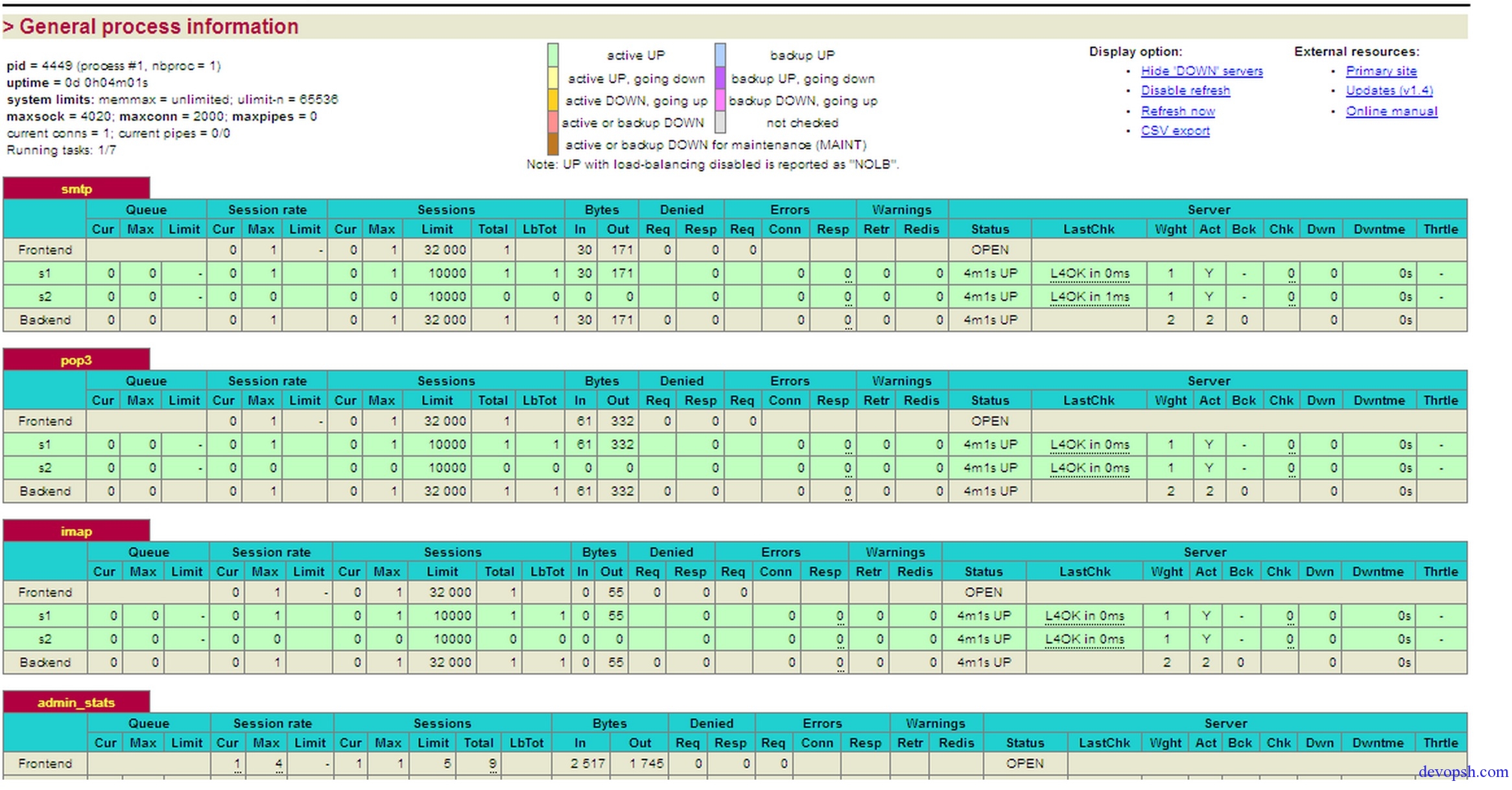
监控图: