1. Installation
- #wget http://haproxy.1wt.eu/download/1.4/src/haproxy-1.4.22.tar.gz
- #tar zxvf haproxy-1.4.22.tar.gz
- #cd haproxy-1.4.22
- #uname -r
- #make TARGET=linux26 PREFIX=/usr/local/haproxy
- #make install PREFIX=/usr/local/haproxy
- #mkdir conf
- #/usr/local/haproxy/sbin/haproxy -f haproxy.cfg
HAProxy Configuration File (haproxy.cfg)
- ########### Global Configuration #########
- global
- chroot /usr/local/haproxy
- daemon
- nbproc 1
- group nobody
- user nobody
- pidfile /usr/local/haproxy/logs/haproxy.pid
- ulimit–n 65536
- #spread-checks 5m
- #stats timeout 5m
- #stats maxconn 100
- ######## Default Configuration ############
- defaults
- mode tcp #Default mode: { tcp|http|health }. TCP is Layer 4, HTTP is Layer 7, health only returns OK.
- retries 3 #If connection fails twice, the server is considered unavailable. This can also be configured later.
- option redispatch #When the server corresponding to serverId goes down, force redirection to another healthy server.
- option abortonclose #When server load is high, automatically terminate connections that have been in the queue for a long time.
- maxconn 32000 #Default maximum number of connections.
- timeout connect 5000ms #Connection timeout.
- timeout client 30000ms #Client timeout.
- timeout server 30000ms #Server timeout.
- #timeout check 2000 #Health check timeout
- log 127.0.0.1 local0 err #[err warning info debug]
- ######## SMTP Configuration #################
- listen smtp 192.168.1.68:25
- # bind 0.0.0.0:25
- mode tcp
- balance roundrobin
- server s1 192.168.1.118:25 weight 1 maxconn 10000 check inter 10s
- server s2 192.168.1.240:25 weight 1 maxconn 10000 check inter 10s
- ######## POP3 Configuration #################
- listen pop3 192.168.1.68:110
- # bind 0.0.0.0:25
- mode tcp
- balance roundrobin
- server s1 192.168.1.118:110 weight 1 maxconn 10000 check inter 10s
- server s2 192.168.1.240:110 weight 1 maxconn 10000 check inter 10s
- ######## IMAP Configuration #################
- listen imap 192.168.1.68:143
- # bind 0.0.0.0:25
- mode tcp
- balance roundrobin
- server s1 192.168.1.118:143 weight 1 maxconn 10000 check inter 10s
- server s2 192.168.1.240:143 weight 1 maxconn 10000 check inter 10s
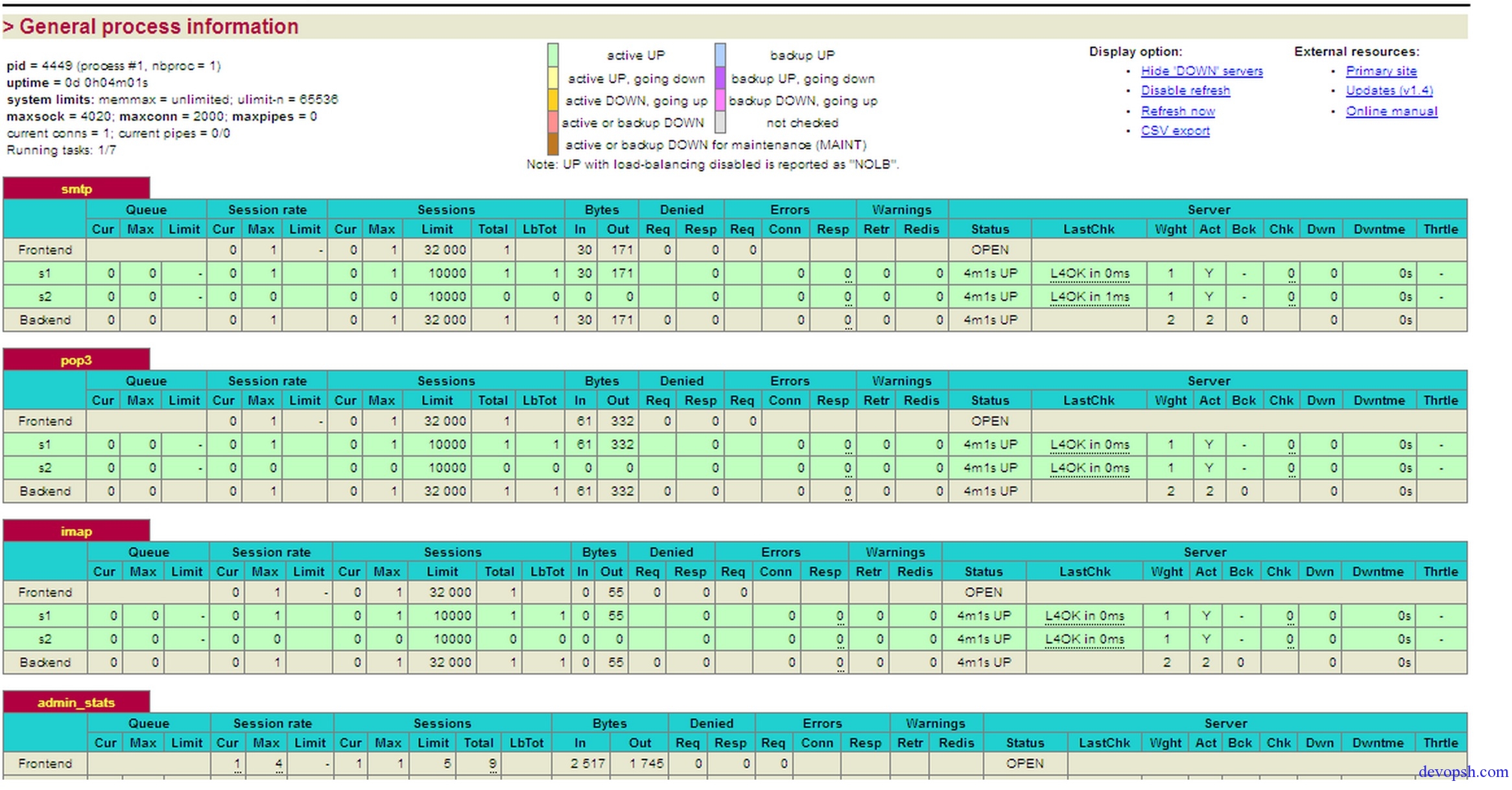
- ######## Statistics Page Configuration ########
- listen admin_stats 192.168.1.68:8099
- # bind 0.0.0.0:8099 #Listening port
- mode http #HTTP Layer 7 mode
- option httplog #Use HTTP log format
- #log 127.0.0.1 local0 err
- maxconn 5
- stats refresh 30s #Auto-refresh interval for statistics page
- stats uri /stats #Statistics page URL
- stats realm XingCloud Haproxy #Prompt text on the statistics page password box
- stats auth admin:admin #Username and password settings for the statistics page
- stats hide–version #Hide HAProxy version information on the statistics page
Monitoring Diagram: