This article previously introduced how to configure SNAT on Alibaba Cloud ECS instances under a VPC network so that the entire VPC accesses the public internet through a single EIP. Today, we will explain how to connect the private networks of two VPCs using a GRE tunnel.
The test environment is as follows:
2 VPCs (VPC1, VPC2) representing two completely isolated physical networks.
Each VPC network has one switch, one router, and one public IP. There are 2 ECS instances: one acting as the gateway for the VPC network, and the other serving as an internal LAN server.
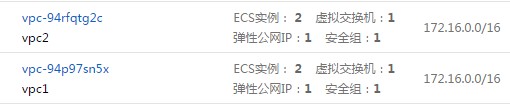
VPC1: {EIP: 112.74.32.191 GW: 172.16.1.1 VPC1-Client: 172.16.1.2}
VPC2: {EIP: 112.74.32.161 GW: 172.16.2.1 VPC2-Client: 172.16.2.2}
The topology is as follows:

VPC1-GW Operations
Load the gre module
1 |
[root@VPC1-GW ~]# modprobe ip_gre |
2 |
[root@VPC1-GW ~]# lsmod |grep gre |
3 |
ip_gre 9575 0 |
4 |
ip_tunnel 12597 1 ip_gre |
Create tunnel tun1
1 |
[root@VPC1-GW ~]# ip tunnel add tun1 mode gre remote 112.74.32.161 local 172.16.1.1 |
Activate tunnel tun1
1 |
[root@VPC1-GW ~]# ip link set tun1 up |
Configure interconnection addresses for the tunnel
1 |
[root@VPC1-GW ~]# ip addr add 192.168.2.1 peer 192.168.2.2 dev tun1 |
Route all traffic destined for the VPC2 network to the tun1 interface
1 |
[root@VPC1-GW ~]# route add -net 172.16.2.0/24 dev tun1 |
The configuration for VPC2-GW is identical to VPC1, just with the links reversed. Adjust according to your actual situation.
1 |
[root@VPC2-GW ~]# modprobe ip_gre |
2 |
[root@VPC2-GW ~]# lsmod |grep gre |
3 |
ip_gre 9575 0 |
4 |
ip_tunnel 12597 1 ip_gre |
5 |
[root@VPC2-GW ~]# ip tunnel add tun1 mode gre remote 112.74.32.191 local 172.16.2.1 |
6 |
[root@VPC2-GW ~]# ip link set tun1 up |
7 |
[root@VPC2-GW ~]# ip addr add 192.168.2.2 peer 192.168.2.1 dev tun1 |
8 |
[root@VPC2-GW ~]# route add -net 172.16.1.0/24 dev tun1 |
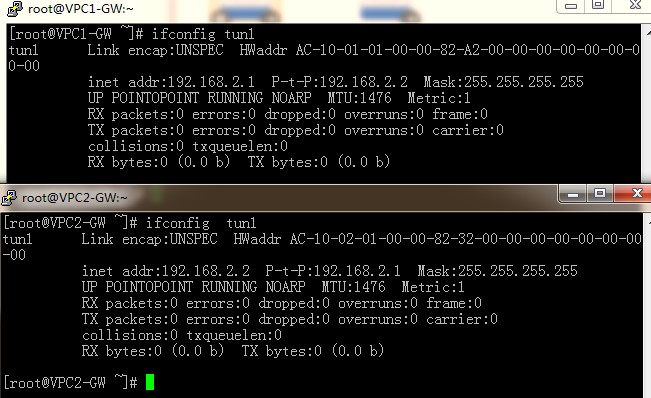
Check the tunnel status; it should be active.
Testing from the VPC2 network to the VPC1 GW shows connectivity. Similarly, testing from VPC1 to the VPC2 GW also succeeds.
1 |
[root@VPC2-GW ~]# nc -zv 172.16.1.1 22 |
2 |
Connection to 172.16.1.1 22 port [tcp/ssh] succeeded! |
3 |
[root@VPC1-GW ~]# nc -vz 172.16.2.1 22 |
4 |
Connection to 172.16.2.1 22 port [tcp/ssh] succeeded! |
At this point, the gateways of both VPC networks can communicate. However, testing connectivity between other servers in the VPCs still fails, as shown below:

This is because routing is not yet fully established. Taking VPC2 client accessing VPC1 client as an example:
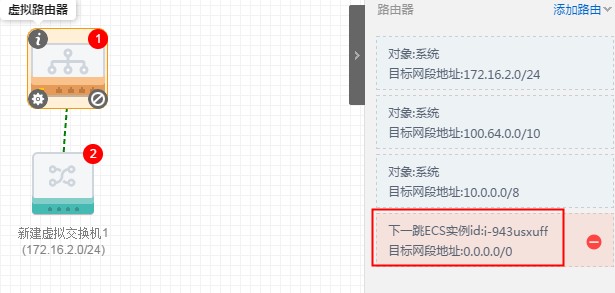
Log in to the VPC2 console and configure a default route on the VPC2 router pointing to the VPC2-GW configured with an EIP (refer to the previous SNAT tutorial).
Log in to VPC2-GW, enable IP forwarding, and configure SNAT so that packets from the VPC1 client are translated to the IP 192.168.2.2, which can communicate via the GRE tunnel:
1 |
[root@VPC2-GW ~]# echo 1 > /proc/sys/net/ipv4/ip_forward |
2 |
[root@VPC2-GW ~]# iptables -t nat -I POSTROUTING -s 172.16.2.0/24 -d 172.16.1.0/25 -j SNAT --to 192.168.2.2 |
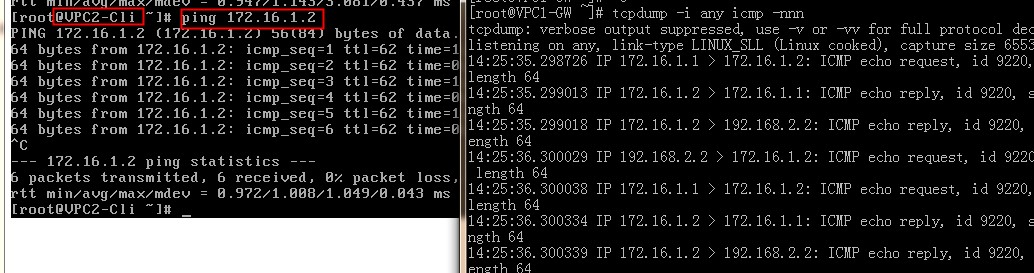
Now, packets from the VPC2-client can reach the VPC1-GW (VPC2-client->VPC2 Router->VPC2-GW->GRE->VPC1-GW), but ping still fails. Let’s check with packet capture:

The source address is the VPC1 interconnection address, and the destination is 172.16.1.2. This path is clearly not working. The VPC1-GW needs to translate these packets back to the VPC1 network address:
1 |
[root@VPC2-GW ~]# echo 1 > /proc/sys/net/ipv4/ip_forward |
2 |
[root@VPC1-GW ~]# iptables -t nat -I POSTROUTING -j SNAT --to 172.16.1.1 |
After configuration, perform the same setup for the reverse direction (VPC1->VPC2).
Now, when testing again, the networks of VPC1 and VPC2 are fully interconnected: