I have recently been working on products related to Alibaba Cloud ECS, so I needed to gain a solid understanding of it. As an Elastic Compute Service, its core components are computing, storage, and networking.
An architecture diagram was extracted from the official ECS website:
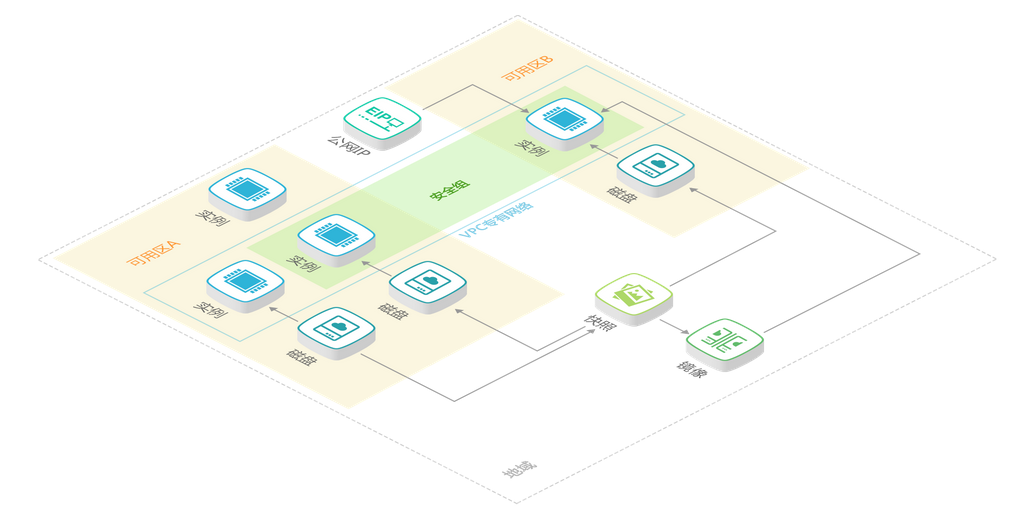
Instances (Compute):
1. Instance Components
1) CPU
2) Memory
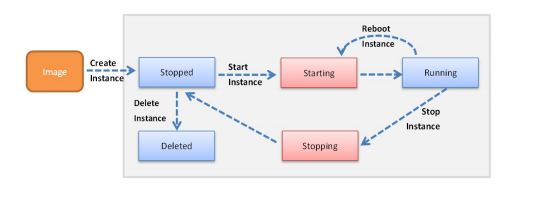
2. Instance States
Disk (Storage):
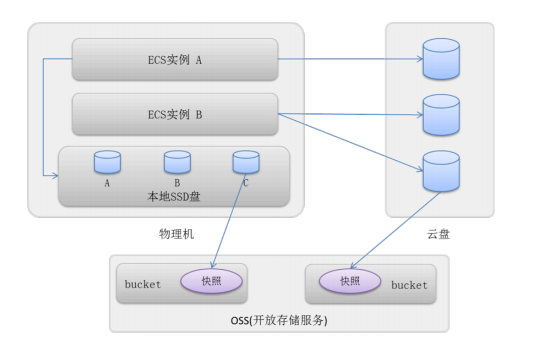
1. Local SSD
Local storage on the physical machine hosting the instance; it does not support independent mounting or unmounting.
2. Cloud Disk
Distributed storage using a three-replica strategy; supports independent mounting and unmounting within the same Availability Zone.
1) Standard Cloud Disk
2) SSD Cloud Disk
Networking:
1. Classic Network
Private Network
1) Private IP
2) Private NIC
3) Inter-instance communication within the same region
Public Network
1) Public IP #Optional, requires public traffic > 0MB
2) Public NIC
3) Internet access
2. Virtual Private Cloud (VPC)
A logically isolated private network where users can customize network topology and IP addresses, supporting connections via Express Connect.
Availability Zone:
An Availability Zone refers to a physically distinct area with independent power and networking infrastructure within the same Region. Within the same Region, Availability Zones are interconnected via the internal network, providing fault isolation between zones.
Security Group:
A logical grouping consisting of instances within the same Region that share similar security protection requirements and trust each other. Similar to a firewall, it is used to configure network access control for one or more cloud servers.
1) Each instance must belong to at least one security group, which must be specified during creation.
2) Instances in different security groups cannot communicate over the internal network by default, but mutual access can be authorized between security groups.
3) Inbound and outbound rules for a security group are enabled or disabled simultaneously.
4) Security group rules include IP authorization, port authorization, protocol authorization, and security group authorization.
5) Adjustments to security groups do not affect service continuity for users.
6) A single security group can contain no more than 1,000 instances. If you need more than 1,000 instances to communicate internally, you can distribute them across multiple security groups and authorize mutual access.
7) Each instance can join up to 5 security groups.
8) Each security group can have a maximum of 100 rule entries.
9) Each user account can have a maximum of 100 security groups.