1) Expand the external service capabilities of your application system through traffic distribution
2) Enhance the availability of your application system by eliminating single points of failure
Here is an architecture diagram of the SLB product taken from the official SLB website:
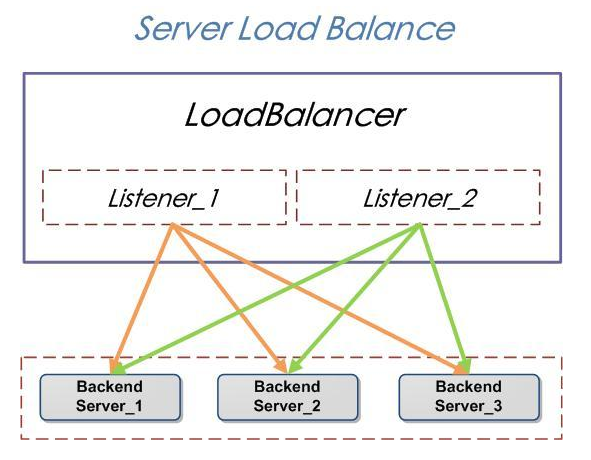
1) LoadBalancer represents an SLB instance.
2) Listener represents user-defined load balancing policies and forwarding rules.
3) BackendServer refers to a group of Elastic Compute Service (ECS) instances behind the load balancer.
External access requests are distributed to backend ECS instances for processing via the SLB instance according to relevant policies and forwarding rules.
The SLB service virtualizes resources from multiple cloud servers (Elastic Compute Service, ECS) located in the same Region into a high-performance, highly available application service pool by setting a Virtual IP address. It distributes network requests from clients to the cloud server pool based on the method specified by the application.
1) Provides two types: Public Network and Private Network
2) Supports Layer 4 (TCP protocol) and Layer 7 (HTTP and HTTPS protocols)
The SLB service checks the health status of ECS instances in the server pool and automatically isolates abnormal ECS instances. This resolves single-point-of-failure issues for individual ECS instances and improves the overall service capability of the application. Beyond standard load balancing features, the SLB service also offers DDoS protection for TCP and HTTP, enhancing the security posture of application servers.
Three Important Features of SLB
1. Health Checks:
When users enable the health check feature, if an issue arises during the health check of a specific backend ECS, requests will be forwarded to other healthy ECS instances. When the problematic ECS recovers to normal operation, SLB will automatically restore it to provide services internally or externally.
1) For Layer 7 (HTTP protocol) services, the SLB system’s health check mechanism works as follows: By default, the SLB system sends an HTTP HEAD request to the default homepage configured on the backend ECS application server using the ECS intranet IP address (accessed via the backend ECS port specified in the listener configuration). A response of 200 OK indicates that the backend ECS is running normally; otherwise, it is considered abnormal. If the page used for health checking is not the default homepage of the application server, users must specify the corresponding URI. If users restrict the Host header parameter for HTTP HEAD requests, they must specify the corresponding URL. Users can also better control the health check function by setting the check frequency, healthy threshold, and unhealthy threshold.
2) For Layer 4 (TCP protocol) services, the SLB system’s health check mechanism works as follows: By default, the SLB system initiates an access request to the backend ECS port specified in the listener configuration. If the port access is successful, the backend ECS is considered running normally; otherwise, it is considered abnormal.
2. Session Persistence:
When users enable session persistence, SLB distributes access requests from the same client to the same backend ECS instance for processing.
For Layer 7 (HTTP protocol) services, SLB uses cookie-based session persistence. The SLB system provides two cookie handling methods:
1) Cookie Insertion: The SLB system directly manages the insertion of cookies into client responses. Users need to specify the timeout duration for session persistence during configuration.
2) Cookie Rewrite: The SLB system manages cookie insertion based on a user-defined cookie name. This facilitates user identification and differentiation of custom cookie names, allowing selective session persistence rules for different applications on backend servers. Users need to specify the corresponding cookie name during configuration.
For Layer 4 (TCP protocol) services, SLB uses IP address-based session persistence. SLB forwards access requests from the same IP address to the same backend cloud server for processing.
Forwarding Rules:
SLB supports two modes of forwarding rules: Round Robin and Least Connections.
1) Round Robin Mode: Distributes external and internal access requests sequentially to backend ECS instances for processing.
2) Least Connections Mode: Distributes external and internal access requests to the backend ECS instance with the fewest current connections.