Amazon Virtual Private Cloud (Amazon VPC) is a virtual private networking service provided by AWS, allowing you to pre-configure a logically isolated section within the AWS cloud. This enables you to launch AWS resources within your own defined virtual network. You have full control over your virtual networking environment, including selecting your own IP address ranges, creating subnets, and configuring route tables and gateways.
In addition to providing IP resources and network connectivity, Amazon VPC offers infrastructure services such as DNS and DHCP. When you launch instances into a default VPC, we provide public and private DNS hostnames corresponding to the instance’s public IPv4 and private IPv4 addresses. When you launch instances into a non-default VPC, we provide private DNS hostnames for the instances, and whether public DNS hostnames are provided depends on the settings specified for the VPC and the instance.
For the us-east-1 region, public (external) DNS hostnames follow the format ec2-<public-ipv4-address>.compute-1.amazonaws.com, while for other regions, they follow the format ec2-<public-ipv4-address>.region.amazonaws.com. For example, an EC2 instance with the public IP 54.222.212.110 has the public DNS name ec2-54-222-212-110.cn-north-1.compute.amazonaws.com.cn. We resolve public DNS hostnames to the instance’s public IPv4 address outside its network and its private IPv4 address inside its network.
Private (internal) DNS hostnames resolve to the instance’s private IPv4 address. For the us-east-1 region, they follow the format ip-<private-ipv4-address>.ec2.internal, while for other regions, they follow the format ip-<private-ipv4-address>.region.compute.internal (where private.ipv4.address is the reverse lookup IP address). For example, an EC2 instance with the private IP 10.206.2.239 has the private DNS name ip-10-206-2-239.cn-north-1.compute.internal. You can use private DNS hostnames to enable communication between instances within the same network, but we cannot resolve DNS hostnames outside the instance’s network. To resolve hostnames outside the instance’s network, you can build your own DNS server to provide DNS services for the VPC and external networks.
A common application scenario is under a hybrid IT architecture, where a customer’s data center connects to the VPC on AWS via VPN or Direct Connect dedicated line. One DNS server is configured in the VPC, and another is configured in the customer’s data center. The master-slave roles of the servers can be defined by the customer. Providing DNS services through multiple DNS servers for clients in different locations ensures high availability of the service, provides services locally to reduce DNS query latency.
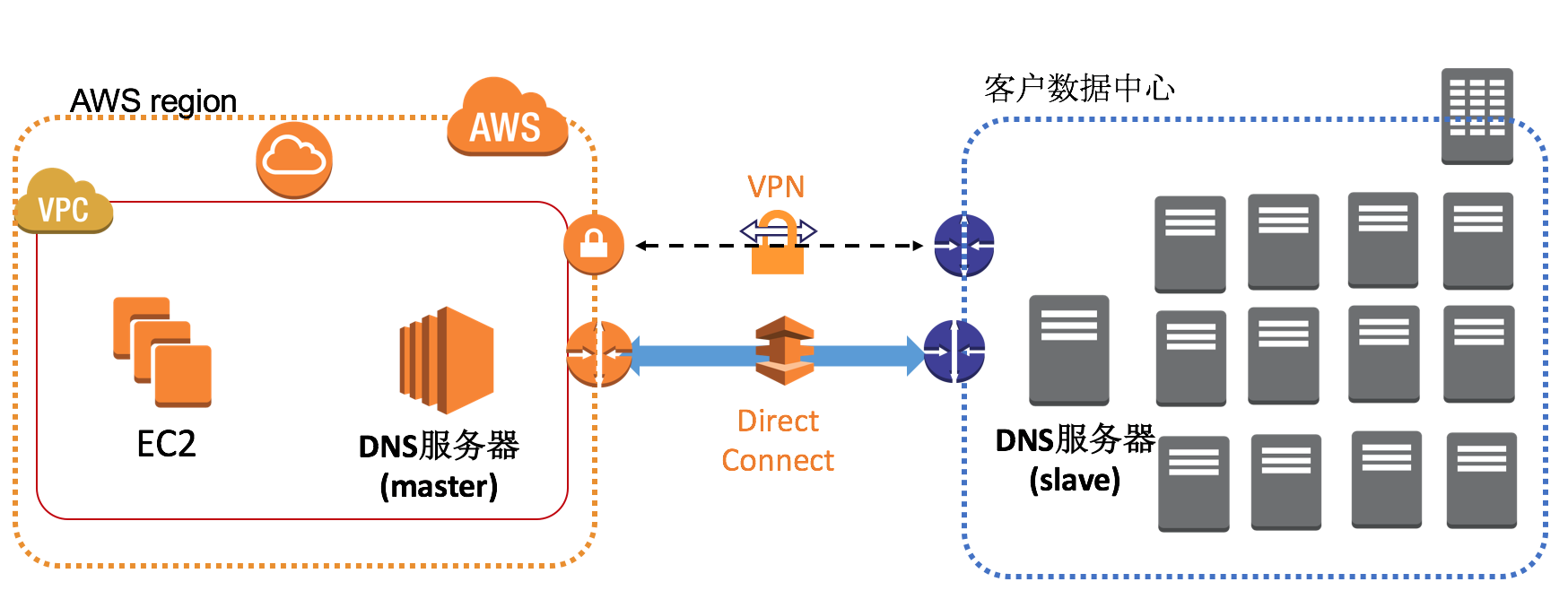
Next, I will explain step-by-step how to set up a DNS server using BIND based on the above architecture diagram. This article will not cover advanced BIND configurations. For more information on advanced BIND configurations, please refer to the BIND official website.
Installing and Configuring the Primary DNS Server
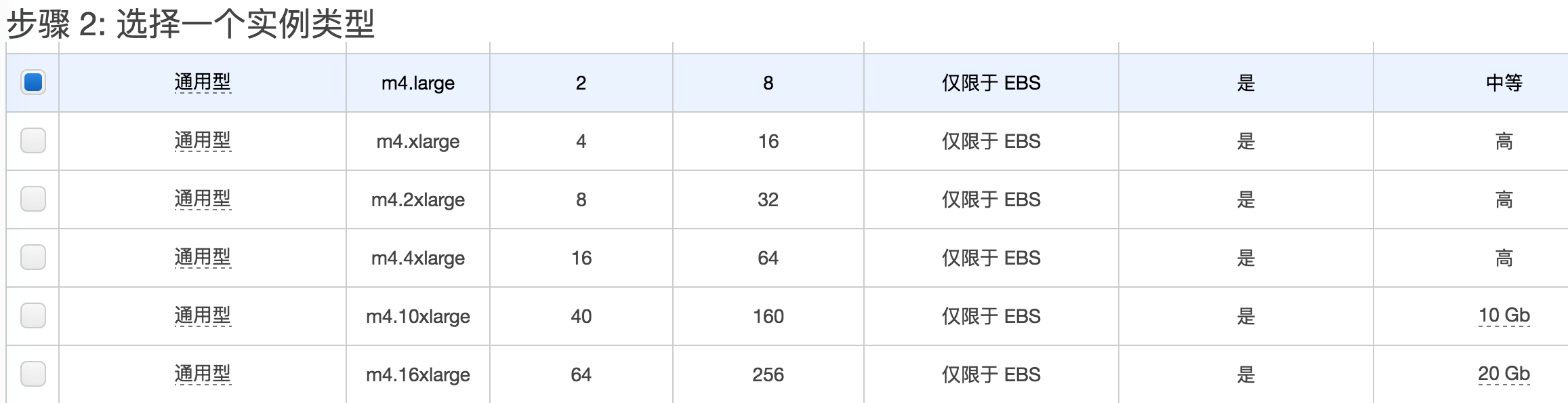
First, prepare an EC2 instance to install the BIND software. For instructions on how to create an EC2 instance, refer to the Amazon EC2 User Guide. In this example, we use an Amazon Linux AMI to create the instance, selecting the general-purpose instance type: m4.large. BIND does not require high hardware resources for the server. Without enabling DNSSEC (which is not covered in this article), a standard configuration server can handle DNS services. The m4.large configuration includes 2 vCPUs and 8GB of memory, which can support medium-scale DNS requests. When request volume increases, you can easily scale up the instance type to a larger configuration.
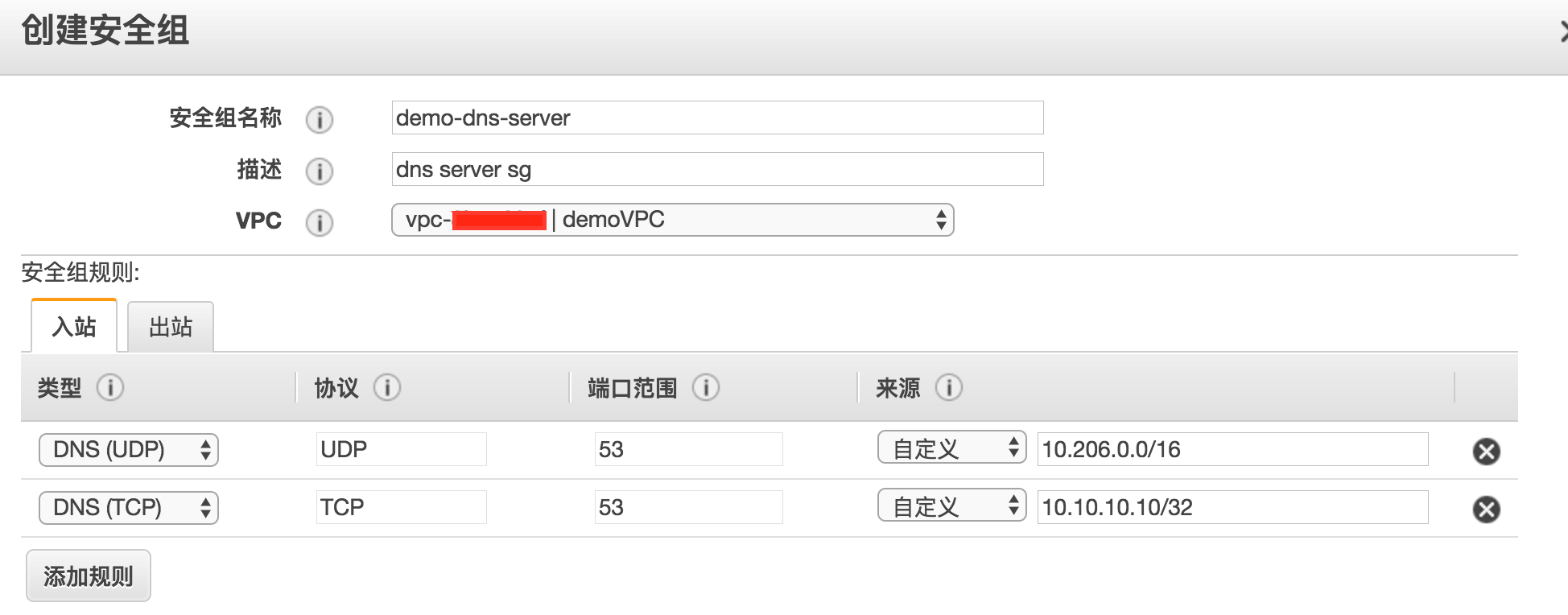
When creating an EC2 instance, you need to specify a security group to open service ports. The DNS service provides DNS query responses via UDP port 53 and zone transfers via TCP port 53. Therefore, the security group should open UDP port 53 for the VPC CIDR block and TCP port 53 for the DNS server in the customer’s data center, as shown below:
The importance of the DNS server as an infrastructure service needs no further elaboration. Amazon EC2 continuously monitors the status of EC2 instances and the underlying hardware, referred to as instance status checks and system status checks, respectively. We can create status check reports that trigger a restart operation if any status check fails and send alerts to a designated email address.
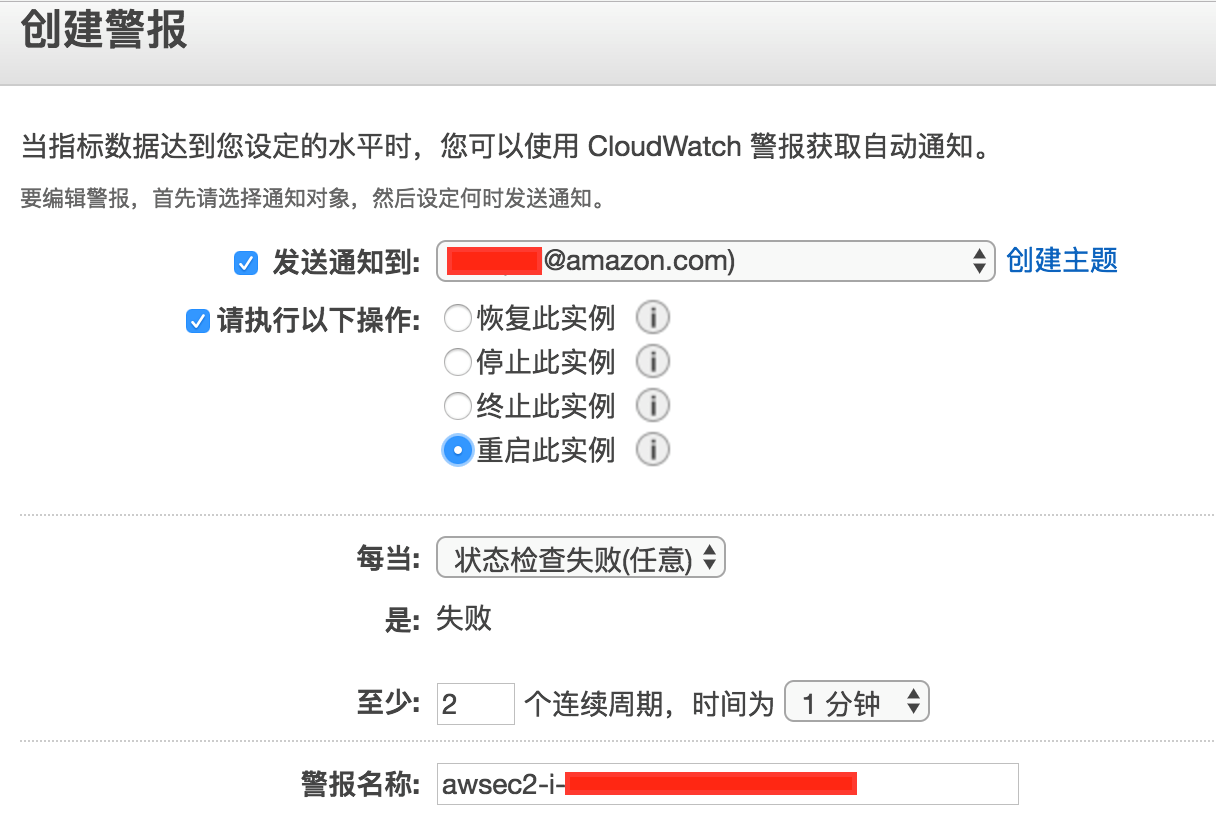
After creating the alarm, log in to the EC2 instance via SSH and install the bind software using the yum command:
yum install bind-utils bind
After installation, we will create a sample DNS domain: aws.local. First, we need to edit the /etc/named.conf file and modify the following content:
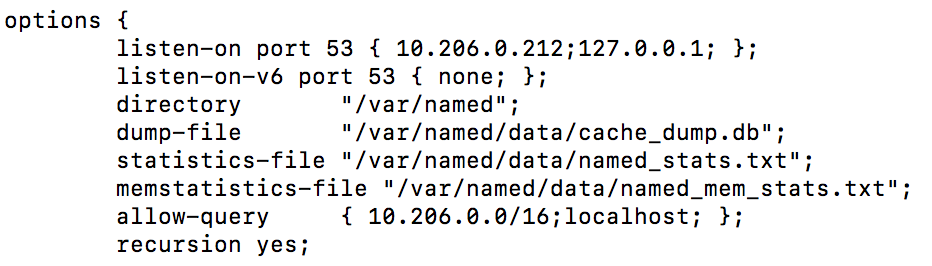
The listen-on default configuration is 127.0.0.1, meaning the DNS service binds only to the system’s loopback interface, preventing access from other clients. You need to add the EC2 instance’s private IP address to allow external access.
The allow-query default configuration is localhost, meaning only the EC2 instance hosting the DNS server can perform DNS queries against itself. Adding the VPC CIDR block allows hosts within the VPC to perform DNS queries. Note: You can also set this parameter to 0.0.0.0/0, as the security group settings previously allowed only IPs within the VPC to access UDP port 53.
Additionally, you need to add the definition for the aws.local domain. Add the following content to /etc/named.conf. The allow-transfer directive specifies that zone transfers are allowed only from the DNS server, limiting the scope of allowed zone transfers to enhance DNS service security:
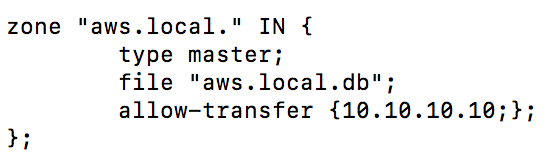
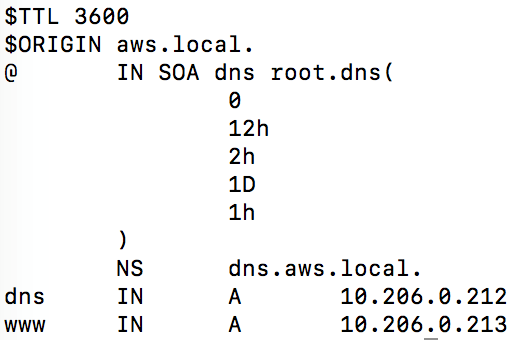
The above configuration indicates that the specific resolution configuration for the aws.local domain is in the file /var/named/aws.local.db. Its content is as follows. In this example configuration, two A records are defined: dns.aws.local corresponds to 10.206.0.212, and www.aws.local corresponds to 10.206.0.213.
Configuring Amazon VPC to Use the Self-Built DNS Server
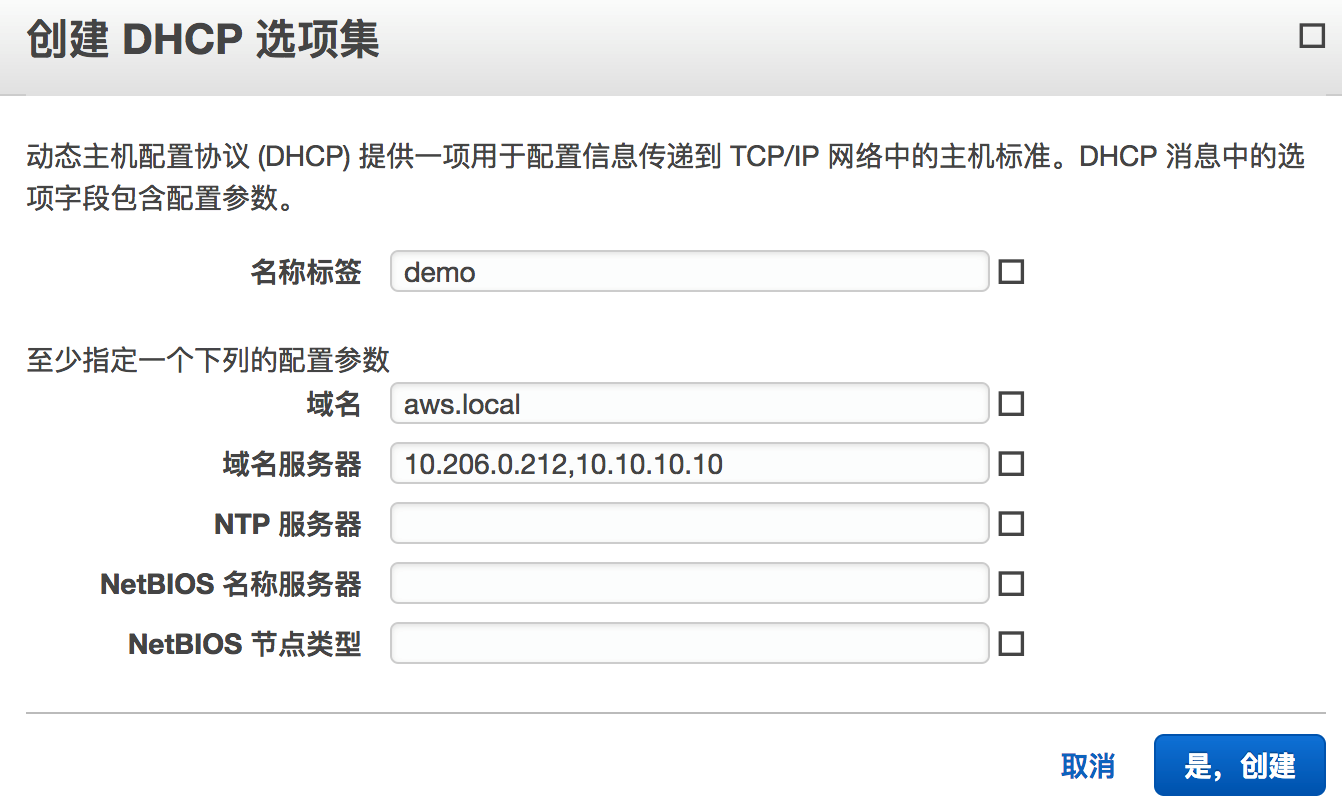
Amazon VPC uses DHCP services to dynamically assign IP addresses to EC2 instances and other connected components within the VPC. The Dynamic Host Configuration Protocol (DHCP) provides a standard method for delivering configuration information to hosts in a TCP/IP network. The options field in DHCP messages contains configuration parameters. These parameters include the domain name, domain name servers, and “netbios-node-type.” Next, we will create a new DHCP options set and point the domain name servers in the options set to the DNS server we just created.
In the AWS console, select the VPC service and choose “DHCP Options Sets” from the left menu. Click the “Create DHCP Options Set” button and enter the following information. Multiple DNS servers can be specified for the domain name servers; the first one is the DNS server within the VPC, and the second one is the DNS server in the customer’s data center:
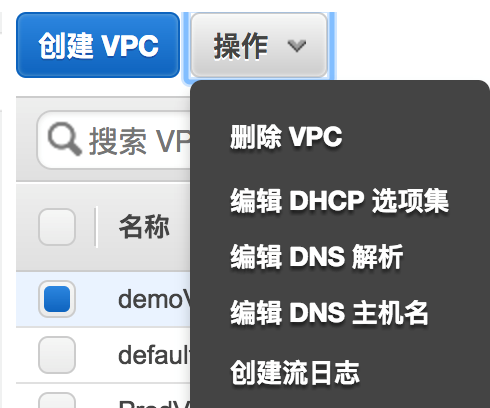
After creating the DHCP options set, select “Your VPCs” from the left menu, select the VPC to be modified, and choose “Edit DHCP Options Set” from the “Actions” dropdown menu.
Select the DHCP options set created earlier and save:
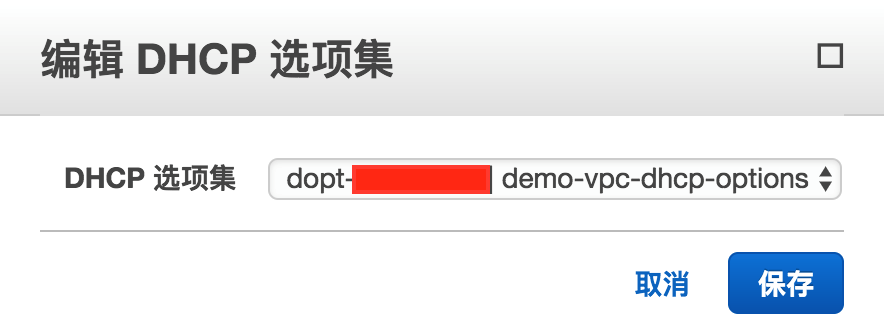
After associating the new DHCP options set with the VPC, all existing instances and any new instances launched within the VPC will use these options. There is no need to stop or restart instances. Depending on how frequently instances update their DHCP leases, they will automatically pick up the changes within a few hours. If desired, you can also use the operating system on the instance to manually renew the lease.
Installing and Configuring the Secondary DNS Server
The steps to install and configure the DNS server in the customer’s data center are the same as those in Amazon EC2, except for slight differences in the /etc/named.conf configuration:
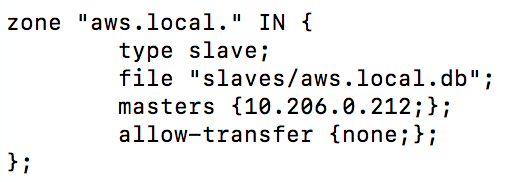
The slave server’s type is set to slave. The domain configuration file corresponding to the file parameter is automatically created and updated based on updates received from the primary DNS server. The masters directive specifies the primary domain name server for the aws.local domain. The last parameter, allow-transfer, disables zone transfers.
After configuring the secondary DNS server, you can set the network devices in the customer’s data center to use the secondary DNS server, with the primary DNS server on AWS as the second DNS server.
Summary
Amazon VPC provides DHCP and DNS services, offering IP address allocation and domain name resolution services for EC2 instances within the VPC, creating DNS domain names in a specific format for each EC2 instance. If users wish to use custom domain names or manage cloud and on-premises resources under a unified domain name system, they can build their own DNS server to provide DNS resolution services, which Amazon VPC supports.