Problem Background
Amazon ECS is a container management service that makes it easy to run, stop, and manage Docker containers on a cluster. When running container tasks using ECS, they are placed on the ECS cluster. Amazon ECS downloads the specified container images from the designated image repository and runs the tasks hosted by these images on the container instances within the cluster.
My colleague Chris Barclay wrote an excellent blog post introducing the method of draining container instances to automatically remove them before an Auto Scaling group scales down an ECS cluster.
Based on numerous real-world customer cases, there are many important scenarios requiring instance termination from an Amazon ECS cluster, such as: upgrading and updating EC2 AMIs, applying critical system patches, updating core system libraries, upgrading Docker software versions, upgrading the ECS agent version, and changing cluster size.
Solution
Typically, these scenarios share a common goal: when terminating or removing container instances from the cluster, ensure no impact on ongoing tasks within the cluster. This means preventing new tasks from being scheduled on container instances in the DRAINING state. If resources are available (or if new container instances are pre-provisioned), new tasks are assigned to other container instances in the ECS cluster. The tasks running on the container instances scheduled for termination wait until they successfully migrate to other instances before the instance is terminated. In practice, you can also manually change the container instance status to DRAINING. In this article, we demonstrate an automated solution for terminating ECS container instances with minimal impact on cluster tasks, utilizing Auto Scaling lifecycle hooks and serverless function invocations provided by Amazon Lambda, as shown below:
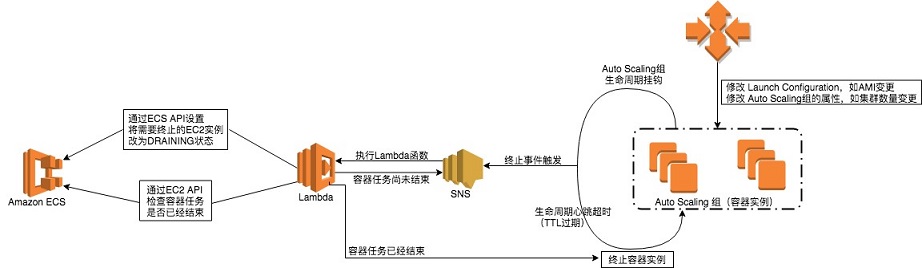
Auto Scaling groups support callable lifecycle hooks, such as Lambda functions, allowing operations to complete before an instance starts or terminates; in this case, before termination. The Lambda function invoked by the lifecycle hook performs the following two tasks:
- Sets the ECS container instance status to DRAINING.
- Checks if there are any ongoing tasks on the container instance. If so, it publishes a message to SNS to re-trigger the Lambda function for checking.
The Lambda function repeats step 2 until there are no longer any running tasks on the container instance or the lifecycle hook heartbeat times out, whichever occurs first. Afterward, control returns to the Auto Scaling lifecycle hook, and the container instance is terminated.
Reference Example
To implement the above automated container instance termination solution, refer to the open-source CloudFormation template and the Lambda deployment package uploaded to the S3 bucket to set up the resources described in this article. The template creates the following resources:
- VPC and associated network elements (subnets, security groups, route tables, etc.)
- ECS cluster, ECS service, and sample ECS task definition
- Auto Scaling group with two EC2 instances and a lifecycle termination hook
- Lambda function
- SNS topic
- IAM role capable of executing the Lambda function
Given that the trusted entities and global naming conventions for Auto Scaling groups differ in China, refer to the modifications here to configure and modify the CloudFormation template.
To create the CloudFormation stack, we can trigger an instance termination event to understand how it works:
- In the Amazon EC2 console, select Auto Scaling Groups and choose the name of the Auto Scaling group created by CloudFormation.
- Select Actions, Edit, and update the service to reduce the number of instances by one.
This triggers the termination process for one instance. Select the Instances tab of the Auto Scaling group: the instance status value should display the lifecycle status:
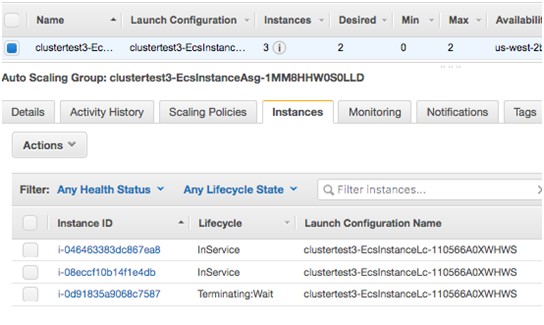
At this point, the lifecycle hook is activated and publishes a message to SNS, eventually triggering the response and execution of the Lambda function. Subsequently, the Lambda function changes the ECS container instance status to DRAINING. The ECS service intervenes in scheduling, stopping tasks on the instance and starting them on available instances.
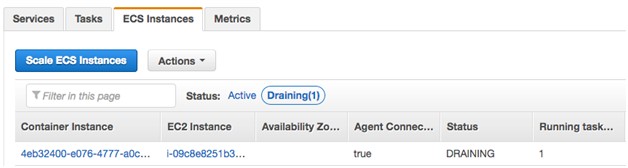
After the tasks are completed, the Auto Scaling group activity history confirms that the EC2 instance has been terminated.

In-depth Analysis
Let’s analyze in depth how the Lambda function works internally. The function first checks if the LifecycleTransition value in the received event is EC2_INSTANCE_TERMINATING, indicating that the current state has entered the termination phase of the lifecycle hook.
 # If the event received is instance terminating...
if 'LifecycleTransition' in message.keys():
    print("message autoscaling {}".format(message['LifecycleTransition']))
if message['LifecycleTransition'].find('autoscaling:EC2_INSTANCE_TERMINATING') > -1:
It then calls the function “checkContainerInstanceTaskStatus”. This function sets the container instance status to ‘DRAINING’ based on the container instance ID.
# Get lifecycle hook name
lifecycleHookName = message['LifecycleHookName']
print("Setting lifecycle hook name {} ".format(lifecycleHookName))

# Check if there are any tasks running on the instance
tasksRunning = checkContainerInstanceTaskStatus(Ec2InstanceId)
Then, it checks if any tasks are running on the instance. If tasks are running, it publishes a message to SNS to re-trigger the Lambda function and exits.
# Use Task ARNs to get describe tasks
descTaskResp = ecsClient.describe_tasks(cluster=clusterName, tasks=listTaskResp['taskArns'])
for key in descTaskResp['tasks']:
 print("Task status {}".format(key['lastStatus']))
 print("Container instance ARN {}".format(key['containerInstanceArn']))
 print("Task ARN {}".format(key['taskArn']))

# Check if any tasks are running
if len(descTaskResp['tasks']) > 0:
 print("Tasks are still running..")
 return 1
else:
 print("NO tasks are on this instance {}..".format(Ec2InstanceId))
 return 0
When the continuing Lambda function finds no running tasks on the container instance, it completes the lifecycle hook and terminates the EC2 instance.
#Complete lifecycle hook.
try:
 response = asgClient.complete_lifecycle_action(
 LifecycleHookName=lifecycleHookName,
 AutoScalingGroupName=asgGroupName,
 LifecycleActionResult='CONTINUE',
 InstanceId=Ec2InstanceId)
 print("Response = {}".format(response))
 print("Completedlifecycle hook action")
except Exception, e:
 print(str(e))
Conclusion
This article discusses various application scenarios for ECS container instance termination, provides an automated termination solution for ECS container instances with minimal impact on cluster tasks, and demonstrates and analyzes its working principle through reference examples. Based on the reference example, you can use services such as CloudFormation and Lambda to achieve true rolling deployments: start new instances first and batch-terminate old ones, while ensuring minimal impact on existing cluster tasks. For more information on container instance draining, please refer to the Amazon ECS Developer Guide.