A hacked website or forgetting the admin password after a long period of inactivity can significantly impact website operations. This article explains how to recover forgotten or lost admin passwords by modifying the database. This tutorial is applicable to most open-source programs such as WordPress, Discuz, ThinkPHP, ECShop, etc.
First, we need a database management tool, which can be the one provided by the server or other third-party management tools (such as phpMyAdmin).
Modify Password
This article uses phpMyAdmin as an example. Typically, website user databases are named in the format “prefix_user”; for example, the default for WordPress is wp_user.
1. After entering phpMyAdmin, go to the website’s database on the left side and search for tables containing “user”.
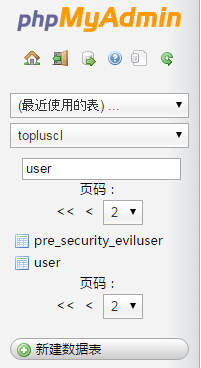 2. Click to enter the user database, where you will see the following image.
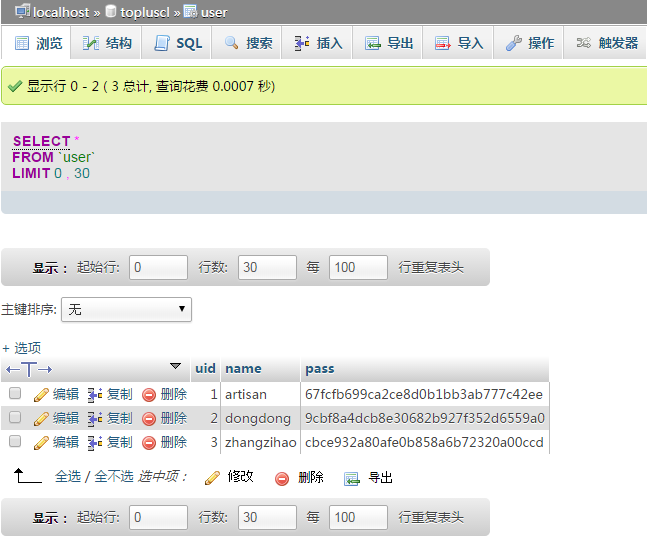 3. As you can see, ‘name’ represents the username, and ‘pass’ contains the password encrypted using the “md5” function. Select the user whose password you want to modify and click “Edit”.
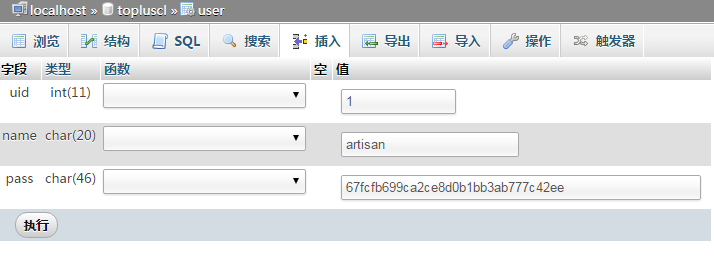 4. We need to modify the password in plain text mode, so change the option for the pass field to “md5”, then directly input the new password.
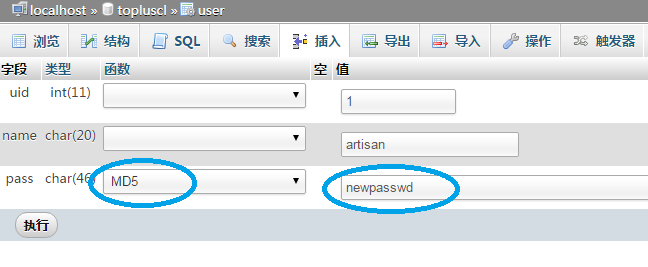 5. Click Execute. Once the modification is successful, the new password takes effect.
Summary
The principle above can also be accomplished with a simple command. This is suitable for Linux servers that do not have graphical management tools.
UPDATE `topluscl(database_name)`.`user(table_name)` SET `pass(password_field_name)` = MD5(encryption_mode)( 'new_password' ) WHERE `user`.`uid` =1;