A security group is a logical grouping composed of instances within the same region that share the same security protection requirements and trust each other.
Similar to a firewall, a security group is used to set network access control for one or more cloud servers. It is an important security isolation measure.
Each instance must belong to at least one security group, which needs to be specified during creation.
By default, instances in different security groups cannot communicate over the internal network. You can authorize mutual access between two security groups. More details
ECS Security Group Configuration
Currently, there are three ways to configure ECS security groups:
- Configuration Method 1: Alibaba Cloud Management Console. Currently,
non-VPC users cannot see security group configurations in the Alibaba Cloud console. You can submit a ticket to request activation, specifying "Activate console display 'This Instance Security Group'".
After activating the security group, you can view it in the ECS instance console, as shown below:
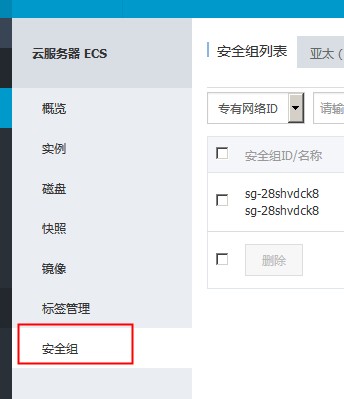
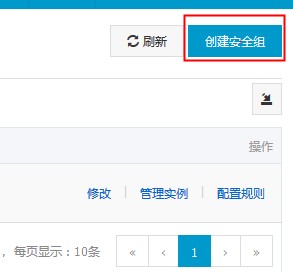
Click "Create Security Group" in the upper right corner:
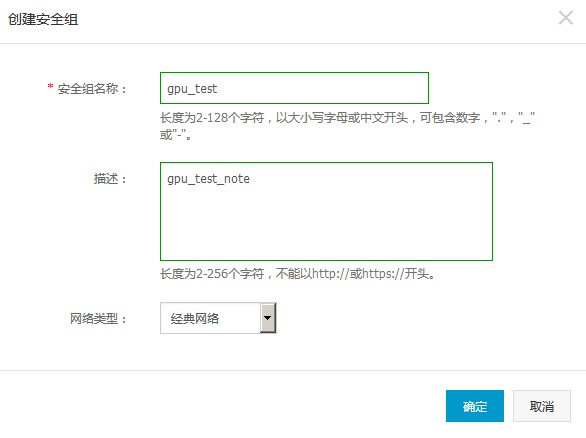
Enter the security group name and description, and select the network type:
After the security group is created successfully, you need to configure rules. Click the "Configure Rules" link for the security group:

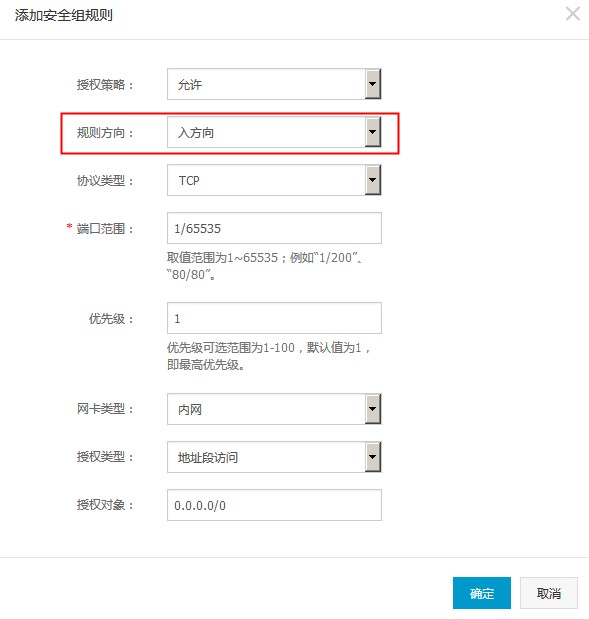
When adding security group configuration rules, select "Inbound" for the rule direction and "Intranet" for the NIC type:
After the rule is created successfully, you will see that the security group has not yet been applied to any ECS instances. As shown in the figure, the number of related instances is 0:

Next, you need to bind the security group to an ECS instance for the ECS to take effect according to this security group rule.
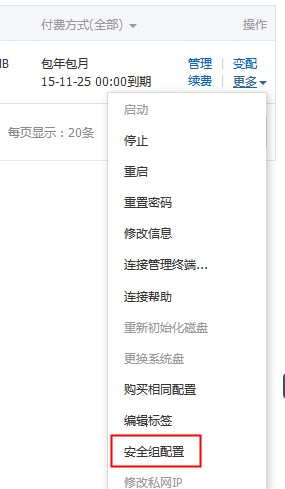
Select the "Security Group Configuration" option for the ECS instance:
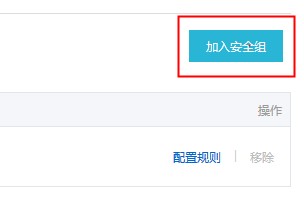
Click "Join Security Group" in the upper right corner:
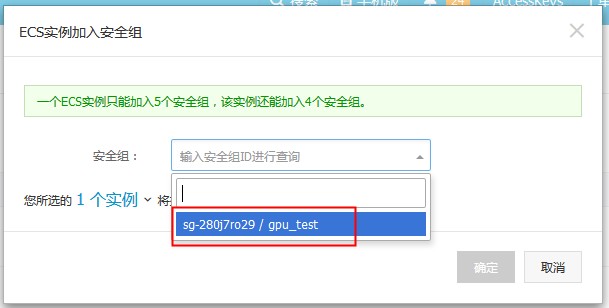
In the pop-up dialog box, select the security group you just created:
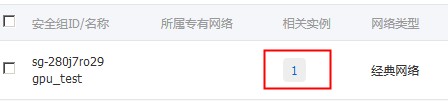
Return to the security group list. You can see that the value for related instances has changed to 1:
You can now test accessing specific ports on this ECS from the configured network segment.
- Configuration Method 2: Command Line JAR Package. First, download the JAR package to a Linux machine with a Java environment. Execute the following command to enter interactive mode:
$ java -jar ~/aliyuncs.jar -id <Your Access Key ID> -secret <Your Access Key Secret> -service ECS:2014-05-26
Here, aliyuncs.jar is obtained by extracting the downloaded file above, and 2014-05-26 is the ECS API version (which can be specified as 2014-05-26).
Then, create a security group instance using the following command. RegionId is the city where the ECS is located, and Description is the security group name:
@ECS:/>CreateSecurityGroup RegionId=cn-qingdao,Description=gpu_test
After successful creation, the security group instance name will be returned. The current operation is sg-28fcdqtel. Next, you can assign more attributes to the security group. The following example allows all machines in the 10.239.23.101/28 network segment to access port 80 on the current ECS:
@ECS:/>AuthorizeSecurityGroup SecurityGroupId=sg-28fcdqtel,IpProtocol=TCP,PortRange=80/80,SourceCidrIp=10.239.23.101/28,NicType=intranet,RegionId=cn-qingdao
After completing the security group instance attributes, you can bind the security group instance to the ECS instance:
@ECS:/>JoinSecurityGroup SecurityGroupId=sg-28fcdqtel,InstanceId=i-28weu9ksr
After performing the above steps, all hosts in the 10.239.23.101/28 network segment can access port 80 on the current ECS.
In addition to the above operations, there are some other related operations:
List all security groups: @ECS:/>DescribeSecurityGroups RegionId=cn-qingdao
List all attributes of the current security group: @ECS:/>DescribeSecurityGroupAttribute SecurityGroupId=sg-28fcdqtel,NicType=intranet,RegionId=cn-qingdao
Unbind the current security group from the current ECS instance: @ECS:/>LeaveSecurityGroup SecurityGroupId=sg-28fcdqtel,InstanceId=i-28weu9ksr
Delete the security group: @ECS:/>DeleteSecurityGroup SecurityGroupId=sg-28fcdqtel,RegionId=cn-qingdao
Authorize security group rules for outbound access from the current ECS: @ECS:/>AuthorizeSecurityGroupEgress SecurityGroupId=sg-28fcdqtel,IpProtocol=TCP,PortRange=1/65535,DestCidrIp=0.0.0.0/0,NicType=intranet,RegionId=cn-qingdao
For more information, please refer to JAR Package Practice.
- Configuration Method 3: API Configuration. See the ECS API documentation. This method is complex and not recommended.
Note:
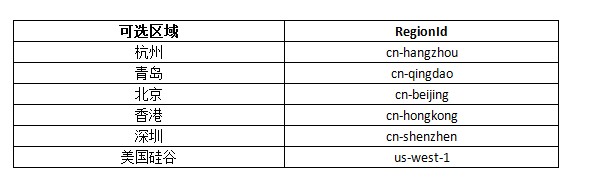
For the current RegionId, please refer to: