An Alibaba Cloud Windows server is available, and you want to access an RDS instance in intranet mode from the public internet without configuring a complex VPN. Currently, Alibaba Cloud RDS only supports either intranet or extranet mode at one time. For Linux servers, we can configure DNAT to meet this requirement, but what should be done for Windows, which lacks iptables? You can use a small utility tool to achieve this.
Solution:
On Linux, you can use SSH tunnels or iptables to implement DNAT port forwarding. However, Windows does not support this by default, and setting up a VPN just to access the intranet is undesirable.
In this case, you can run a Windows port forwarding software called Portmap on the server:
The configuration is simple: set the input port, output IP, and output port, then save. The changes take effect immediately.
As shown in the figure below, running the software on the server with this configuration will achieve the following:
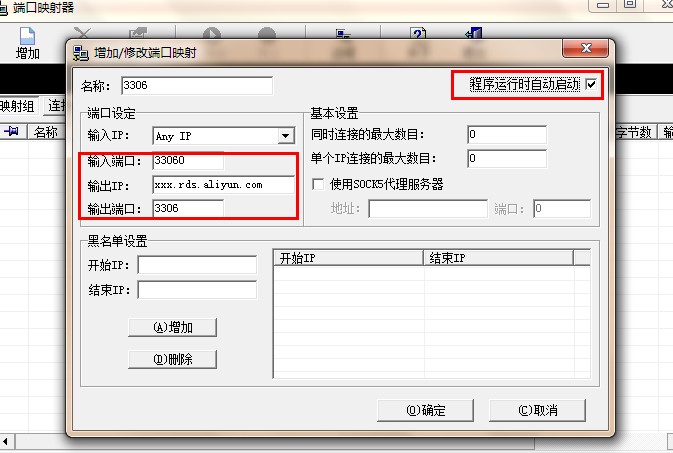
Accessing port 33060 of the server’s public IP will forward the request to port 3306 of xxx.rds.aliyun.com, achieving the same effect as DNAT. The output IP supports both domain names and IP addresses.
You can download the software online yourself. Download Link.
I have used this software for a period of time, and it is quite stable.
However, its drawback is that it cannot be installed as a service. Friends who are reluctant to use VPNs are encouraged to try this software.
