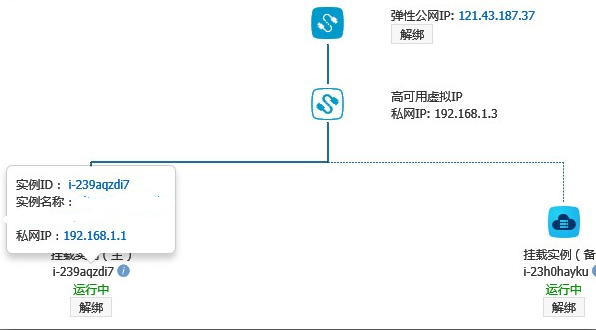
Many cloud environments, including Alibaba Cloud, have been widely criticized for not supporting floating IPs. Alibaba Cloud has now released HAVIP (High Availability Virtual IP) under VPC networks, which enables ARP announcement of IPs. This makes it possible to build your own HA setup, and I was fortunate enough to get early access to test it out. (Note: Classical networks still do not support this feature.)
Test Environment:

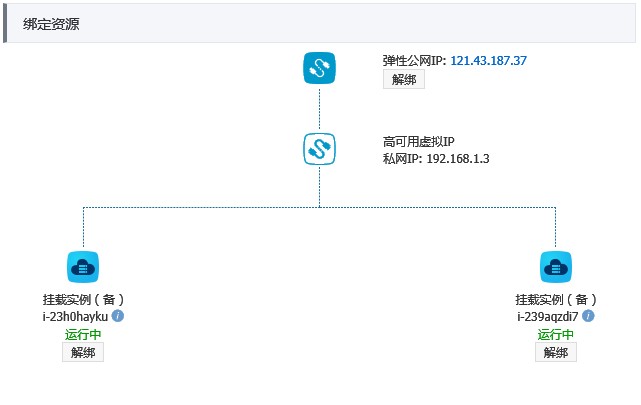
VPC: 192.168.1.0/24
ECS:
nginx1: 192.168.1.1
nginx2: 192.168.1.2
HAVIP: 192.168.1.3
Public EIP bound to the HAVIP: 121.43.187.37
The topology after configuration is as follows:
After setting up the environment, log in to the primary and standby ECS servers and configure nginx + keepalived on each.
[root@Nginx1 ~]# yum install nginx keepalived -yThe following is the content and explanation of the MASTER server (nginx1) configuration file /etc/keepalived/keepalived.conf:
! Configuration File for keepalived

# Configure global_defs, primarily used to identify the machine and send notifications in case of failure.
global_defs {
   router_id Nginx1
}
# Configure vrrp_script, primarily used for health checks and defining actions to take upon check failure.
vrrp_script chk_nginx {
# Health check script. If the script returns a non-zero value, the check is considered failed.
    script "/etc/keepalived/ck_ng.sh"
# Check interval. The following configuration performs a check every 2 seconds.
    interval 2
# Upon check failure, reduce the priority of the vrrp_instance by 5.
    weight -5
# Require 3 consecutive failures before considering the health check truly failed and adjusting the priority.
    fall 3
# Consider it successful after 2 consecutive successes. However, do not adjust the priority.
    rise 2

}

# Define the vrrp_instance configuration for the VIP providing external services
vrrp_instance VI_1 {
# Specify the initial state of the vrrp_instance. Whether it is MASTER or BACKUP primarily depends on the priority.
    state MASTER
# Specify the network interface bound to the vrrp_instance. The VIP will ultimately be advertised via this specified interface.
    interface eth0
# Source IP for sending heartbeat packets. You can use the IP address of the bound interface or any other IP address on this server.
    mcast_src_ip 192.168.1.1
# Equivalent to VRID, used to distinguish multicast groups within a subnet. It must be unique within the multicast domain.
    virtual_router_id 55
# Local priority. Among machines with the same VRID, the one with the highest priority will be elected as MASTER.
    priority 101
# Heartbeat interval. With the following configuration, the MASTER will send a packet every second to inform other machines in the group that it is still alive.
The configuration for the BACKUP server (nginx2) needs to be modified:
state MASTER changed to  state BACKUP
mcast_src_ip 192.168.1.1 changed to the actual IP mcast_src_ip of the backup server, 192.168.1.2
priority 101 reduced, for example to    priority 100
Keep everything else unchanged.
To enable automatic failover when the Nginx service fails, you need to write a custom script. There are no strict requirements for the script; it just needs to achieve the goal. Here, we use monitoring the number of Nginx processes as an example:
vim /etc/keepalived/ck_ng.sh
#!/bin/bash
# Check if the nginx process exists
count=$(ps -C nginx --no-heading|wc -l)
# When the number of processes equals 0
if [ "${count}" = "0" ]; then
# Attempt to start nginx once, then wait 2 seconds before checking again
    service nginx start

    sleep 2
   count=$(ps -C nginx --no-heading|wc -l)
    if [ "${count}" = "0" ]; then
# If startup fails, stop keepalived to trigger a master/standby failover
        /etc/init.d/keepalived stop
    fi
fi
# Add execute permissions to the script
chmod +x vim /etc/keepalived/ck_ng.sh
# Start the nginx & keepalived services for both Nginx1 and Nginx2:
[root@Nginx1 ~]# /etc/init.d/nginx start;/etc/init.d/keepalived start
Starting nginx: [ OK ]
Starting keepalived: [ OK ]
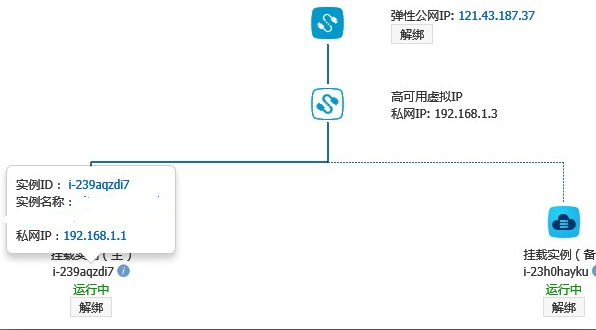
Checking the HAVIP console shows that the server at 192.168.1.1 is the primary server.
At this point, we kill the nginx service on the Nginx1 server.
Oct 23 17:20:01 iZ239aqzdi7Z Keepalived_vrrp[25019]: VRRP_Instance(VI_1) sending 0 priority
Oct 23 17:20:01 iZ239aqzdi7Z Keepalived_vrrp[25019]: VRRP_Instance(VI_1) removing protocol VIPs.
Oct 23 17:20:01 iZ239aqzdi7Z Keepalived_healthcheckers[25018]: Netlink reflector reports IP 192.168.1.3 removed
At this point, accessing http://121.43.187.37/ allows you to see that the access has automatically switched to NGINX2
Oct 23 17:22:14 iZ239aqzdi7Z Keepalived_vrrp[25610]: VRRP_Instance(VI_1) Entering MASTER STATE
Oct 23 17:22:14 iZ239aqzdi7Z Keepalived_vrrp[25610]: VRRP_Instance(VI_1) setting protocol VIPs.

Oct 23 17:22:14 iZ239aqzdi7Z Keepalived_vrrp[25610]: VRRP_Instance(VI_1) Sending gratuitous ARPs on eth0 for 192.168.1.3
Oct 23 17:22:14 iZ239aqzdi7Z Keepalived_healthcheckers[25609]: Netlink reflector reports IP 192.168.1.3 added
Oct 23 17:22:19 iZ239aqzdi7Z Keepalived_vrrp[25610]: VRRP_Instance(VI_1) Sending gratuitous ARPs on eth0 for 192.168.1.3
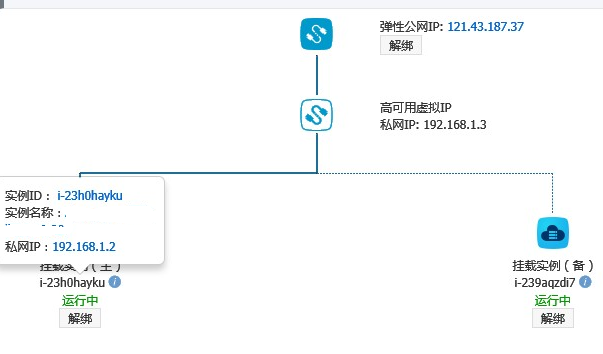
Re-access http://121.43.187.37/ for testing; the request was routed back to Server NGINX1. Checking the HAVIP console, the server with IP 192.168.1.1 has regained control and resumed its role as the primary server.