This article is suitable for initial users and those with some experience who wish to accelerate websites and videos using CloudFront. It covers configuration and optimization, with a difficulty level of 200~300.
Background
With the development of mobile internet, applications such as image sharing, short videos, and online live streaming have become increasingly popular. Developers are paying more attention to how to securely, cost-effectively, and with low latency distribute content to end users. Content Delivery Networks (CDNs) were born to solve the problem of internet congestion. By using numerous edge nodes closer to end users to provide services, CDNs accelerate content distribution. Therefore, deploying a CDN at the front end of an application system has become the best choice for accelerating content distribution.
I. What is Amazon CloudFront?
Amazon CloudFront is a global content delivery network service that securely distributes data, videos, applications, and APIs to viewers with low latency and high transfer speeds. CloudFront integrates with various AWS products, such as AWS Shield for DDoS mitigation, AWS WAF (Web Application Firewall), Amazon S3, Elastic Load Balancing, Amazon EC2, and Amazon Route 53, as well as Lambda@Edge, which allows you to run user code on the AWS global infrastructure.
As of July 2018, Amazon CloudFront has 131 Points of Presence (121 Edge Locations and 11 Regional Edge Caches) in 59 cities across 26 countries/regions.
For example, when a client initiates access to www.customer.com, the DNS system first resolves the host IP corresponding to this domain name. Through local ISP DNS recursive queries, it reaches the customer.com DNS server and learns that this domain points to xxx.cloudfront.net. Further resolving xxx.cloudfront.net, CloudFront’s DNS server returns the host IP of the edge node suitable for the current client based on information such as the request source IP, e.g., 1.1.1.1. Finally, the client sends a request to 1.1.1.1. If this edge node has already cached the content requested by the client (static files such as images, videos, etc.), it returns it directly to the client. If not cached, it fetches the content from the origin first, stores it in the edge node, so that subsequent requests for this content can be returned directly.
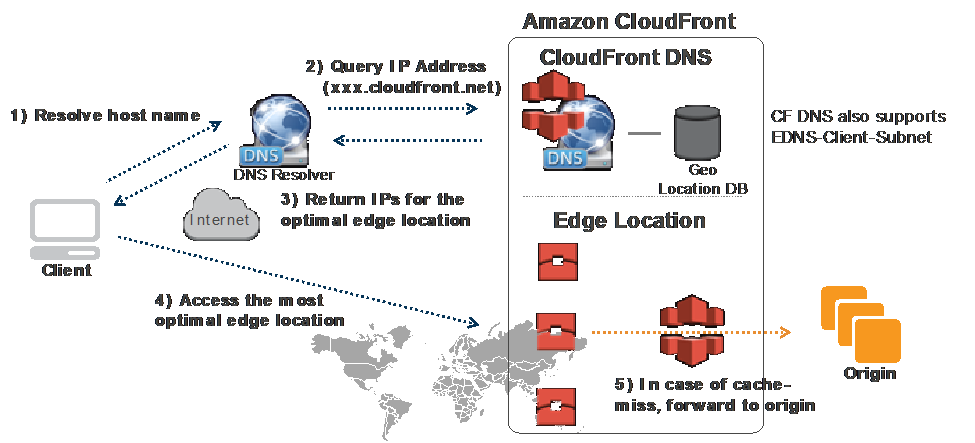
Better CDN performance brings more traffic and a better user experience. Below we will introduce how to configure and optimize it.
II. How to Configure CloudFront Distribution
Below we introduce how to configure CloudFront for your application to accelerate website access.
Before starting, let’s briefly introduce common CloudFront terminology.
Distribution: A distribution is the basic unit of CloudFront. Each distribution has a unique ID and a domain name assigned by CloudFront (similar to abcdefg13456789.cloudfront.net). There are currently two types of distributions: Web and RTMP. Web distributions are mainly used for distributing static and dynamic content, media files based on HTTP/s protocols, and internet live streaming based on HLS protocols. RTMP distributions are mainly used for video-on-demand scenarios based on the RTMP protocol, where the origin must be an S3 bucket. This article uses Web distribution as an example.
Origin: As the name suggests, the origin is the site being accelerated. It can be an S3 bucket, ELB/EC2, Elemental MediaStore/MediaPackage, or a user-defined site (such as an HTTP web server in a third-party IDC). A distribution can have multiple origins.
Behaviors: Behaviors determine which cache action to execute via path matching. A distribution can have multiple Behaviors, and each Behavior corresponds to an origin. In Behaviors, you can set cache TTL time, allowed HTTP methods (GET, PUT, POST, etc.), association with Lambda, etc.
This section will cover the following content:
- Create a distribution;
- The distribution has two origins: one added during creation and one added later. One origin is an ELB, and the other is an S3 bucket;
- Two Behaviors: one is the default Behavior corresponding to the origin ELB, and the other is a newly added Behavior corresponding to the origin S3 bucket;
- The creation process of ELB and S3 is not covered;
1. Enter the CloudFront console and select New Distribution, choosing Web Distribution.
2. Origin Settings
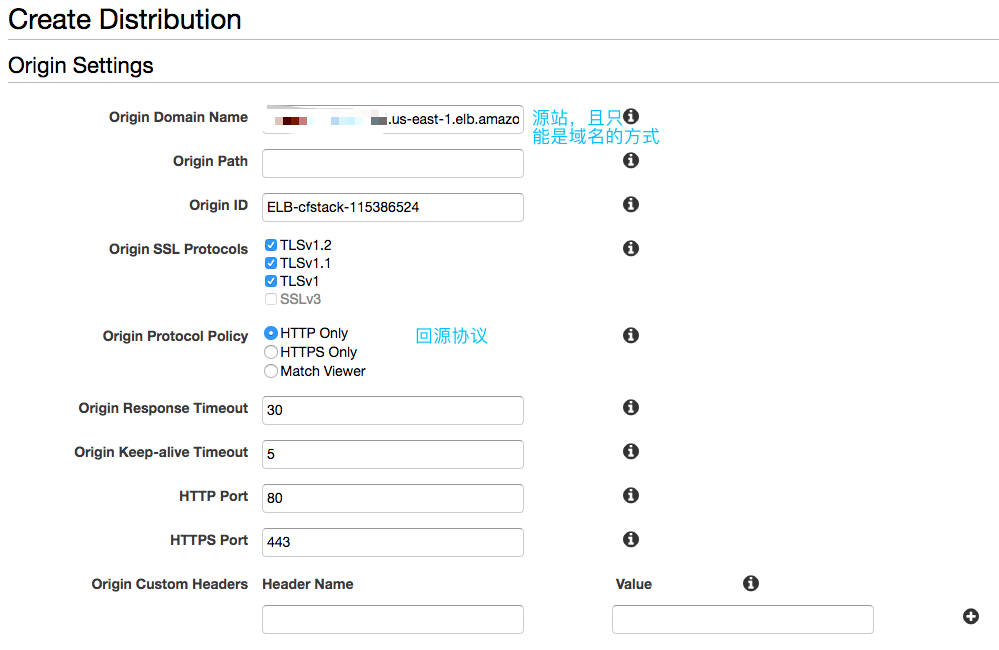
Some explanations are as follows:
| Origin Settings | |
| Origin Domain Name | Origin address, supporting only domain names. You can see ELBs, S3s, and Elemental Media Services created in your account in the dropdown list.
If it is a custom site, you must configure a domain name for the site first; you cannot fill in an IP address. |
| Origin Path | (Optional) If the origin content has multiple directory levels, but you do not want these directory levels to appear in the path when fetching from the origin, you can set the directory levels to hide here. |
| Origin Protocol Policy | CloudFront origin-fetching protocol, which can be HTTP or HTTPS, or the same protocol as the client’s request. Note that this is the protocol used by CloudFront when fetching from the origin, not the protocol used by the client to reach the CloudFront PoP point.
If HTTPS is selected, be sure to configure the SSL certificate corresponding to the origin domain name (Origin Domain Name) on the origin. |
| Origin Response Timeout | Origin fetch timeout duration. |
| Origin Custom Headers | (Optional) Custom origin-fetching headers, i.e., headers added when fetching from the origin. These can be custom headers, usually used for the origin to check these headers. If the header exists, service is provided; otherwise, an error code is returned. This can be used to strengthen content access security. |
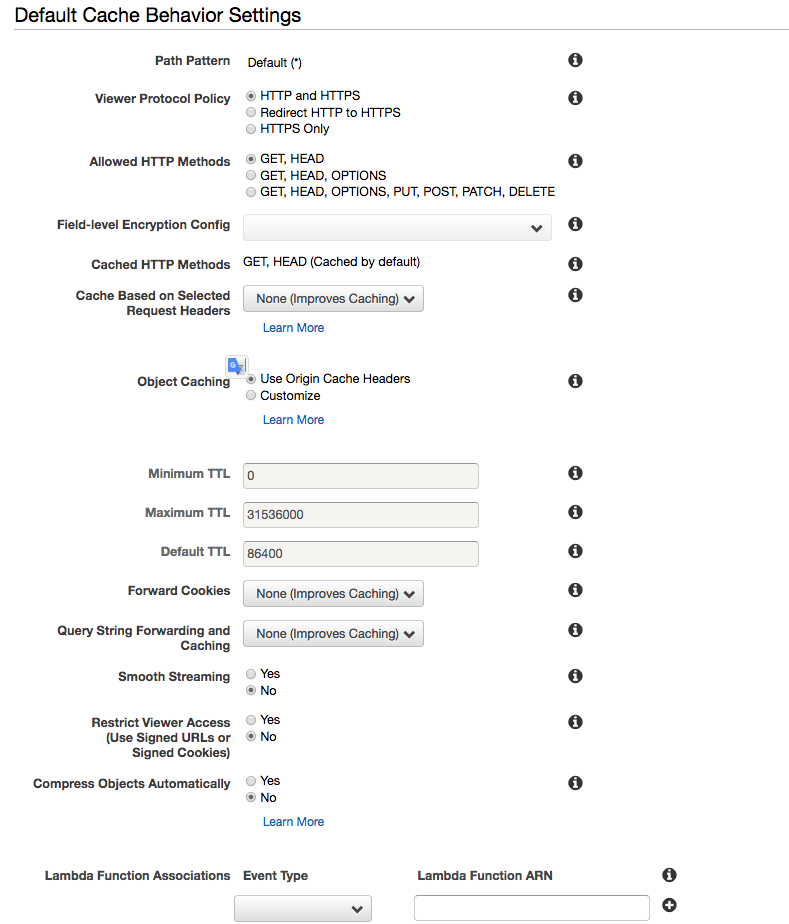
| Default Cache Behavior Settings | |
| Path Pattern | Currently, it is the default Default. |
| Viewer Protocol Policy | The protocol used by the client to reach CloudFront, supporting HTTP and HTTPS, and providing redirection from HTTP to HTTPS. |
| Allowed HTTP Methods | Allowed HTTP actions. Different Behaviors can be configured with different options. |
| Cache Based on Selected Request Headers | Whether to cache based on headers. There are three options: None, Whitelist, and All. If you only need to cache based on partial headers, select Whitelist and add the corresponding headers. All means no caching; all requests are forwarded to the origin, in which case TTL must be set to 0.
Normally, CloudFront removes some headers sent by the client. Therefore, if you need to cache content differently based on headers or if the origin needs to handle content differently based on headers, you must whitelist these headers here. By default, the Host field value in the request received by the origin from CloudFront is the origin domain name set in the Origin. If the user’s origin needs to obtain the value of the Host field sent by the client (i.e., the domain name the user CNAMEd to this distribution), you need to add Host to the whitelist here. At this time, the origin will receive the value used by the client when making the request. |
| Object Caching | Caching duration. You can follow the origin’s settings (Cache-Control Header) or customize it here. For the relationship and effects of Min, Max, and Default TTL, see:
https://docs.aws.amazon.com/zh_cn/AmazonCloudFront/latest/DeveloperGuide/Expiration.html |
| Forward Cookies | Whether to forward cookies to the origin. CloudFront also caches different content based on this value. |
| Query String Forwarding and Caching | Whether to forward query strings to the origin. CloudFront also caches different content based on this value. |
| Restrict Viewer Access
(Use Signed URLs or Signed Cookies) |
Whether to use signed URLs or signed cookies. |
| Compress Objects Automatically | Whether to enable automatic compression. If the request’s Accept-Encoding supports gzip, CloudFront can automatically compress to reduce traffic transmission. |
| Lambda Function Associations | Whether to associate Lambda@Edge. We will introduce the usage of Lambda@Edge in another blog post; this article does not cover it. |
From the above, it can be seen that whether to cache and for how long is related to whether to forward headers, cookies, and query strings. To improve cache hit rates and thus access performance, see https://docs.aws.amazon.com/zh_cn/AmazonCloudFront/latest/DeveloperGuide/ConfiguringCaching.html.
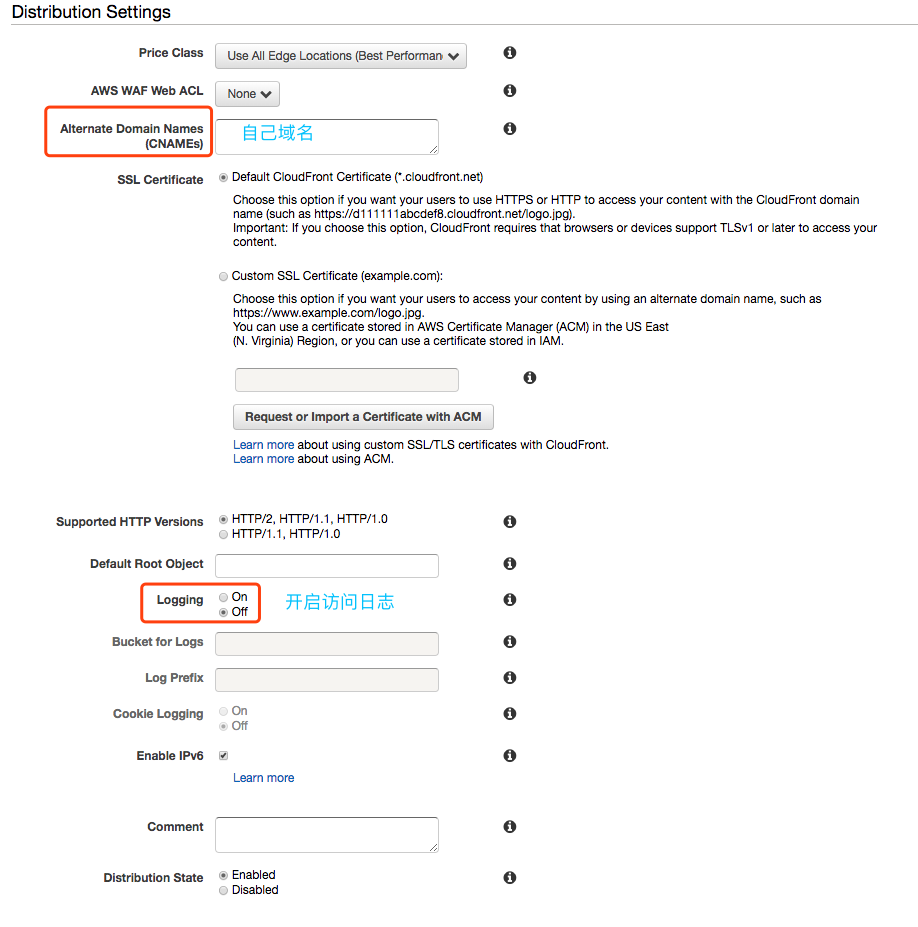
| Distribution Settings | |
| Price Class | There are three categories: North America and Europe, North America, Europe, and Asia Pacific excluding Africa, and Global Acceleration. Different categories use different PoPs and have different prices. |
| AWS WAF Web ACL | If WAF is configured, it can be associated here. Of course, after the CloudFront Distribution is created, it can also be associated in the WAF Console. |
| Alternate Domain Names (CNAMEs) | (Required, if using your own domain) After the CloudFront Distribution is created, CloudFront provides a domain name ending in cloudfront.net. If the user needs to use their own domain name, they need to fill in the domain name to be used here. |
| SSL Certificate | Supports users using certificates for their own domains, which must match the domain name in the previous field. You can apply for a certificate using Amazon ACM. Note that you must apply for the certificate in the us-east-1 region for it to be applied to CloudFront.
Supports both dedicated IP and SNI modes. |
| Logging | Access logs. It is recommended to enable them. |
| Bucket for Logs/ Log Prefix | The location where logs will be stored when logging is enabled. Enabling logs helps with client access behavior analysis, debugging, etc. |
After clicking Create, go to the Distribution list page. You can see the Status is “In Process.” After about 10 minutes, when the status changes to “Deployed,” it means the distribution has been created and is ready to use, and the domain name assigned by CloudFront is visible.
3. Add Origin
Click the distribution ID to see the relevant settings for the current distribution.
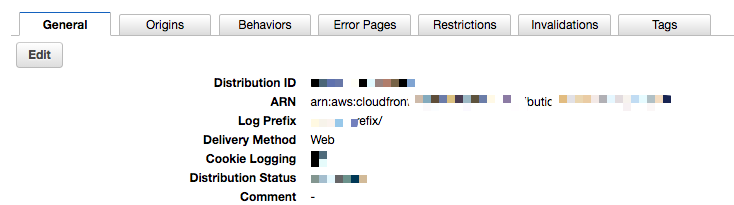
Click Origin to see the current Origin configuration. Click Create Origin to add an origin.
At this time, we add an S3 bucket as the origin.
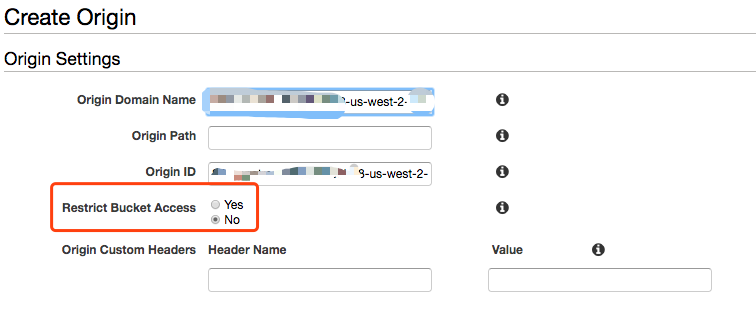
Note that when selecting an S3 bucket as the origin, there will be an option for “Restrict Bucket Access.” We know that S3 controls whether objects in the bucket are publicly accessible through ACL and Bucket Policy. Therefore, this S3 bucket needs to allow CloudFront to pull objects from the S3 bucket. There are two ways to do this: one is to set the bucket to public access, allowing anyone to download directly from the bucket; the second is to use OAI (Origin Access Identity), i.e., the distribution obtains an OAI, and fills in this OAI in the principle part of the S3 bucket policy. This way, the S3 bucket will only grant corresponding permissions to this distribution, and others cannot download resources directly from the bucket.
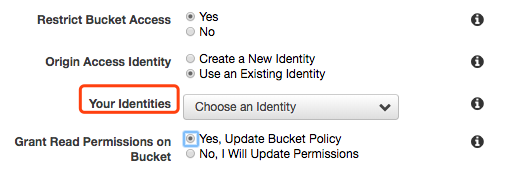
It is recommended to select “Yes, Update Bucket Policy” to avoid incorrect Bucket Policy configuration[2].
4. Add Behavior
Similarly, after entering the distribution, select Create Behavior in the Behavior column. We assume that requests for jpg images are fetched from the previously created S3 bucket.
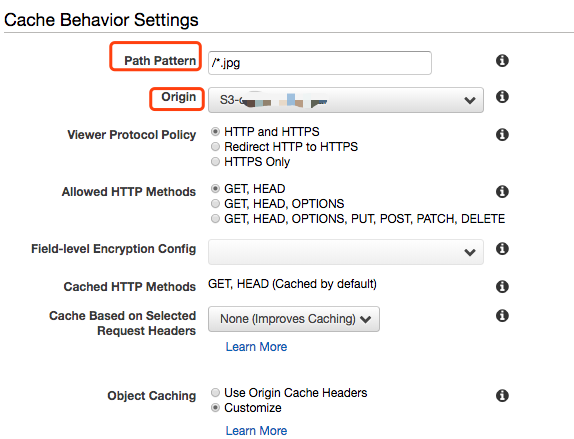
Wildcards are supported in the Path Pattern. Configure the path pattern here. When a request reaches the CloudFront POP point, CloudFront checks the URL path of the request and matches it with the settings in the Behavior. The behavior corresponding to the matched Behavior is executed based on its configuration.
The Origin column allows you to select an origin already added to this distribution.
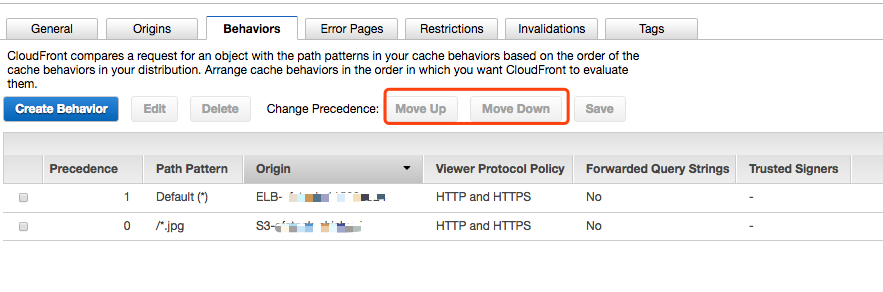
When there are multiple Behaviors, if there are overlaps in the path patterns, you can adjust the matching order by moving up/down. Once a match is found, it will execute according to that Behavior and will not match other Behaviors. The smaller the Precedence number, the higher the priority for matching.
III. Cache Optimization
This section introduces common TTL setting suggestions, dynamic acceleration, setting examples, and error handling.
1. TTL Setting Suggestions
When calculating the Cache key, CloudFront considers the request URL and the configuration of the Behavior corresponding to the current distribution (such as whether to forward headers, cookies, query strings) to calculate a unique value. Therefore, even if two requests have the same URL, if individual headers in the two requests are different and that header is configured to be forwarded (Cached based on Selected Headers), the calculated Cache keys will be different, and the content returned to the client will naturally be different. Therefore, the fewer query strings, cookies, and headers configured to be forwarded, the fewer Cache keys, the higher the cache hit rate, and the better the performance.
For the cache TTL of user content at the PoP point, you can use the value set by the origin’s Cache Control: max-age, or use Customized settings in the Behavior for Minimum TTL, Maximum TTL, and Default TTL (https://docs.aws.amazon.com/zh_cn/AmazonCloudFront/latest/DeveloperGuide/Expiration.html).
| Category | Static Content, Long-term | Static Content, Short-term | Dynamic Content |
| Examples | *.css, *.js, *.jpg, *.png
Software downloads, media files, media segment files (HLS *.ts, *.m3u8). |
Login pages, index.jsp, news, weather information, HLS live m3u8 files. | Changing content, non-cacheable content. |
| Suggestions | Unchanging content can be set with a large TTL value, updating content using version numbers. | Content updated periodically should be set with a low TTL value. After the TTL expires, CloudFront fetches from the origin to verify if the content has changed. | Frequently changing content; content varies by request;
Set very low or even 0 TTL. |
For dynamic content and dynamic acceleration scenarios, you can set the following on the origin:
Cache-Control: no-cache; max-age=0; No-store; private
or Cache-Control: public; max-age=0;
If using Customize TTL in CloudFront Behavior, you can directly select ‘All’ in ‘Cache based on Selected Header’, and set Minimum TTL, Maximum TTL, and Default TTL all to 0.
Examples of Cache-Control Header settings:
| Static Resources | Login Page | Media Segments | Dynamic Content | HLS Live |
| *.css, *.js, software downloads, update packages, etc. | Index.html | /*.ts | /*.m3u8 | |
| Cache-Control: public; max-age=31536000 |
Cache-Control: no-cache=Set-Cookie; max-age=30 |
Cache-Control: public; max-age=31536000 |
Cache-Control: no-cache; max-age=0;No-store;private |
Cache-Control: public; max-age=2 |
2. Error Handling
When the origin is unavailable, you can configure custom response pages for error codes such as 400, 403, 404, 405, 414, 500, 501, 502, 503, 504, etc., in CloudFront and modify the response code returned to the client. CloudFront will periodically verify the availability of the origin and can return the currently cached content as a response to the client before the origin recovers.
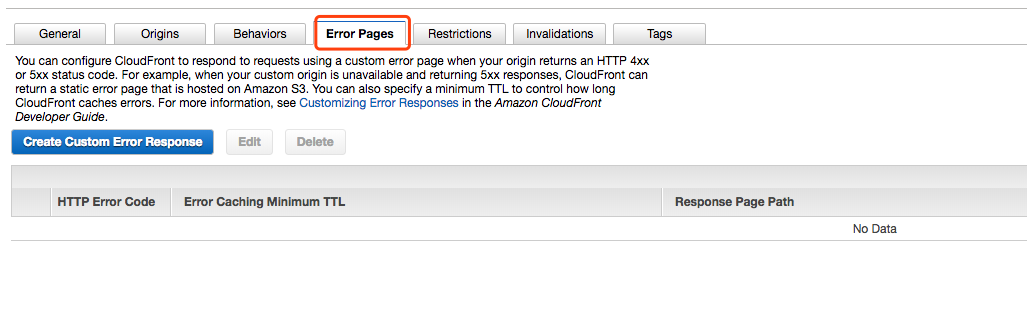
For setup instructions, see https://docs.aws.amazon.com/zh_cn/AmazonCloudFront/latest/DeveloperGuide/GeneratingCustomErrorResponses.html
IV. Content Updates
When static content on the origin is updated, how to ensure that clients get the latest version of the content before the TTL expires is a concern for every developer. There are two ways in CloudFront.
1. Version Control
When published content is updated, you can distinguish versions using version numbers in the file name or path, such as from v1 to v2, or timestamps, or other methods that can distinguish two versions of the same object. Meanwhile, the application side points resource links to the new version of the resources.
2. Use Invalidation to Invalidate Files in Cache
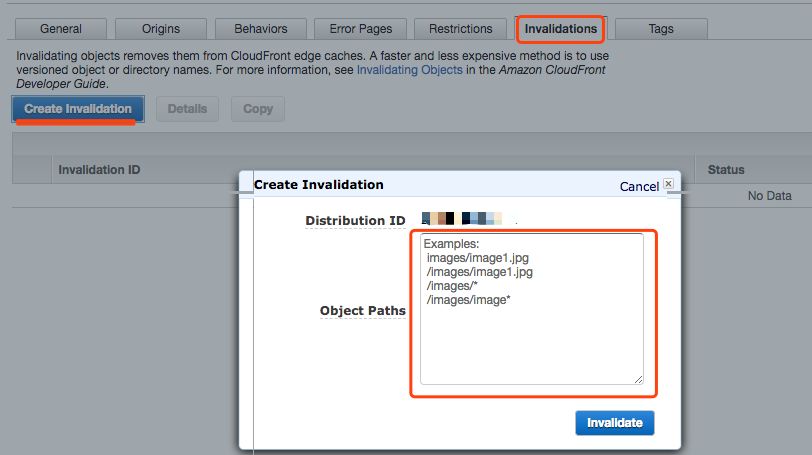
CloudFront provides a feature called ‘Invalidation,’ which allows files to be deleted from PoPs before the TTL expires. Using this feature allows for quick updates of files without changing the file name.
Invalidation supports specifying a single file or a path ending with a * wildcard. Limitations and costs can be found at https://docs.aws.amazon.com/zh_cn/AmazonCloudFront/latest/DeveloperGuide/Invalidation.html
V. Monitoring and Logging
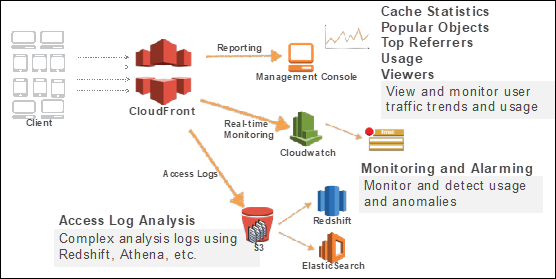
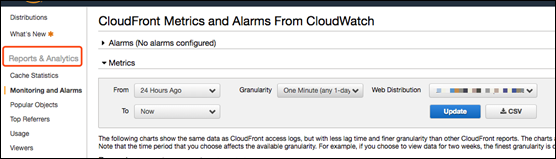
CloudFront provides various reports for users to understand the usage of their distributions. You can use the CloudWatch API to obtain corresponding monitoring metrics for the distribution. Note that when using the CloudWatch API, the region should be set to us-east-1.
CloudFront reports provide request counts, data transfer, HTTP Status Codes, Top 50 accessed objects, usage rates, and reports by device, browser, operating system, client location, etc., on a daily or hourly basis. You can also configure CloudWatch alerts to monitor key metric data (request count, downloaded bytes, uploaded bytes, total error rate, 4xx error rate, 5xx error rate). Once thresholds are exceeded, operations personnel can receive alerts immediately.
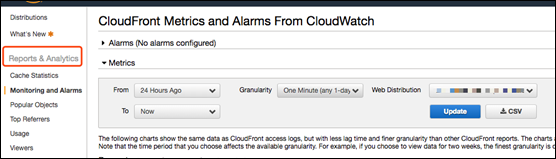
Although CloudFront provides multi-dimensional reports, it may still not meet the needs for multi-dimensional analysis. Therefore, it is recommended that such users analyze CloudFront logs. When users enable CloudFront distribution logs, the logs will be uploaded to a specified S3 bucket. Analyzing the logs can reveal more client request behaviors related to the distribution, helping with operational analysis or debugging. For log field explanations, see https://docs.aws.amazon.com/zh_cn/AmazonCloudFront/latest/DeveloperGuide/AccessLogs.html. Users can easily use standard SQL to analyze data directly in S3 using Amazon EMR or the serverless interactive query service Amazon Athena, and integrate with Amazon QuickSight for easy data visualization.
See https://docs.aws.amazon.com/zh_cn/athena/latest/ug/cloudfront-logs.html for using Amazon Athena to query Amazon CloudFront logs.
See Reference 8 for analyzing CloudFront logs using Amazon EMR.
VI. Compliance and Security
CloudFront has obtained PCI DSS compliance, GDPR (https://amazonaws-china.com/compliance/gdpr-center/service-capabilities/), HIPAA, SOC, and ISO 9001, 27001, 27017, 27018 compliance certifications.
Additionally, with CloudTrail enabled, all CloudFront API calls under the user account will be recorded by CloudTrail, facilitating future audits.
We will introduce how CloudFront ensures content security from four aspects below.
1. Origin Protection
We can set the origin to only allow access from CloudFront and reject direct client access to the origin.
When the origin is ELB/EC2:
(1) The security group of the ELB/EC2 only opens the corresponding ports (80/443) to CloudFront node IPs. The IP address ranges of CloudFront node servers can be found at:
https://docs.aws.amazon.com/zh_cn/AmazonCloudFront/latest/DeveloperGuide/LocationsOfEdgeServers.html
(2) When configuring CloudFront Origin, add custom header fields and values. The origin checks the fields in the request. If the header field and value are not present, it returns an error code.
(3) Origin Fetch via HTTPS
Origin fetching supports TLSv1.1, TLSv1.2 security protocols and RSA, ECDSA cipher algorithms.
When the origin is an S3 bucket:
Apply OAI in the S3 bucket policy, allowing only CloudFront distributions with this OAI to retrieve content from the bucket.
2. Transmission Security
CloudFront supports HTTPS requests from clients to PoPs. The domain names generated by CloudFront for each distribution support HTTPS requests, and support users uploading certificates purchased from trusted CAs. Users can apply for certificates for their own domains for free in the Amazon ACM service. Note that you must apply for the certificate in the us-east-1 region for it to be applied to CloudFront distributions.
For user domain certificates, CloudFront supports both dedicated IP and SNI methods.
3. Content Protection
(1) Signed URLs, Signed Cookies
In scenarios where access to certain content is restricted, such as content only available to paid or authorized users, we can provide private access to content via signed URLs or signed cookies. The documentation already provides very detailed instructions, so we will not elaborate here. See specific methods at: https://docs.aws.amazon.com/zh_cn/AmazonCloudFront/latest/DeveloperGuide/PrivateContent.html. Also see Reference [3].
(2) Field-Level Encryption
In December 2017, CloudFront launched this feature. Using this feature further enhances the security of sensitive data (such as credit card numbers or personally identifiable information). Before forwarding POST requests to your origin, CloudFront’s field-level encryption further encrypts sensitive data in HTTPS forms using field-specific encryption keys (provided by the user). This ensures that sensitive data can only be decrypted and viewed by certain components or services in the application stack.
Configuration method see: https://docs.aws.amazon.com/zh_cn/AmazonCloudFront/latest/DeveloperGuide/field-level-encryption.html
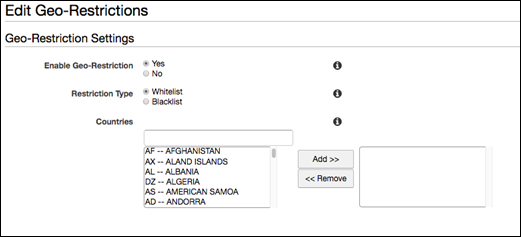
(3) Geo Restrictions
CloudFront provides geo-based access restriction features. Users can allow or deny access to their distributions from specific countries or regions by setting whitelists or blacklists.
4. Integration with AWS WAF and Shield
AWS WAF is a web application firewall that helps protect your web applications from common web vulnerabilities [5]. AWS Shield is a managed distributed denial-of-service (DDoS) protection service that protects protected applications running on AWS [7].
Users can associate an existing WAF when creating a CloudFront distribution, or associate it with the CloudFront distribution after creating WAF rules in the WAF Console.
VII. Programmable CDN
AWS officially launched Lambda@Edge in July 2017. With Lambda@Edge, users can easily run code on AWS’s global infrastructure to respond to end users with the lowest latency. Code can be triggered by Amazon CloudFront events, such as content requests or responses between the origin server and the viewer. You just need to upload Node.js code to AWS Lambda, and Lambda will provide everything needed for replication, routing, and scaling the code at AWS sites close to end users, ensuring high availability.
We will explain Lambda@Edge and share usage cases in the next article. Interested readers can check the official documentation for further understanding: https://docs.aws.amazon.com/zh_cn/AmazonCloudFront/latest/DeveloperGuide/lambda-at-the-edge.html
References
[1] Developer Guide: https://docs.aws.amazon.com/zh_cn/AmazonCloudFront/latest/DeveloperGuide/Introduction.html
[2] Common CloudFront Configuration Errors and Solutions: https://amazonaws-china.com/cn/blogs/china/cloudfront-errors-solutions/
[3] Using Amazon CloudFront Signed URLs + S3 for Private Content Publishing https://amazonaws-china.com/cn/blogs/china/amazon-cloudfront-signature-url-s3/
[5] AWS WAF https://amazonaws-china.com/cn/waf/?nc2=h_m1
[6] AWS Certificate Manager https://amazonaws-china.com/cn/certificate-manager/?nc2=h_m1
[7] AWS Shield https://amazonaws-china.com/cn/shield/?nc2=h_m1
[8] Step-by-step guide to using Amazon EMR for interactive data queries https://amazonaws-china.com/cn/blogs/china/amazon-emr/