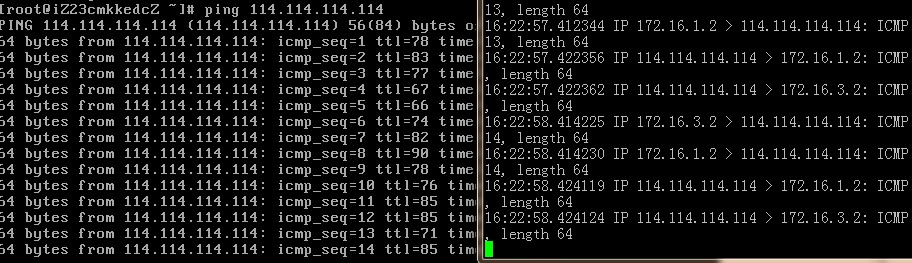
Many cloud servers, including those from AWS and Alibaba Cloud, do not support SNAT by default. A client obtained test permissions for an Alibaba Cloud VPC and asked our studio to verify if SNAT is supported in this virtual private network mode. Below is a summary of the testing process.
Use one virtual router and two virtual switches to connect the internal LAN and the external network LAN. Use two ECS instances:
one purely internal, and one bound with an EIP to act as a NAT gateway, as shown below:
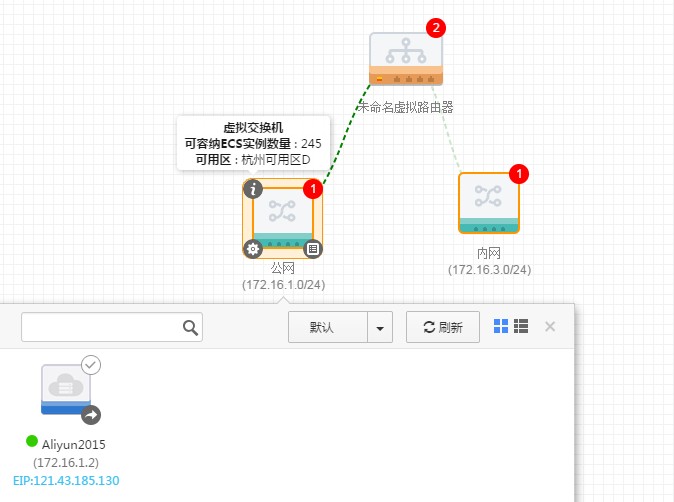
Configure routing on the virtual router
To allow internal servers to access the public internet via the EIP, set the next hop for all destination addresses 0.0.0.0/0 to forward to the ECS instance bound with the public IP. Note that the next-hop ECS does not support search, which can be somewhat cumbersome.

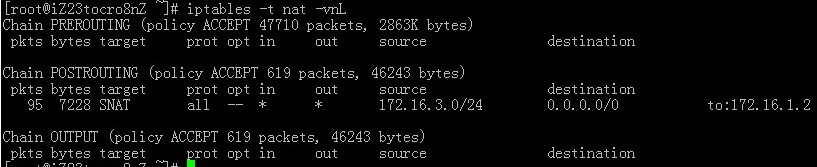
After configuration, log into the external-facing machine to configure SNAT
1 |
iptables -t nat -I POSTROUTING -s 172.16.3.0/24 -j SNAT --to-source 172.16.1.2 |
Here, the 3rd subnet (172.16.3.0/24) is the internal LAN segment, and 172.16.1.2 is the self IP of the ECS bound with the EIP, used to complete source address translation.
Then, modify kernel parameters to enable IP forwarding:
1 |
sed -i 's/net.ipv4.ip_forward = 0/net.ipv4.ip_forward = 1/g' /etc/sysctl.conf;sysctl -p |
After completion, test the connection. The internal server can now access the external network: