Create Subnet
In large enterprise cloud migration projects, it is common to migrate on-premises data center subnets to AWS. On-premises subnetting is typically divided based on functional roles, such as firewall subnets, load balancer subnets, heartbeat subnets for high-availability architectures, and application system subnets. Different enterprises have varying subnetting rules, mask sizes, and routing policies. Furthermore, after the migrated systems go live, enterprises often need to create new network segments to deploy additional applications. This requires a universal template to assist network administrators in simplifying workflows and improving efficiency. In one project I worked on, the production VPC contained 47 subnets with various mask sizes including /24, /25, /26, /27, and /28. Adding new subnets required careful calculation of CIDR blocks and configuration of route tables.
Overview of Dynamic Subnet Creation Solution
Since CloudFormation does not support programmatic logic and only allows the creation of static resources, this solution uses AWS Lambda to dynamically create different types of subnets based on input parameters. We define three types of subnets: Public Subnet, External Subnet, and Internal Subnet.
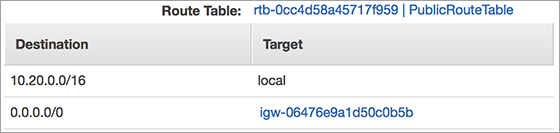
The route table for a Public Subnet contains the following routing information:
| Destination | Target |
| 0.0.0.0/0 | igw-xxxxx (Internet Gateway) |
Servers deployed in public subnets can communicate directly with the Internet (assigned a default public IP address and a default route pointing to the Internet Gateway).
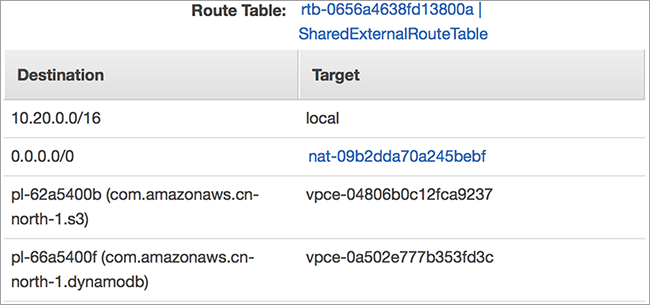
The route table for an External Subnet contains the following routing information:
| Destination | Target |
| 0.0.0.0/0 | nat-xxxxx (NAT Gateway) |
| pl-xxxxxx (com.amazonaws.cn-north-1.s3) | vpce-xxxxxxx |
| pl-xxxx (com.amazonaws.cn-north-1.dynamodb) | vpce-xxxx |
Servers deployed in external subnets can communicate with the Internet via NAT Gateway and access S3 and DynamoDB without traversing the public internet.
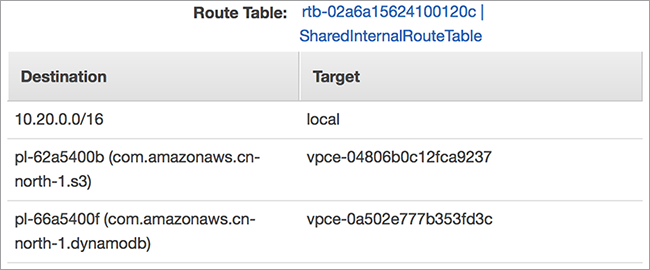
The route table for an Internal Subnet contains the following routing information:
| Destination | Target |
| pl-xxxxxx (com.amazonaws.cn-north-1.s3) | vpce-xxxxxxx |
| pl-xxxx (com.amazonaws.cn-north-1.dynamodb) | vpce-xxxx |
Servers deployed in internal subnets cannot access the Internet but can directly access S3 and DynamoDB.
This solution uses two CloudFormation templates. The first template (CreateBaseVpc.json) creates shared resources, such as the VPC, Internet Gateway, Public Subnet route tables, public subnets in each Availability Zone (AZ), NAT Gateway, VPC Endpoints (S3 and DynamoDB endpoints), and External Subnet route tables. It also creates three Lambda functions:
-
SharedInfra – Corresponds to the Python program create_shared_infra.zip
Functionality: Based on input parameters, creates public subnets in each AZ within the running AWS Region, and associates the public subnet route table created in CreateBaseVpc.json with each public subnet. Creates NAT Gateways and VPC Endpoints within each public subnet, creates Internal Subnet route tables, and creates External Subnet route tables. Deletes already created resources, including: subnets, route tables, VPC endpoints, NAT Gateways, and Elastic IPs.
-
CreateExternalRoute – Corresponds to the Python program create_external_route.zip
Functionality: Creates routes in the External Subnet route table. Since NAT Gateway creation is slow, routes must only be created after the NAT Gateway status becomes ‘available’. Combining this function with SharedInfra could lead to Lambda timeout errors during execution. Deletes already created route information.
-
SubnetAutomation – Corresponds to the Python program subnet_creation.zip
Functionality: Based on input parameters, calculates the subnet mask, creates Public, External, and Internal subnets, and associates the corresponding route tables (Public, Internal, and External) with the respective subnets. Deletes already created subnets. During the execution of the CreateBaseVpc.json template, user-defined resources ExternalRouteCreation and SharedInfraCreation trigger the Lambda functions CreateExternalRoute and SharedInfra respectively, thereby completing the creation of shared resources. It also provides the ARN of the SubnetAutomation function for invocation when running the second template.
The second template (SubnetAuto.json) creates dynamic resources, such as calculating subnet masks based on input parameters, creating subnets, and assigning route tables.
In this solution, the input parameters for creating subnets do not require CIDR blocks; you only need to specify the number of usable IP addresses. The program excludes the 5 reserved IP addresses in AWS subnets when calculating usable IPs. For example: to create a subnet with 50 IPs, the mask is /26, providing 64 – 5 = 59 usable IPs; to create a subnet with 16 IPs, the mask is /27, providing 32 – 5 = 27 usable IPs.
The parameter input rules for creating subnets are as follows:
- Each subnet entry consists of 4 parts separated by colons (:) – Format: Name: Number of IPs: Availability Zone: Subnet Type
- Availability Zone options depend on the Region, e.g., 1a, 1b, 1c, 1d, 1e, etc.
- Subnet type options are: p (Public Subnet), e (External Subnet), or i (Internal Subnet).
- Different subnet entries are separated by commas (,).
Installation and Execution
- Navigate to https://github.com/shaneliuyx/autosubnet_creation in your browser to download the 2 JSON files and 3 ZIP files. Upload the 3 ZIP files to an S3 bucket.
- Open the AWS Console, select CloudFormation, choose the local JSON file, and run the CloudFormation template.
- Assume the default inputs for PublicSubnetCapacity and VpcCidr are as follows:
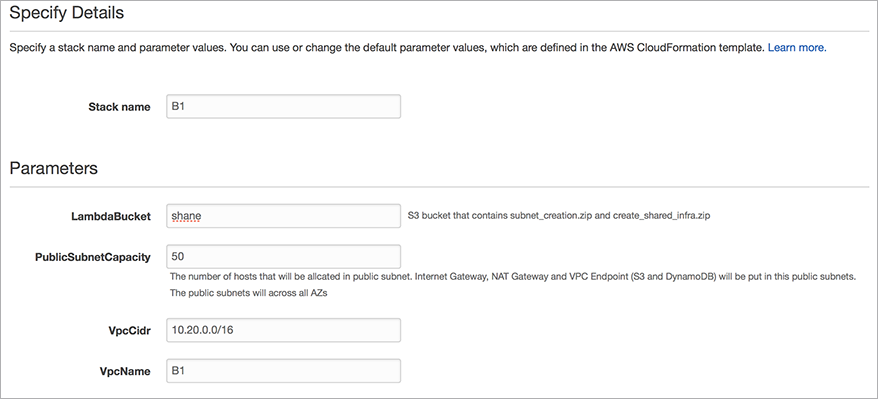
- Select Next until AWS resources begin creating.
- The final execution result is as follows:
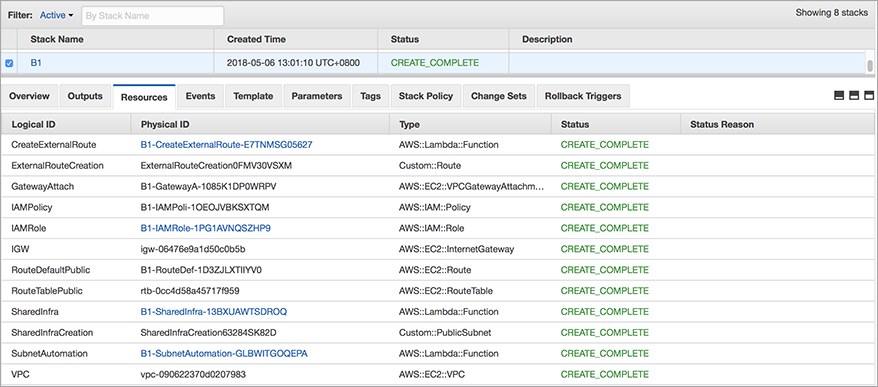
The created Subnets are as follows:

Public Subnet Route Table:
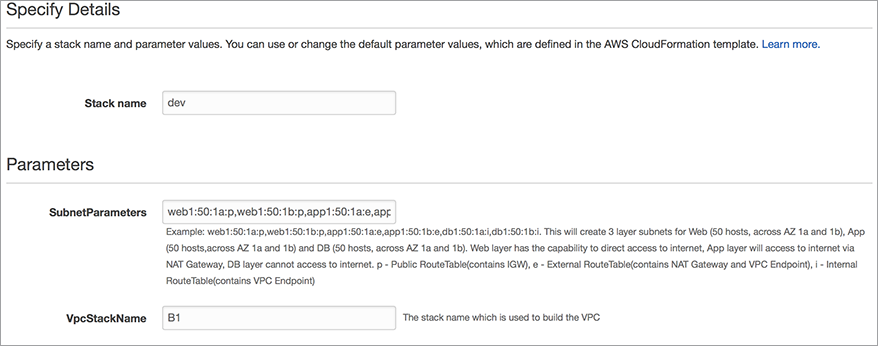
- Open the AWS Console, select CloudFormation, choose the local JSON file, and run the CloudFormation template.
- Input SubnetParameters: web1:50:1a:p,web1:50:1b:p,app1:50:1a:e,app1:50:1b:e,db1:50:1a:i,db1:50:1b:i
This will create 6 subnets, with 2 subnets each for Web, APP, and DB, distributed across 2 AZs:
- The execution result is as follows:
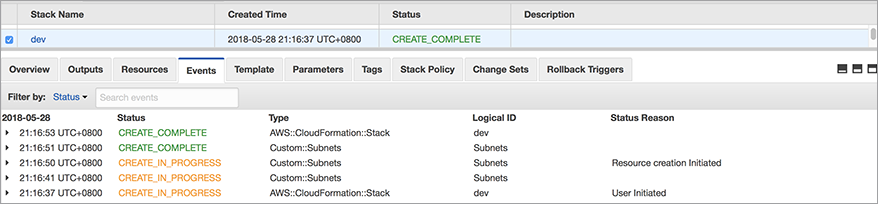
Created Subnets:



Internal Subnet Route Table:
External Subnet Route Table:
Suppose we now need to create a public subnet with 16 usable IPs for deploying network devices. You can run SubnetAuto.json again with the output parameters: net1:16:1a:p,net1:16:1b:p.
This will create the following subnets:

Integration with Other CloudFormation Templates for Landing Zone Deployment
A “Landing Zone” refers to the foundational AWS environment where users deploy security and operational processes. Landing Zone content includes: account structure, account security baselines, network structure, and AWS IAM. Below is a brief introduction to AWS Landing Zone best practices.
-
Account Structure
AWS recommends that account structures align with the enterprise’s organizational and operations department structures. For example, divide accounts as follows:
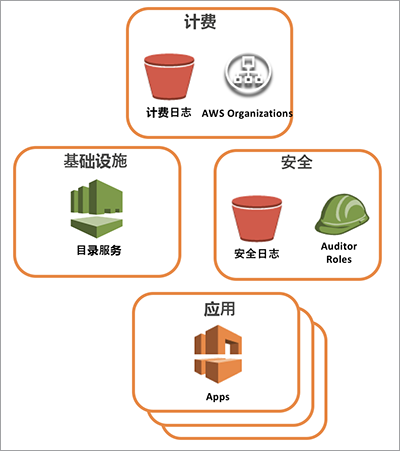
-
Account Security Baseline
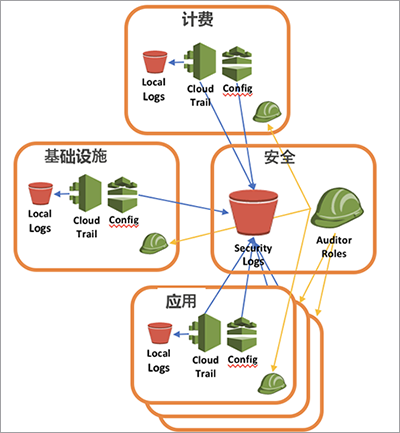
AWS recommends enabling CloudTrail and AWS Config in all accounts. All log information should be replicated to an S3 bucket in the security account. Establish an Auditor role for cross-account access.
-
Network Structure
AWS recommends deleting the default VPC and creating customer-defined VPCs. Establish a Shared VPC (containing directory services, mail servers, etc.) and peer Application VPCs with the Shared VPC. Establish network connections with on-premises data centers via VPN or Direct Connect, or use a Transit VPC (refer to https://aws.amazon.com/answers/networking/aws-global-transit-network/, https://aws.amazon.com/blogs/aws/aws-solution-transit-vpc/) to establish centralized network control mechanisms. Implement security controls for network input/output (establish bastion hosts, Security Groups, Network ACLs, or third-party firewall tools).
-
AWS User Access Management
This includes recommendations for SAML-based Single Sign-On (SSO) and establishing cross-account role access mechanisms.
The method described above for building VPCs and subnets can be viewed as the foundation for building a Landing Zone. On top of this, we can use CloudFormation to build bastion hosts, enable CloudTrail and AWS Config, establish log replication mechanisms between different accounts, set up Config Rules for compliance checks, and more. AWS has developed several QuickStart CloudFormation scripts to assist users in completing these tasks, but these scripts require modifications to run in the China Region (Beijing). The table below lists some available resources, where the China Region deployment templates have been modified by me to suit local characteristics and run normally in BJS.