Today, I am thrilled to introduce a powerful new feature of AWS CloudFormation called Macros. CloudFormation Macros allow developers to invoke AWS Lambda-powered transformation functions, thereby extending the native syntax of CloudFormation templates. It uses the same technology that supports the popular Serverless Application Model, but the transformation function runs in your own account, using your own Lambda function, and is fully customizable. If you are not yet familiar with AWS, remember that CloudFormation is an absolutely critical tool for modeling and defining Infrastructure as Code (YAML or JSON). It is also one of the core components of all AWS products, with many of our services relying on its existence.
There are two main steps to using macros. First, we need to define the macro. Of course, this requires using a CloudFormation template. Then, to use the macro in our templates, we either add it as a transform for the entire template or call it directly. In this blog post, the terms “macro” and “transform” are largely interchangeable. Ready to see how it works?
Creating a CloudFormation Macro
Creating a macro involves two elements: definition and implementation. To create the macro’s definition, we need a CloudFormation resource of type AWS::CloudFormation::Macro, which defines the Lambda function to be used and the name of the macro to be invoked.
Type: "AWS::CloudFormation::Macro"
Properties:
  Description: String
  FunctionName: String
  LogGroupName: String
  LogRoleARN: String
  Name: String
The macro’s Name must be unique across the region, and the Lambda function referenced by FunctionName must be in the same region as the macro being created. When you execute the macro template, the macro becomes available to other templates as well. The macro’s implementation is handled by the Lambda function. A macro can reside in its own template or be combined with others, but it cannot be used within the template where it is registered. The Lambda function receives a JSON payload similar to the following:
{
    "region": "us-east-1",
    "accountId": "$ACCOUNT_ID",
    "fragment": { ... },
    "transformId": "$TRANSFORM_ID",
    "params": { ... },
    "requestId": "$REQUEST_ID",
    "templateParameterValues": { ... }
}
The fragment section of the payload contains the entire template or a relevant section of the template, depending on how the transformation function was called from the template invoking the macro. The section is always in JSON, even if the template is in YAML.
The Lambda function is expected to return a simple JSON response:
{
    "requestId": "$REQUEST_ID",
    "status": "success",
    "fragment": { ... }
}
requestId must be the same as the one received in the input payload. If status contains any value other than “success” (case-insensitive), the creation of the change set will fail. Then, fragment must contain valid CloudFormation JSON for the transformed template. Even if your function does nothing, you still need to return its section to include it in the final template.
Using CloudFormation Macros
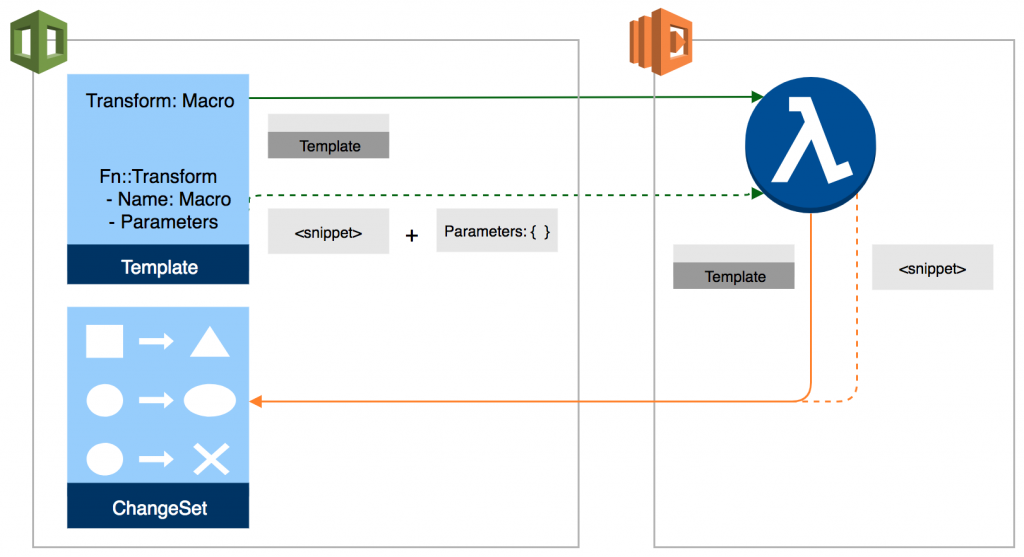
To use a macro, we simply call Fn::Transform with the required parameters. If you wish to leverage the macro to parse the entire template, we can list it in the transforms list of the template, just like with SAM: Transform: [Echo]. When we execute the template, the transformation functions are collected into a change set by calling each macro’s designated function and returning the final template.
Suppose we have a dummy Lambda function named EchoFunction that simply logs the data passing through it and returns the unmodified fragment. We define the macro as a standard CloudFormation resource, similar to the following:
EchoMacro:
  Type: "AWS::CloudFormation::Macro"
  Properties:
    FunctionName: arn:aws:lambda:us-east-1:1234567:function:EchoFunction
	Name: EchoMacro
The code for the Lambda function might be as simple as this:
def lambda_handler(event, context):
    print(event)
    return {
        "requestId": event['requestId'],
        "status": "success",
        "fragment": event["fragment"]
    }
Then, after deploying this function and executing the macro template, we can call the macro in the transforms at the top level of any other template, similar to the following:
AWSTemplateFormatVersion: 2010-09-09
 Transform: [EchoMacro, AWS::Serverless-2016-10-31]
 Resources:
    FancyTable:
      Type: AWS::Serverless::SimpleTable
CloudFormation will first call our defined Echo macro, then the AWS::Serverless transformation function, creating a change set for the template. It will execute the macros listed in the transforms in the order they appear in the list.
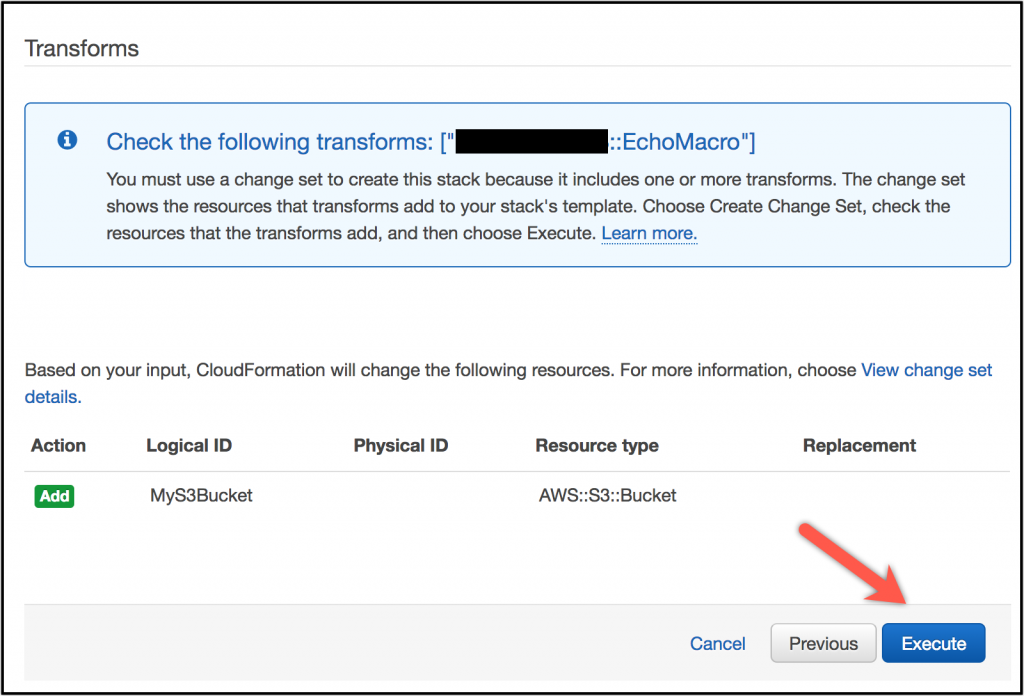
Additionally, we can use the intrinsic function Fn::Transform to call a macro, which allows us to pass additional parameters. For example:
AWSTemplateFormatVersion: 2010-09-09
Resources:
  MyS3Bucket:
    Type: 'AWS::S3::Bucket'
    Fn::Transform:
      Name: EchoMacro
      Parameters:
        Key: Value
An inline transformation function has access to all its sibling nodes and child nodes. The processing order of transformation functions is from deep to shallow, meaning the top-level transformation functions are executed last. I know most people will say: No, you can’t nest macros inside macros — but it’s a good idea.
When you execute a CloudFormation template, it will directly ask you to create a change set, and you can preview the output before deployment.
Example Macros
We are releasing several reference macros to help developers get started, and I expect many more will be released by the community. The following four macros were the winners of a small internal hackathon prior to the release of this feature:
| Name | Description | Author |
|---|---|---|
| PyPlate | Allows you to insert inline Python functions into your template | Jay McConnel — Partner Solutions Architect |
| ShortHand | Defines shorthand syntax for common CloudFormation resources | Steve Engledow — Solution Builder |
| StackMetrics | Adds CloudWatch metrics to stacks | Steve Engledow and Jason Gregson — Global Solutions Architect |
| String Functions | Adds common string functions to your template | Jay McConnel — Partner Solutions Architect |
Here are some ideas I think people might be interested in implementing:
- Automatic registration of Route 53 domains + AWS Certificate Manager (ACM) credential provisioning
- Automatic assignment of custom domains to S3 static websites or Amazon CloudFront
- Extend CloudFormation mappings to read DynamoDB tables
- Automatically configure IPv6 for Amazon Virtual Private Cloud
- Automatically subscribe webhooks to integrate with Slack, Twitter, Messenger
If you have any brilliant ideas, I look forward to seeing them written!
Now Available
CloudFormation Macros are now available in all AWS regions that support AWS Lambda. There are no additional CloudFormation charges for using Macros, meaning you only pay the normal AWS Lambda function costs. For more information, please refer to the documentation.