1. What is a VPN?
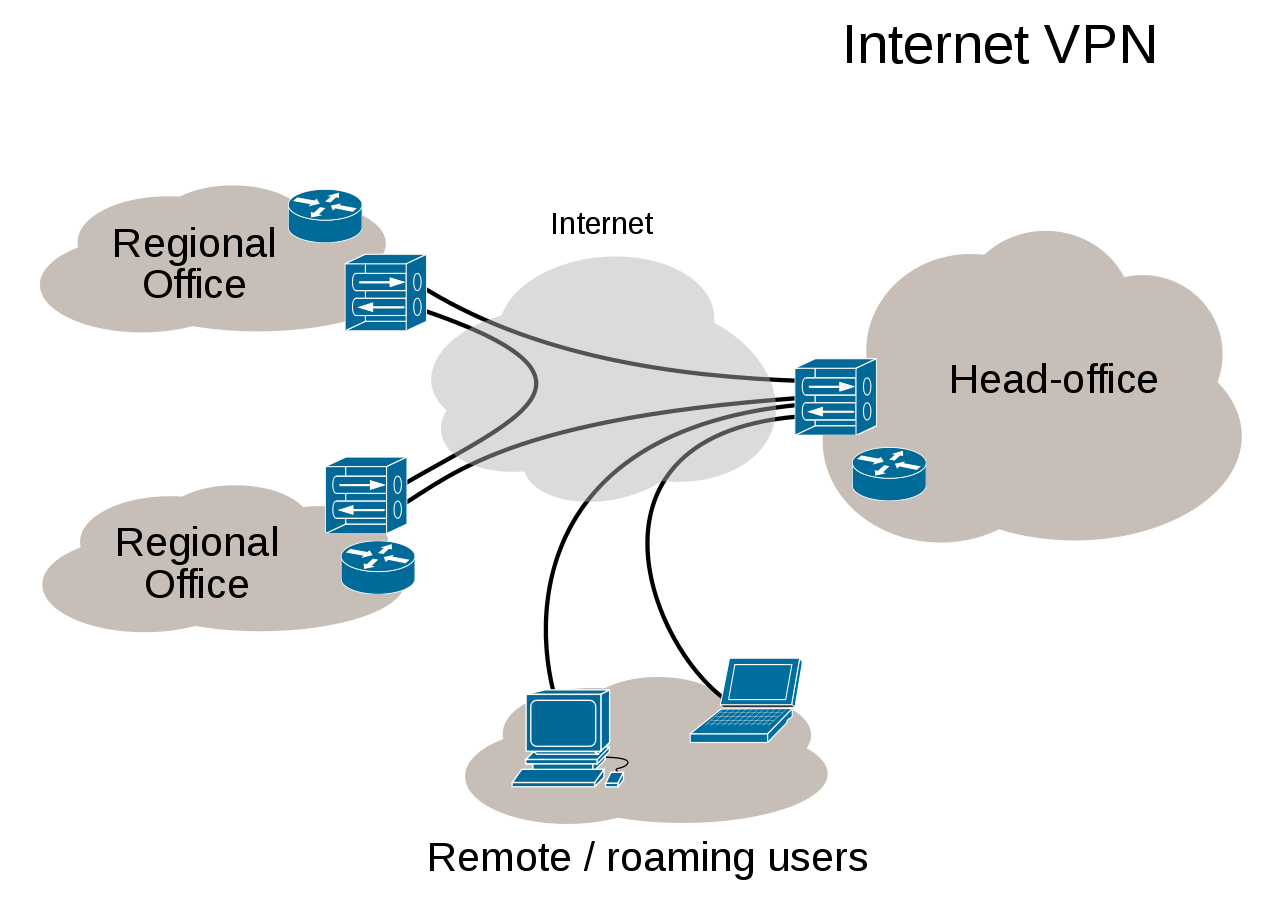
A VPN (Virtual Private Network) is a communication method commonly used to connect private networks of medium-to-large enterprises or organizations with one another. Messages within a virtual private network are transmitted over public network infrastructure (such as the Internet). It utilizes encrypted tunneling protocols to achieve security effects such as confidentiality, sender authentication, and message integrity. This technology allows for the transmission of reliable and secure messages over insecure networks (such as the Internet). It is important to note that whether messages are encrypted is controllable. Unencrypted virtual private network messages remain at risk of being intercepted. [Excerpted from Wikipedia]
2. Security
Secure virtual private networks use encryptiontunneling protocols, providing confidentiality by preventing eavesdropping and sniffing. They also allow for sender authentication to prevent identity spoofing, while ensuring message integrity by preventing information from being modified.
Some virtual private networks do not use encryption to protect data. Although virtual private networks typically provide security, unencrypted virtual private networks are strictly speaking not “secure” or “trusted“. For example, a tunnel created between two hosts via the GRE protocol constitutes a virtual private network, but it is neither secure nor trusted. In addition to the aforementioned GRE protocol example, local plaintext tunneling protocols include L2TP (when not used with IPsec) and PPTP (when Microsoft Point-to-Point Encryption (MPPE) is not used).
3. Protocols
Common virtual private network protocols include:
4.Special Use Cases
Due to restrictions and blocking of overseas networks within mainland China, there has been a rise in the use of free or paid virtual private networks (VPNs) for connecting to overseas networks, a practice commonly referred to as “bypassing the Great Firewall.” Additionally, many foreign companies wishing to connect back to overseas websites often set up their own VPNs or subscribe to paid VPN services. Starting in January 2015, China began tightening its blockade on foreign VPN services. The VPN provider Astrill notified users that due to upgrades to the Great Firewall, devices using IPSec, L2TP/IPSec, and PPTP protocols could no longer access its service, with iOS devices being primarily affected. The Chinese Ministry of Industry and Information Technology has stipulated that companies providing VPN services in China must register; otherwise, they will not be protected under Chinese law.
5. Features of OpenVPN
Overview
OpenVPN allows participants in creating a VPN to perform authentication using public keys, digital certificates, or usernames/passwords. It extensively utilizes SSLv3/TLSv1 protocol functions from the OpenSSL encryption library. Currently, OpenVPN runs on Solaris, Linux, OpenBSD, FreeBSD, NetBSD, Mac OS X, and Windows, and includes many security features. It is not a web-based VPN software, nor is it compatible with IPsec or other VPN software.
Encryption
OpenVPN uses the OpenSSL library to encrypt data and control information: it leverages OpenSSL’s encryption and verification capabilities, meaning it can utilize any algorithm supported by OpenSSL. It offers optional HMAC functionality for packets to enhance connection security. Furthermore, hardware acceleration provided by OpenSSL can also improve performance.
Authentication
OpenVPN provides multiple authentication methods to verify the identities of both parties in a connection, including: pre-shared keys, third-party certificates, and username/password combinations. Pre-shared keys are the simplest but can only be used to create point-to-point VPNs. PKI-based third-party certificates offer the most comprehensive functionality but require additional effort to maintain a PKI certificate infrastructure. Starting with OpenVPN 2.0, username/password combination authentication was introduced; this method eliminates the need for client certificates, although a server certificate is still required for encryption.
Network
All OpenVPN communication occurs over a single IP port. The default and recommended protocol is UDP, though TCP is also supported. OpenVPN connections can traverse most proxy servers and function well within NAT environments. The server has the ability to “push” certain network configuration settings to clients, including: IP addresses and routing configurations. OpenVPN offers two types of virtual network interfaces: generic Tun/Tap drivers, which allow for the creation of Layer 3 IP tunnels or virtual Layer 2 Ethernet networks capable of transmitting any type of Layer 2 Ethernet data. Transmitted data can be compressed using the LZO algorithm. IANA (Internet Assigned Numbers Authority) has assigned official port 1194 to OpenVPN. Since version 2.0, each OpenVPN process can manage several concurrent tunnels simultaneously. The use of standard network protocols (TCP and UDP) makes OpenVPN an ideal alternative to protocols like IPsec, particularly when ISPs filter specific VPN protocols.
Security
OpenVPN inherently possesses many security features: it runs in user space, requiring no modifications to the kernel or network protocol stack; after initialization, it operates via chroot, relinquishing root privileges; and it uses mlockall to prevent sensitive data from being swapped to disk.
OpenVPN supports hardware encryption tokens, such as smart cards, through PKCS#11.
Comparison
|
PPTP
|
L2TP/IPSEC
|
OpenVPN
|
|
| Overview | The first VPN protocol introduced by Microsoft. It consumes few resources and is the most widely deployed. | A more advanced VPN protocol that supports various platforms. It offers higher security but is less flexible and more prone to being blocked. | An open-source VPN protocol with good encryption and adaptability. It is flexible and less likely to be blocked. Good performance can be achieved via UDP ports. |
| Encryption | Supports 40-bit, 56-bit, and 128-bit encryption | 256-bit encryption | Customizable between 160-bit and 256-bit |
| Platform Support |
|
|
|
| Connection Speed | Very Fast | Fast | Fast |
| Ports | 1723 TCP | 500 UDP 1701 UDP 5500 UDP |
Customizable and changeable as needed; any port for UDP/TCP is supported. |
| Anti-Blocking | Easily blocked via protocol and port detection. | Easily blocked via protocol and port detection. | Difficult to block (based on standard TCP/IP protocols). The UDP mode is officially recommended, offering high speed and efficiency. |