AppDeploy is a command-line tool implemented via SSH, capable of completing application deployment and remote operations management. The current tool is available in two versions: the Standard Version (pseudo-code description language) and the Python Version. The Python Version uses Python syntax rules to implement various application requirements; the Standard Version has simple syntax and is easy to get started with, serving as a streamlined version of the Python Version. Both versions are currently free to use. Download links are as follows:
Standard Version:
http://market.aliyun.com/products/53690006/cmgj000331.html?spm=5176.900004.4.2.iTWBiC
PythonVersion:
http://market.aliyun.com/products/53690006/cmgj000321.html?spm=5176.9000004.0.0.8AlNTY
1 Introduction to Main Features ofAppDeploy
1).Remote Application Deployment:
Local applications can be installed and deployed to remote cloud servers. Software packages can be compiled and packaged locally, or you can choose to compile and install them on the cloud server;
2).Remote Operations Management:
You can use AppDeploy to remotely execute shell scripts, making operational commands feel like they are being executed locally, greatly improving developers’ work efficiency;
3).One-Click Environment Installation:
One-click installation of Web environments. Currently supports Java, Nginx, Apache, Tomcat, PHP, Mysql, and other environments. You can select the appropriate version suitable for your specific business needs;
4).One-Click Application Deployment:
Can one-click compile, package, and deploy common applications, supporting packaging and deployment solutions such as Maven and Ant;
5).One-Click Source Update:
Execute AppDeploy custom commands (update_source) to update system sources, supporting mainstream versions of Ubuntu, Centos, Redhat, Opensuse, Debian, etc.;
6).File Upload and Download:
You can use AppDeploy to upload and download files (folders) between the local host and remote servers. It not only implements FTP functionality but also allows remote execution of management commands;
7).Concurrent Machine Control:
Based on software deployment scenarios, it provides the function of deploying to multiple servers simultaneously, and allows selection of sequential or concurrent execution modes. All the above-mentioned functions can run concurrently across multiple servers.
8).Account Password Management:
Provides flexible and user-friendly account management functions. Users can set password-free execution, and different passwords can be set for different hosts;
2. AppDeploy Installation& Configuration
AppDeploy supports usage on Windows, Linux, and Mac systems, while the remote server currently only supports Linux systems. Installation steps are introduced separately for different systems (taking the Python Version as an example, the Standard Version is similar):
Linux System Platform Installation:
Please install python2.7 in advance; (usually installed in /usr/local/lib/python2.7)
1). Download AppDeploy source code installation package from Aliyun Market – AppDeploy-Python-1.0.0.tar.gz;
2). Extract: $ tar –zvxf AppDeploy-Python-1.0.0.tar.gz; Get AppDeploy-Python-1.0.0-Linux.tar.gz;
Extract: $ tar –zvxf AppDeploy-Python-1.0.0-Linux.tar.gz;
3). Execute: $ cd AppDeploy-Python && sudo python setup.py install to install appdeploy;
4). Execute: $ adep command. If the command is found, it indicates successful installation (the image below shows successful installation);
Windows System Installation:
Pre-install python2.7; (usually installed in C:/Python27);
1). Download AppDeploy windows installation package from Aliyun Market – AppDeploy-Python-1.0.1.zip;

2). Extract: $ tar –zvxf AppDeploy-Python-1.0.1.tar.gz -> AppDeploy-Python-1.0.1-Windows.tar.gz;
3). Extract: $ tar –zvxf AppDeploy-Python-1.0.1-Windows.tar.gz; After extraction, you will find an installation file setup.exe, which is the AppDeploy installer;
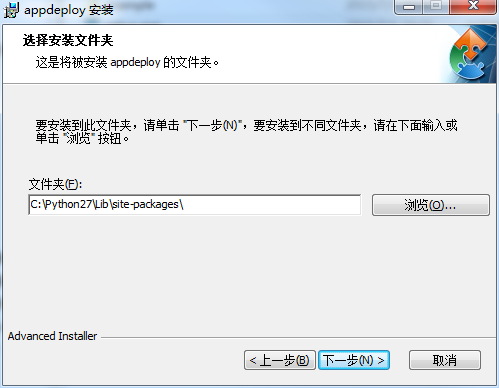
4). Double-click setup.exe, double-click setup.exe (ensure python2.7 is pre-installed), the following AppDeploy installation view will appear. The installation directory should be selected as the Libsite-packages subdirectory under the Python2.7 installation directory;
5). Follow the wizard until installation is complete;
6). Set environment variables:
Environment variables are usually set automatically, but here you can confirm to ensure normal operation;
Right-click “Computer” – Select Properties – Select “Advanced System Settings” – Select Advanced – Select “Environment Variables”: Add environment variable, name (APPDEPLOY) value (C:Python27Libsite-packages); In the path system variable, add “C:Python27;%APPDEPLOY%; C:Python27;”, which are the installation directories for Python2.7 and AppDeploy respectively;
7). Verification: Open cmd command line tool,
Input: python, if it runs, it means python is available;
Input: adep, if the log below is displayed, it means installation was successful;

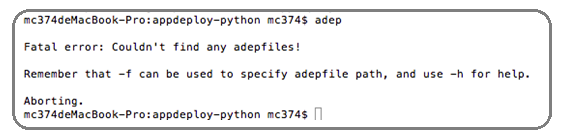
4). Enter command line and execute $ adep. The appearance of the following view indicates successful installation:
3.Basic Usage Methods
The usage format of AppDeploy is running the command ‘adep + parameters’ in the command line. Its execution task basis is the python file appdeploy.py (default) in the current working directory as the execution description file. If users have custom description files, they can specify them using the “-f” parameter. There are two detailed usage methods:
1)Execute commands directly via command line
Format: $ adep[options] — [shell command]
| Option: Defines execution parameters for command options; “—“:Double hyphen, serves as a separator to separate preceding parameters from subsequent shellcommands; [shell command]: shellcommand, which will be executed on the remote server; |
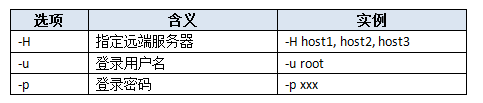
Common option flags:
For example: Check nginx status on the server
$ adep -H ‘101.200.184.144’ -u root -p xxxx — ps-aux | grep nginx
PS: The above method is convenient and allows flexible, fast execution of desired commands, but the implemented functionality is relatively simple. In most cases, you can use the following method to achieve your specific tasks;

2)Execute as tasks by editing appdeploy.pyfile
Define functions (task implementation details) in the appdeploy.py file, and execute defined tasks sequentially by running $ adeptask1 task2 (function names defined in the file) in the current directory of the command line;
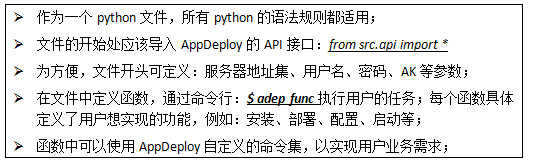
appdeploy.py writing rules:
4.Get and Set Access Key
Since the AppDeploy tool is designed based on Aliyun products, some of its features are implemented based on Aliyun OpenApi, so it is necessary to set the value of Access Key to obtain the qualification to call OpenApi.
For methods to obtain Access Key, please refer to: http://bbs.aliyun.com/read/253666.html?spm=5176.7189909.0.0.l1LU3c&fpage=2
The obtained Access KeyID and Access Key Secret are configured into AppDeploy through the following methods:
5.Environment Variables
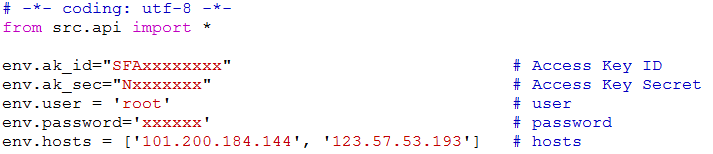
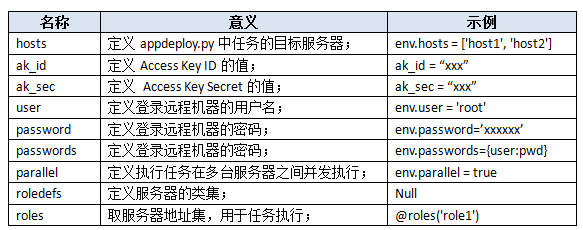
| env.hosts = [‘host1’, ‘host2’]: Indicates two remote servers, namely host1 and host2.
env.hosts = [‘host1’, ‘user2@host2’, ‘host3’]: Indicates a total of three remote servers host1, host2, host3, where host2 uses username user2 to log in, and the usernames for host1 and host3 use the value defined by env.user;
|
| env.hosts = [‘host1’, ‘host2’]
def task1():
run(ls)
|
| @parallel
def task1():
pass
def task2():
pass
$ adep -H host1,host2,host3 task1task2
|
| env.roledefs = {
‘apphosts’: [‘host1’, ‘host2’, ‘host3’],
‘webhosts’: [‘host3’, ‘host4’]
}
@roles(‘apphosts’)
@hosts(‘host3’, ‘host5’)
def task1():
run(‘ls/var/www’)
|
6.Execution Commands
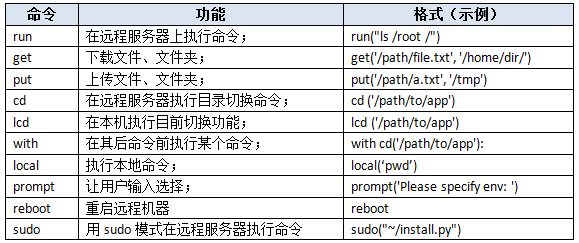
Environment variables define related environment parameters for task execution: such as username, password, etc., while the specific execution of tasks consists of many specific instructions. Below are the custom execution command sets of AppDeploy;
|
get(‘/path/to/remote_file.txt’, ‘local_dir’)
|
Create new local_dir and save the file;
|
|
get(‘/var/log/apache2/access.log’, ‘%(path)s’)
|
Download access.log file, save in the same directory;
|
|
get(‘/var/log’, ‘%(path)s’)
|
Recursively download all files under /var/log;
|
|
get(‘/var/log’, ‘%(host)s/%(path)s’)
|
When there are multiple hosts, save in different directories;
|
| put(‘/path/test.txt’, ‘/root/’) Upload local file test.txt to the specified server /root;
put(‘/path/test’, ‘/root/’) Upload all files under the local folder to the specified server /root;
put(‘/path/test.txt’, ‘/root/’) Upload local file test.txt to the specified server /root, and set permissions;
|
| env = prompt(‘Please specify target environment: ‘)Can input content at runtime and save it in env;
prompt(‘Specify dish: ‘, ‘dish’, default=’spam & eggs’)Set default input content, use default value if not input;
prompt(‘Please specify level: ‘, key=’nice’, validate=int)Set input content to be integers only;
|
7.Modifiers
| env.hosts = [‘host1’, ‘host2’]
@parallel
def task1():
pass
|
| @task
def task1():
run(“ls”)
def task2():
run(“pwd”)
$ adep –list
|
The above content describes the usage methods of AppDeploy from aspects such as AK settings, environment variables, custom commands, and modifiers. Below is a concrete example to demonstrate the above content.
|
# -*- coding: utf-8 -*- from src.api import * env.ak_id=”xxx” @task @task def useless(): |
# Access Key ID # Indicates this function can be executed # Upload folder # Specify server cluster # Local execution command # Without @task, cannot be executed |
8.Upload and Download Files (Folders)
AppDeploy provides two implementation methods for file upload and download:
One method: is to define file upload and download tasks in appdeploy.py, and then execute $ adep task in the command line to achieve file upload and download functions. This method can achieve complex logic upload and download functions, such as uploading files from different directories and different servers, but the usage is slightly cumbersome. For simple upload and download functions, refer to method two.
Another method: Directly use the command line of adep, format as follows:
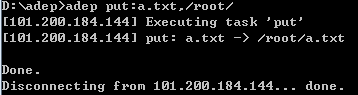
$ adep put:local_file,remote_dir
$ adep get:remote_file,local_dir
Note that there are no spaces in the above commands. If there are spaces in the directory, enclose them in quotes. Below are some examples for reference:
1)Upload local file a.txt to the server /root/ directory;
2)Upload b.txt from local “D:ProgramFiles” directory to the server /root/ directory;
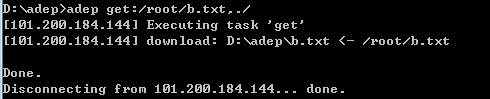
3)Download server /root/b.txt file to local;
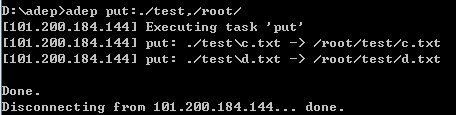
4)Upload local ./test/ directory (and included files) to server /root/;
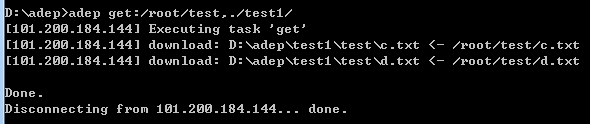
5)Download server /root/test directory to local ./test1/ directory;
9.Remote Execution of Commands
AppDeploy tool has built-in run instruction for remote execution of commands. When editing tasks in appdeploy.py, using the run command makes it easy to achieve remote execution. But how to execute a remote command in the command line??
AppDeploy provides two implementation methods:

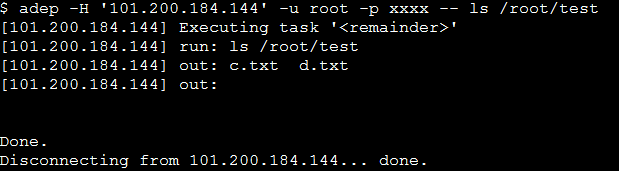
One method: Execute $ adep [options] — [shell command] in the command line, where option is the parameter of the command.
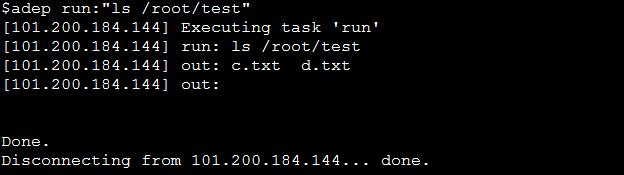
For example: View the file list in the server /root/test/ folder;
Another method: Use $ adep run:”shell command” in the command line. Note that run and the subsequent shell command are connected by “:” with no space. If the shell command has spaces, please enclose it in quotes.
10.One-Click Source Station Update
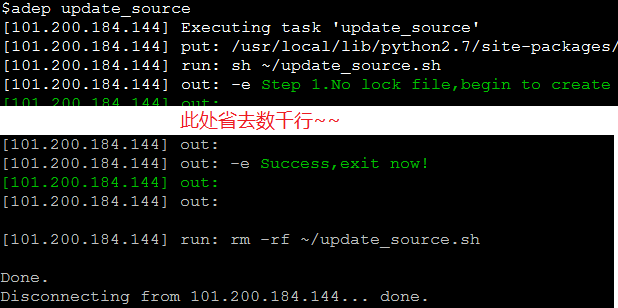
After purchasing ECS machines and installing the system, most users need to update the system source. AppDeploy has collected the most commonly used and efficient source station links on Aliyun servers and provides one-click update functionality. This feature already supports Unix systems such as Ubuntu, Centos, Fedora, Opensuse, Debain, etc.
Update source station command: $ adep update_source
11.Concurrent Execution
Such commands are summarized based on user habits. If you have new features or shortcuts you want to add, please contact us, and we will consider adding the features you need to the next version of the tool.
AppDeploy was initially focused on application deployment, but during the early development stage, the tool focused more on the intercommunication of underlying information flow and the realization of general functions. Currently, AppDeploy’s support for application deployment is not comprehensive enough, which is exactly what we need to strengthen recently.
Application deployment-related work can be divided into: installation of server-side runtime environments, compilation and packaging of applications, and upload and deployment of applications;
12.Server-Side Runtime Environment Installation
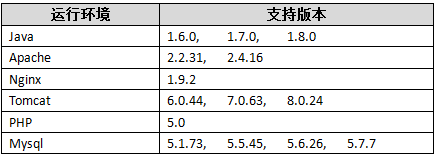
Currently [font=&]AppDeploy focuses more on web server installation. [font=&]AppDeploy supports one-click installation of common Web environments. Supported environments and versions are shown in the table below:
However, some of the above environments have different dependency libraries and installation details on different operating systems, so it cannot be guaranteed that the above tools can be installed correctly on all operating system environments. If installation fails, please check the error log or contact our email. Installation steps are as follows:
1)Edit appdeploy.py file, input the web environment components you wish to run.
2)Define a task, calling the built-in function of appdeploy in the task: install_runtime(para), where parameter para is the details of the web component to be installed, input in json format.
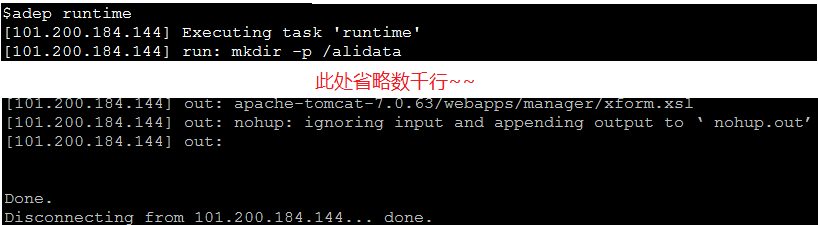
3)Execute in the command line: $adep runtime.
Example1:Install Jdk-1.7.0 and Tomcat-7.0.63 runtime environment on the server
1)Define task runtime in appdeploy.py, and call install_runtime(compontens) function, with parameters being the jdk, tomcat version numbers to be installed, input in json format.
| def runtime(): componets={“jdk” :”1.7.0″, “tomcat” :”7.0.63″ } install_runtime(componets) |
2)Execute in the command line: $ adep runtime to execute the installation process,
3)Enter the access address in IE to verify the installation result. The figure below shows that tomcat has been successfully installed.
[attachment=81519]
Example2:Installapache and Tomcat-7.0.63 runtime environment on the server
1)Define task runtime in appdeploy.py, and call install_runtime(compontens) function, with parameters being the Apache, PHP version numbers to be installed, input in json format.
| def runtime(): componets={“ apache” : “ 2.2.31″, “php” : “5.0”, } install_runtime(componets) |
2)Execute in the command line: $ adep runtime to execute the installation process,
[attachment=81520]
3)Enter the access address in IE to verify the installation result. The figure below shows that PHP has been successfully installed (hello.php is a file placed in the specified php directory after environment installation);
[attachment=81521]
13.Application Packaging and Deployment
Example1: Deploy local Java application to the server.
Combine with the above environment installation example (1), deploy a local java application to the server.
1)Add the following task in appdeploy.py. The task defines: packaging tool, local project directory, server-side web application directory, and calls the packaging and deployment commands package and deploy interfaces.
| def pack_deploy(): componets={“package_tool”: “maven”, “project_dir” : “/home/xxx/src/example/maven/myFirstWebApp”, “web_dir” :”/alidata/server/tomcat/webapps” } package(componets) deploy(componets) |
2)Enter command in the command line: $ adep pack_deploy to execute the packaging and deployment task, as follows:
[attachment=81522]
3)Enter the application address in IE to check the deployment effect. The figure below indicates successful application deployment:
[attachment=81523]
Application deployment is the key research direction for AppDeploy in the future. We know very well that what we have done so far is limited. This is also an opportunity to communicate with developers. We hope you can send us the shortcomings of the tool and your own needs, so that we can make the application deployment plan newer and easier to use together.