Preface
Users often rely on FTP and NFS for local area network (LAN) file sharing. However, after a recent client requested Samba configuration, we learned that some users need to simplify the learning curve for access, meet basic permission control management requirements, and support real-time editing and saving of files. These needs are difficult to satisfy with previous methods, but Samba can perfectly support the above requirements.
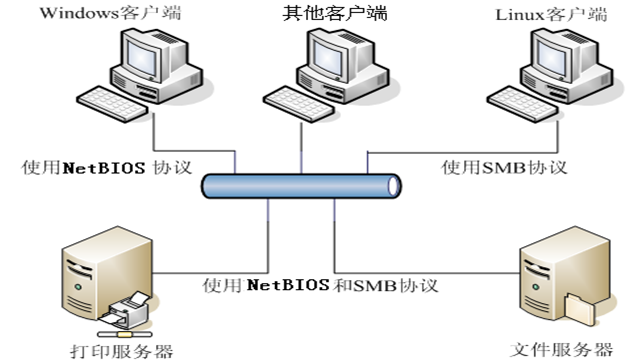
One of the best ways to share files between Unix and Windows
Installing Samba
Installation is quite simple across various platforms, so we will skip this step.
Configuring Samba
We recommend planning directories and user permissions reasonably. You can use user groups to simplify authorization management.
# Create directory (example)
mkdir -p /data2/sm
chmod -R 777 /data2/sm

# Add user (example)
groupadd dengling
useradd -g dengling -s /sbin/nologin dengling
smbpasswd -a dengling

# Backup smb config file and edit
cd /etc/samba
cp smb.conf smb.conf.bak
vi smb.conf

# Global parameters
[global]
    security = share
    lanman auth = Yes
    log file = /var/log/samba/log.%m
    idmap config * : backend = tdb
    guest ok = Yes
    hosts allow = 127., 172., 192.168.1., 192.168.3.
    cups options = raw

# Share parameters
[homes]
    comment = Home Directories
    read only = No
    browseable = No

[sheji]
    comment = sheji
    path = /data2/sm/sheji
    valid users = share, shenwei, xuwei, shenjiamei, humengchu, rensiqiang, yeting, tongying, jinbo, zengfanan, fengpeisi
    read only = No
    create mask = 0775
    directory mask = 0775

[test]
    comment = sheji
    path = /data2/sm/test
    valid users = test, test2, shenwei
    read only = No
    create mask = 0775
    directory mask = 0775

[q2]
    comment = sheji
    path = /data2/sm/q2
    valid users = xuejia, sungaoshuai, lujingjing, huangsonghe, yefei, lvwenhan, fangyuan, zhanghuichen, liuguofa, xupeiyu, yangpengfei, lisuitao, sunzhen, shenwei, xuwei, shenjiamei, humengchu, rensiqiang, yeting, tongying, jinbo, zengfanan, fengpeisi, chenye, wuailing, pengnan, liangzhixue, chenhong, daimengyou, wangxiaoshuo, zhoujian, fenglu, linlijun, chenshuxian, linzhimin, yanyoushan, xiaguoying, zhanghuanrong, mayushu, xuyangjing, guogaoyan, huangyouyang, jinzhibin, huyuqing, shenxuemei, liukui
    read only = No
    create mask = 0775
    directory mask = 0775

[market]
    comment = sheji
    path = /data2/sm/market
    valid users = zhanghuichen, shenwei, chenye, wuailing, pengnan, liangzhixue, chenhong, daimengyou, wangxiaoshuo, xuyangjing, chenshuxian, linzhimin, caoling, guogaoyan, xiehaibo, huangyouyang, jinzhibin, huyuqing
    read only = No
    create mask = 0777
    directory mask = 0775

[market_finance]
    comment = sheji
    path = /data2/sm/market_finance
    valid users = yangqiong, shenwei, chenye, wuailing, pengnan, liangzhixue, chenhong, daimengyou, wangxiaoshuo, xiehaibo, gaofangjie, xuyangjing, chenshuxian, linzhimin, huangyouyang, jinzhibin, huyuqing
    read only = No
    create mask = 0777
    directory mask = 0775

[shenwei]
    comment = sheji
    path = /data2/sm/develop/shenwei
    valid users = shenwei
    read only = No
    create mask = 0777
    directory mask = 0775

[qijun]
    comment = qj
    path = /data2/sm/homedir/qijun
    valid users = qijun
    read only = No
    create mask = 0777
    directory mask = 0775
    guest ok = No

[wenyong]
    comment = sheji
    path = /data2/sm/develop/wenyong
    valid users = wenyong
    read only = No
    create mask = 0777
    directory mask = 0775

[wudi]
    comment = sheji
    path = /data2/sm/develop/wudi
    valid users = wudi
    read only = No
    create mask = 0777
    directory mask = 0775

[caijiannan]
    comment = sheji
    path = /data2/sm/develop/caijiannan
    valid users = caijiannan
    read only = No
    create mask = 0777
    directory mask = 0775

[weiduani2]
    comment = weiduan
    path = /data2/sm/develop/raochao/微端
    valid users = wangfeng
    read only = No
    create mask = 0777
    directory mask = 0775

[raochao]
    comment = raochao
    path = /data2/sm/develop/raochao
    read list = wangfeng, xuwei, shenjiamei, chenxianzhe, chenye, wuailing, liuyuting, dainan
    write list = raochao

[product]
    comment = product
    path = /data2/sm/product
    read only = No
    create mask = 0777
    directory mask = 0777

[jinbo]
    comment = JinBo
    path = /data2/sm/homedir/jinbo
    valid users = jinbo
    read only = No
    guest ok = No

[xiaoqiang]
    comment = xiaoqiang
    path = /data2/sm/homedir/xiaoqiang
    valid users = xiaoqiang
    read only = No
    guest ok = No

[share]
    comment = share
    path = /data2/sm/homedir/share
    valid users = share, market, wal, qijun, zhanghua
    read only = No
Starting Samba
Accessing from Windows Client
1. Accessing Samba on Windows
Enter in “Computer”:
\xxx.xxx.xxx.xxx2. Disconnect Samba shared connection on Windows. If necessary, you can choose to log off or restart.
In [Start] -> [Run] -> [CMD], press Enter and type:
net use * /del /y3. Map the Samba shared Linux directory to a Windows drive letter
Right-click [Computer] -> [Map Network Drive] -> [Folder XX.XX.XX.XX]