Preface
Percona XtraBackup is arguably a relatively perfect free and open-source data backup tool. It supports online table-lock-free synchronous replication and offers a parallel, high-efficiency, secure backup and recovery mechanism that truly stands out compared to mysqldump. For a comparison of its features with MySQL Enterprise Backup (InnoDB Hot Backup), please refer to the extended reading section. Of course, in actual operations and maintenance processes, we should analyze and select appropriate backup and recovery solutions based on different business needs. This article focuses on achieving online, zero-downtime, table-lock-free MySQL master-slave synchronization for scenarios involving multiple MySQL instances where one instance corresponds to multiple databases. We will continue to update and share other practical skills based on XtraBackup in the future.
XtraBackup is currently one of the preferred backup solutions.
Principles
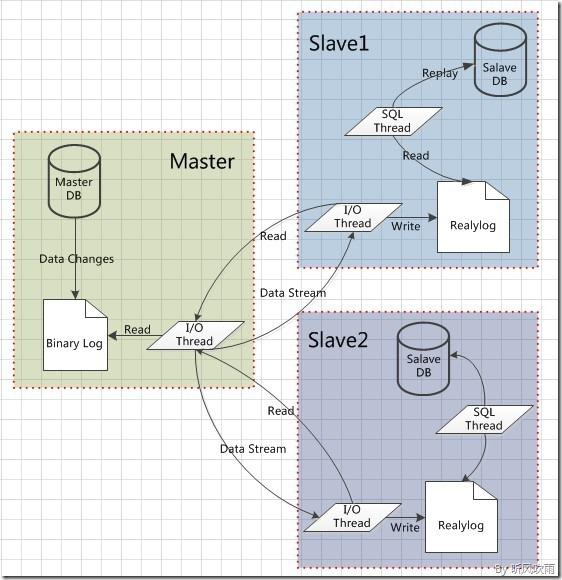
MySQL Master-Slave Synchronization Principle
MySQL master-slave synchronization is implemented on the basis of MySQL Master-Slave Replication. By enabling binlog on the Master MySQL (keeping it in an open state), the Slave MySQL uses an I/O thread to read the binlog from the Master MySQL and then transmits it to the relay log on the Slave MySQL. Subsequently, the SQL thread on the Slave MySQL reads the relay log and applies it to the Slave MySQL database. This achieves master-slave data synchronization.
XtraBackup Backup Principle
innobackupex continuously tracks InnoDB log files in background threads and then copies InnoDB data files. After the data file copying is completed, the log copying thread also ends. This results in a data copy not at the same point in time and transaction logs generated after the start of the backup. After completing the above steps, you can use the InnoDB crash recovery code to execute transaction logs (redo log) to achieve data consistency.
Backup consists of two processes:
- backup: The backup phase, which tracks transaction logs and copies data files (physical backup).
- preparing: Replays transaction logs to bring all data to the same point in time, achieving a consistent state.
Advantages of XtraBackup
- Can quickly and reliably complete data backups (copying data files and tracking transaction logs).
- Does not interrupt transaction processing during data backup (hot backup).
- Saves disk space and network bandwidth.
- Automatically completes backup verification.
- Increases online time due to faster recovery times.
Configuration
Preparation
MySQL Steps and my.cnf Configuration
# Original master database version
mysql -V
mysql  Ver 14.14 Distrib 5.5.31, for Linux (x86_64) using readline 5.1

# Migration slave database version
mysql -V
mysql  Ver 14.14 Distrib 5.6.25, for linux-glibc2.5 (x86_64) using EditLine wrapper

# Check database engines
show engines;

+--------------------+---------+----------------------------------------------------------------+--------------+------+------------+
| Engine             | Support | Comment                                                        | Transactions | XA   | Savepoints |
+--------------------+---------+----------------------------------------------------------------+--------------+------+------------+
| MRG_MYISAM         | YES     | Collection of identical MyISAM tables                          | NO           | NO   | NO         |
| CSV                | YES     | CSV storage engine                                             | NO           | NO   | NO         |
| MyISAM             | YES     | MyISAM storage engine                                          | NO           | NO   | NO         |
| BLACKHOLE          | YES     | /dev/null storage engine (anything you write to it disappears) | NO           | NO   | NO         |
| MEMORY             | YES     | Hash based, stored in memory, useful for temporary tables      | NO           | NO   | NO         |
| InnoDB             | DEFAULT | Supports transactions, row-level locking, and foreign keys     | YES          | YES  | YES        |
| ARCHIVE            | YES     | Archive storage engine                                         | NO           | NO   | NO         |
| PERFORMANCE_SCHEMA | YES     | Performance Schema                                             | NO           | NO   | NO         |
| FEDERATED          | NO      | Federated MySQL storage engine                                 | NULL         | NULL | NULL       |
+--------------------+---------+----------------------------------------------------------------+--------------+------+------------+


# Notes for master-slave database synchronization
[mysqld]
# The IDs between master and slave cannot be the same
server-id
# Enable binary logging
log-bin
# Generally enabled on the slave (optional)
read_only
# It is recommended to use InnoDB and configure it properly


# Check master-slave database status
mysql -S /tmp/mysql.sock -e "show global variables like 'server_id';"
+---------------+-------+
| Variable_name | Value |
+---------------+-------+
| server_id     | 1     |
+---------------+-------+

mysql -S /tmp/mysql.sock -e "show global variables like 'log_bin';"
+---------------+-------+
| Variable_name | Value |
+---------------+-------+
| log_bin       | ON    |
+---------------+-------+
Installing Percona XtraBackup
RPM installation is generally recommended – https://www.percona.com/downloads/XtraBackup/LATEST/
Backup and Recovery
Usually, innobackupex is used directly because it can back up tables with both InnoDB and MyISAM engines simultaneously.
Focus on whether the status of Slave_IO_Running and Slave_SQL_Running is YES.
MySQL Master-Slave Switching
Before switching, disconnect access to the master database and observe the process status. Stop the slave IO_THREAD for switching only after there are no write operations.
Common Issues
Slave_SQL_Running: No
# Usually caused by transaction rollback
stop slave;
set GLOBAL SQL_SLAVE_SKIP_COUNTER=1;
start slave;