Security of your AWS account is paramount. It is critical to stay informed about all the latest security-related events in your AWS account. You can receive alerts through various channels, such as email or SMS; however, in this blog post, I will demonstrate how to receive voice alerts on your mobile phone using Amazon AI services (such as Amazon Polly) along with any cloud-based communication platform (such as Twilio).
Amazon Polly is a service that converts text into lifelike speech, enabling you to build chat-enabled applications and create an entirely new category of voice-enabled products. It uses deep learning technology to synthesize speech that sounds like a human voice. The service offers a variety of voices in different languages.
For IT security professionals who are away from their desks, phone call alerts regarding security events in their AWS accounts can be extremely helpful. These security events can be customized based on severity and priority. High-severity and high-priority security events can be routed to a system that triggers phone call alerts.
For phone call alerts, I use Twilio, which provides API capabilities for voice, video, and messaging. When a security event occurs in a given AWS account, the Twilio platform enables programmatic API calls to initiate phone calls. Amazon Polly converts these text alerts into voice messages played over the phone.
Solution Overview
The solution consists of two systems, as shown in the following architecture diagram:
- Event Detection and Notification System
- Text-to-Speech Conversion System
The Event Detection and Notification System is decoupled from the Text-to-Speech Conversion System because the latter is generic and can be applied to any user-defined event detection. In this blog post, as a solution example, I focus on the Text-to-Speech Conversion System and utilize the Event Detection and Notification System introduced in my previous blog post.
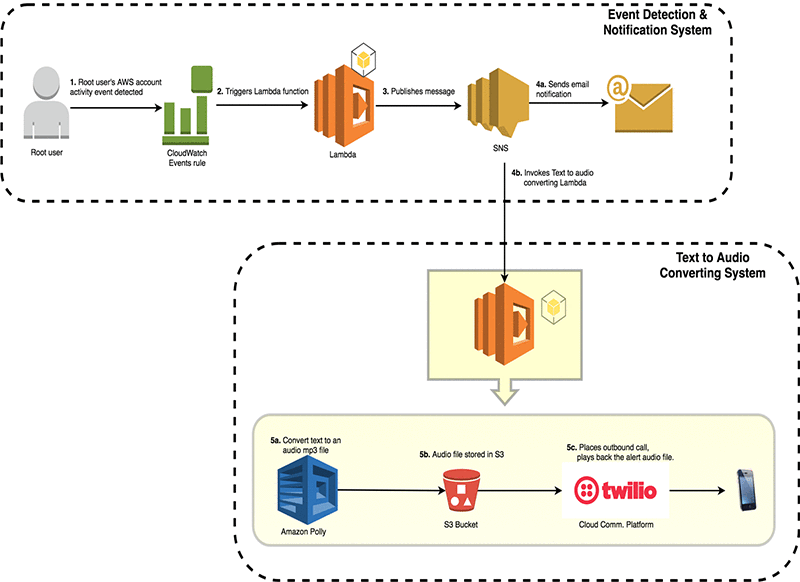
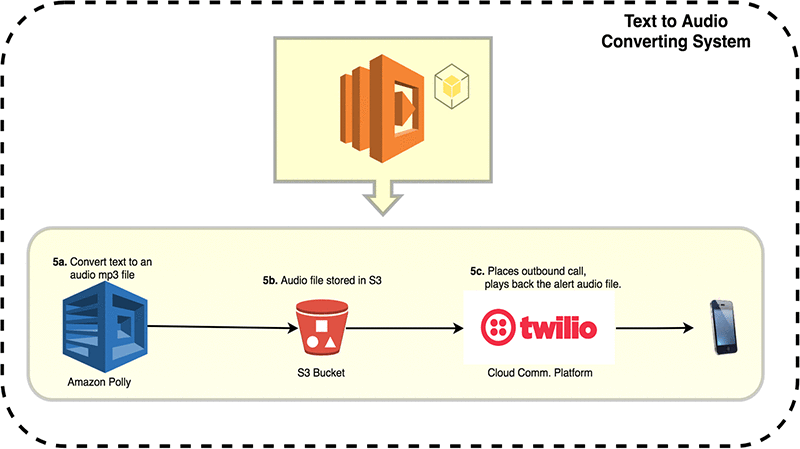
As illustrated in the architecture diagram, the alert message from Step 3 is published to an Amazon SNS topic, which triggers a Lambda function in our Text-to-Speech Conversion System.
- This Lambda function parses the subject of the SNS alert message and uses Amazon Polly to convert the text into a speech file.
- This speech file is stored in an Amazon S3 bucket.
- Twilio uses the location of the speech file to place an outbound call to the relevant party and play the audio file. Note that you can apply an Amazon S3 object lifecycle policy to these files based on your needs after they have been used for outbound calls.
Demo
Prerequisites
- An event detection and notification system. For example, you can set up monitoring and notifications for AWS account root user activity.
- You will need a Twilio account authentication token to make API calls. You can register for a free (trial) Twilio account here.
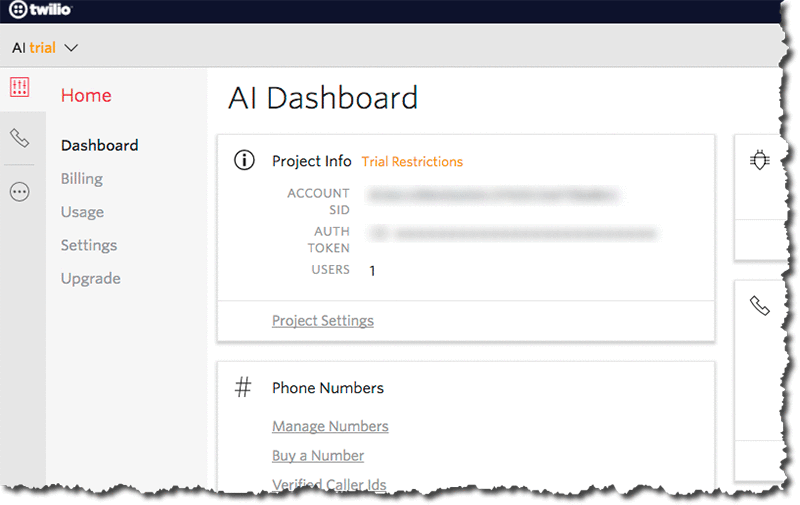
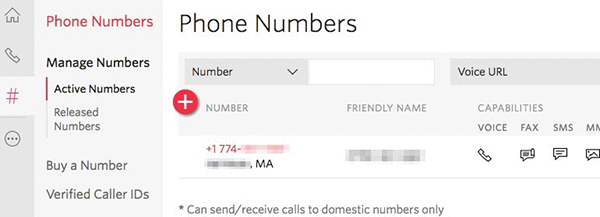
- A phone number is assigned to your Twilio account. This is the caller ID number that appears when you receive call alerts.
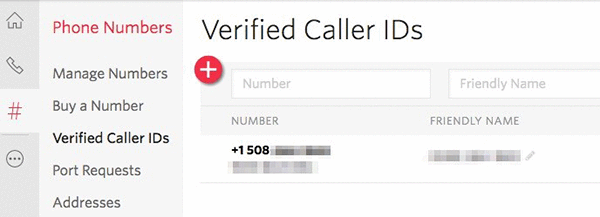
- If you are using a trial account, you must verify the “To” phone number.
Deployment Steps
The following deployment steps will deploy the text-to-speech system as shown in the diagram below.
- In the AWS CloudFormation console, select Create Stack. Use the CloudFormation JSON template
 . Select Next. (Note: Amazon Polly is not supported in China or AWS GovCloud (US) regions.)
- Create the stack in the region where you want to deploy the event detection and notification system.
- Enter the following parameter details, select Next, and then select Next:
- ToPhoneNo: The phone number that Twilio will call. Prefix the phone number with “+CountryCode”, e.g., +14561237890.
- FromPhoneNo: The virtual phone number used by Twilio to make the call. You can find this information in your Twilio account. See the “Prerequisites” section.
- TwilioAccntSid: Enter the Twilio Account SID. This is provided when you register at https://www.twilio.com/.
- TwilioAuthToken: Enter the Twilio Authentication Token.
- BucketName: Enter the name of the bucket you want to create. This bucket will store the voice files for event alerts.
- PollyVoiceId: Enter the Amazon Polly voice ID you wish to use for incoming alert calls. The default voice is “Amy”.
- LambdaS3Bucket: The name of the Amazon S3 bucket storing the Lambda function zip file.
- LambdaS3Key: The name of the Lambda function zip file. This is the full path of the S3 object, including the prefix. For example, “dir1/dir2/lambdafunction.zip”. The Lambda function zip file can be downloaded from the link in the Lambda function section of this blog post.
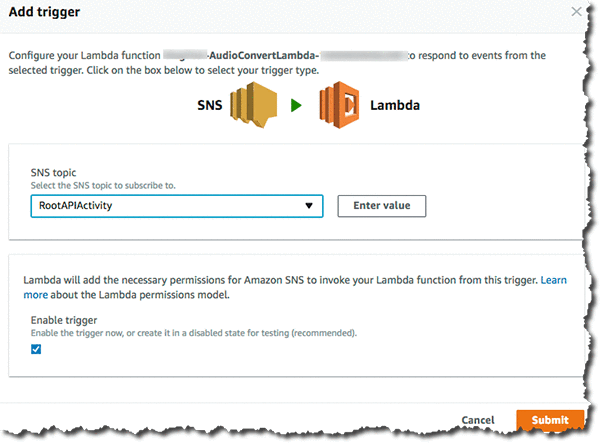
SNS Triggering the Lambda Function
When triggered, the Text-to-Speech Lambda function parses the subject of the SNS message. It then passes the text from this subject field to the Amazon Polly service to convert it into a voice file. Once the text is converted into a voice file, the file is stored in the S3 bucket created earlier by the CloudFormation stack.
It then invokes the Twilio API to place a phone call and play the event notification audio file from the S3 bucket.
This AWS Lambda code zip file can be downloaded here and used for CloudFormation stack deployment.
Solution Verification
In the following example voice clips, I will demonstrate that after deploying an event detection system (to notify about root API activity) and integrating it with a text-to-speech system, I receive phone call alerts whenever root API activity is detected in the AWS account.
Example of a phone call alert triggered by console login via root credentials:
 |
Listen now
Voice provided by Amazon Polly |
Then, I create an Amazon EBS volume using root credentials and receive another phone call alert.
|
Listen now
Voice provided by Amazon Polly |
Conclusion
In this post, I demonstrated how to create a phone call audio alerting system that can be integrated into existing alerting and monitoring systems. This framework is useful for obtaining near-real-time phone call alerts for critical events within an AWS account.
For further reading, we recommend the following articles:
- Build Your Own Text-to-Speech Applications with Amazon Polly
- Monitor and Notify on AWS Account Root User Activity
- Monitor Changes and Auto-Enable Logging in AWS CloudTrail