ELB (Elastic Load Balancer)
ELB, short for Elastic Load Balancer, is AWS’s elastic load balancer service that assigns the most suitable servers for external access based on actual conditions. In practical usage, it is often necessary to restrict client access passing through the ELB. This article explains how to implement such restrictions by configuring EC2 instances.
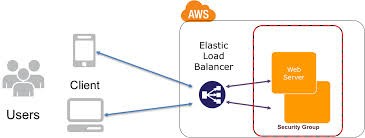
As shown in the figure, since ELB does not belong to a security group, applying restrictions directly to the security group will not affect ELB traffic; clients accessing via ELB can still reach the EC2 instance.
However, if you were to restrict ELB from accessing EC2, the HealthCheck actions initiated by ELB to EC2 would fail, causing ELB to incorrectly judge the EC2 instance as unhealthy.
Therefore, access restrictions for clients passing through ELB must be configured on the web server running on the EC2 instance.
When implementing access restrictions, since all traffic passes through the ELB, the detected source IP addresses will all be those of the ELB. In this case, you need to use the X-Forwarded-For (XFF) header to verify and enforce restrictions.
Examples
Allow only the IP address 172.24.40.83 to access the website.
Edit the website configuration file and add or modify it as follows:
SetEnvIf X-Forwarded-For "172.24.40.83" allow_ip
Order deny,allow
Deny  from all
Allow from env=allow_ip
Deny access to the website for IP addresses 172.24.40.83 and 172.24.40.84.
Edit the website configuration file and add or modify it as follows:
SetEnvIf X-Forwarded-For "172.24.40.83" deny_ip01
SetEnvIf X-Forwarded-For "172.24.40.84" deny_ip02
Order allow,deny
Allow from all
Deny  from env=allow_ip01
Deny  from env=allow_ip02
The function of X-Forwarded-For is to append the real client’s IP address to the end of the data packet when distributing requests received by the ELB to the EC2 instance.
Using an Apache web server, you can modify the client IP to reflect the X-Forwarded-For value by installing and configuring mod_extract_forwarded. The specific method is currently under further investigation.
# yum install mod_extract_forwarded
Introduction to Load Balancer Distribution Methods
The ELB elastic load balancer is a relatively simple and easy-to-use load balancer. It uses the Round Robin method to evenly distribute external access among EC2 instances managed by the ELB, ensuring optimal allocation and use of system resources for the instance cluster under high traffic loads.
Additionally, common high-performance load balancers generally support methods such as Least Connections, Observed, Dynamic Ratio, Round Robin, Ratio, Fastest, Predictive, and more. ELB is considered simple because it only provides Round Robin functionality, but it is considered easy to use because you can have a load balancer with just a few steps on the web interface.