In recent times, my GoAgent has been completely unusable, likely due to strict firewall measures. I then switched to XX-Net from GitHub, which still uses the GoAgent + Proxy SwitchySharp architecture. This proxy works well, although accessing Google can sometimes be slow.
1. Need a fast VPN connection
I previously used Amazon’s free cloud tier for some development testing, but the SSH speed was so slow it was nearly unbearable. Consequently, two days ago, I decided to purchase a foreign VPS. The primary purposes are for small-scale development testing and to access technical articles abroad (the world is big, and I want to see it).
After searching for VPS recommendations on v2ex, most suggestions centered around Linode, DigitalOcean, Bandwagon, and Azure HK. However, it seems Linode is also heavily restricted. I found a discount code online and selected a $19.99/year VPS configuration on Bandwagon (surprisingly, it supports Alipay).
After switching the VPS operating system to CentOS 7.1 64-bit, I followed some Shadowsocks tutorials online to set up the proxy (taking less than an hour).
After using it for three days, the SSH connection speed to the VPS is quite robust. Accessing Google via Shadowsocks + Proxy SwitchyOmega + net-speeder is also very fast.
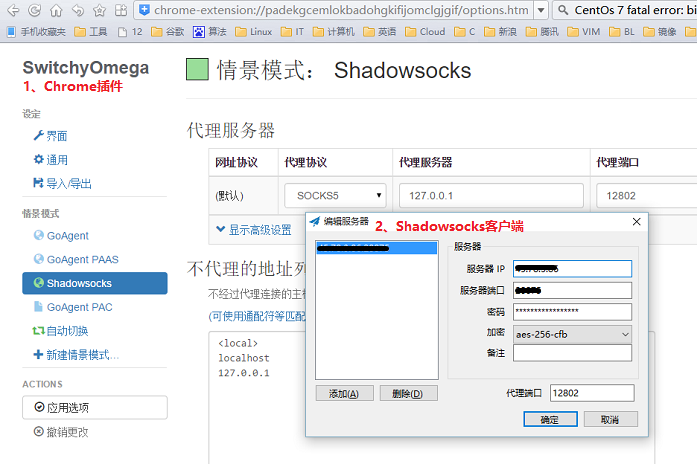
2. Sharing my operational process
- A foreign VPS: I purchased the BandwagonHost VPS.
- An excellent tutorial for setting up Shadowsocks: From boxwang.
- An excellent tutorial for optimizing Shadowsocks with net-speeder: From Jark. However, it is recommended to run net-speeder in the background by changing
./net_speeder eth0 "ip"to./net_speeder eth0 "ip" &. - Chrome extension Proxy SwitchyOmega 2.3.15: Local backup download. After downloading, simply drag it into the Chrome browser.
- Shadowsocks Windows GUI client: Local backup download. After installation, run it and configure the IP, port, and password for the Shadowsocks server on your VPS. By the way, the C# source code on GitHub failed to compile with Visual Studio. I wonder if anyone else has encountered this issue.
3. Using Crontab to periodically execute shell scripts to clear TCP connections
The drawback of net-speeder is that if there are too many simultaneous requests to the Shadowsocks server, it can cause the proxy speed to slow down. As shown in the figure below, the Shadowsocks server TCP connections show many SYN_RECV, TIME_WAIT, and other states.
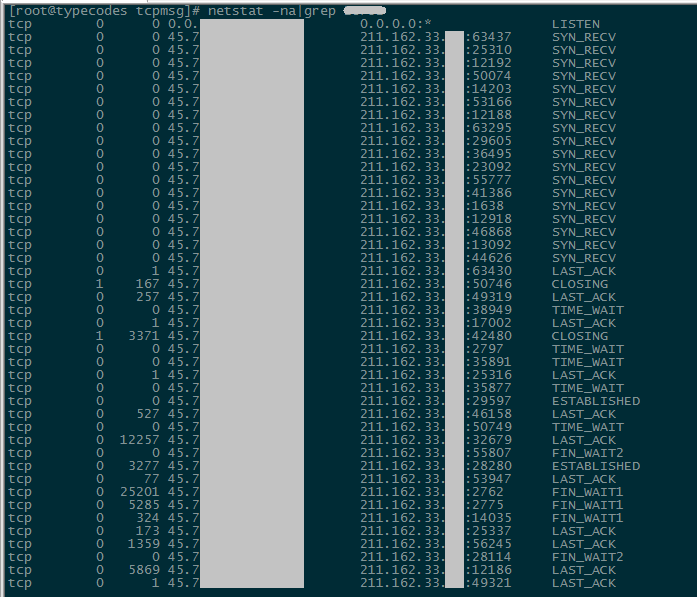
Solution: First, create a shell control script, then use crontab to periodically execute it to close all net-speeder processes and restart net-speeder.
[root@typecodes net_speeder]# pwd
/root/net_speeder
###### build.sh script is used to gcc compile net_speeder.c to generate the net_speeder binary file
[root@typecodes net_speeder]# ls
build.sh  net_speeder  net_speeder.c
###### Create net_speeder_crontab.sh script (4 lines total)
[root@typecodes net_speeder]# vim net_speeder_crontab.sh
#!/bin/bash

killall net_speeder
./net_speeder lo "ip" &

###### Set crontab to automatically execute net_speeder_crontab.sh script at 1 AM daily
[root@typecodes ~]# crontab -e
no crontab for root - using an empty one
0 1 * * * /root/net_speeder/net_speeder_crontab.sh >/dev/null 2>&1
The above method is suitable for Google fans, but abuse is not recommended!