A customer requested to install MySQL 5.6.22 on the Amazon CentOS 7 AMI.
After logging into the Amazon EC2 server as the centos user, switch to the root user using sudo.
If you execute the yum install mysql-server command on the CentOS 7 AMI, you will find that the MySQL server cannot be installed.
# sudo su -
# yum install mysql-server
Loaded plugins: fastestmirror
base                                                     | 3.6 kB     00:00
epel/x86_64/metalink                                     | 5.5 kB     00:00
epel                                                     | 4.4 kB     00:00
extras                                                   | 3.4 kB     00:00
rpmforge                                                 | 1.9 kB     00:00
updates                                                  | 3.4 kB     00:00
epel/x86_64/primary_db                                     | 3.8 MB   00:00
(1/2): epel/x86_64/updateinfo                              | 230 kB   00:00
(2/2): epel/x86_64/pkgtags                                 | 1.3 MB   00:00
Loading mirror speeds from cached hostfile
 * base: www.ftp.ne.jp
 * epel: s3-mirror-ap-northeast-1.fedoraproject.org
 * extras: www.ftp.ne.jp
 * rpmforge: ftp.riken.jp
 * updates: www.ftp.ne.jp
No package mysql-server available.
Error: Nothing to do
This is because the default database for CentOS 7 is MariaDB.
1. Configure the MySQL 5.6 Repository
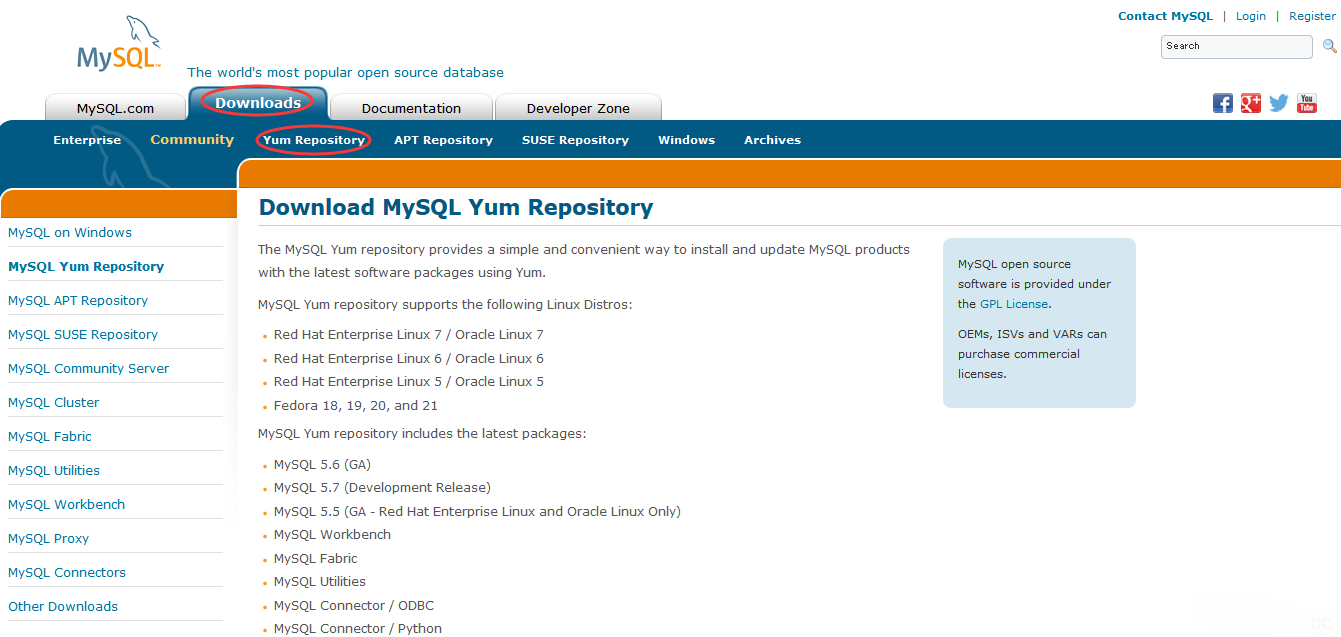
Visit http://www.mysql.com/downloads/, then click “Downloads” → “Yum Repository”.
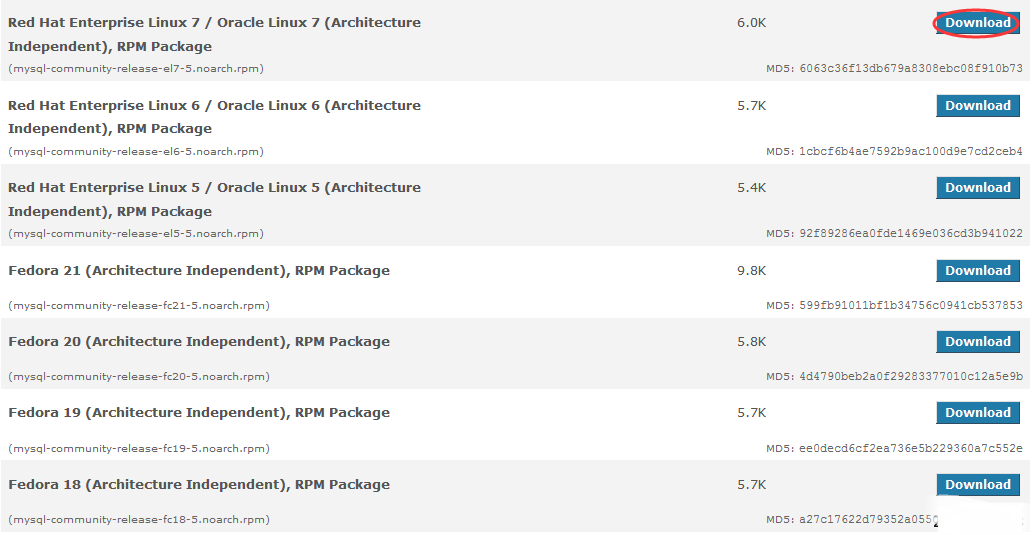
Select “Download” for Red Hat Enterprise Linux 7 / Oracle Linux 7 (Architecture Independent), RPM Package.
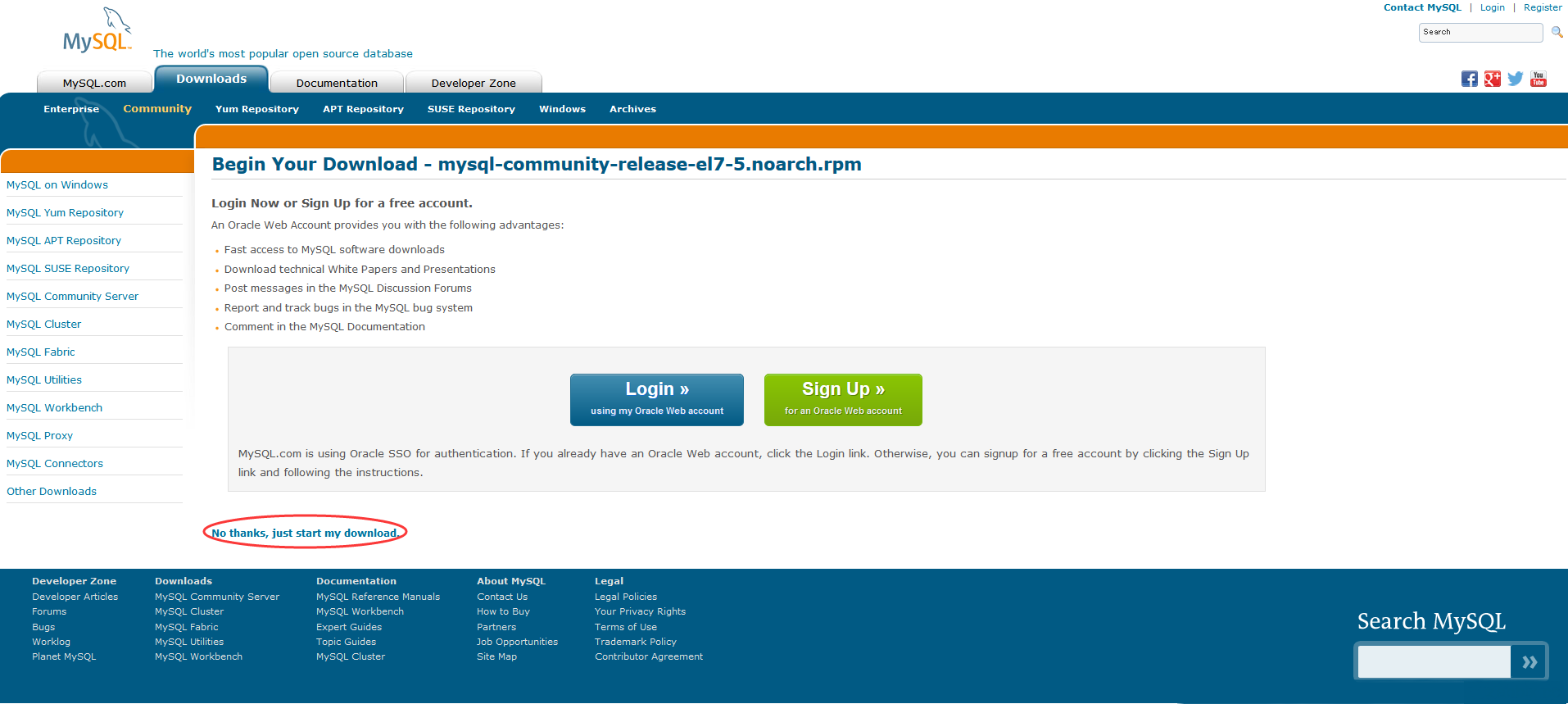
A page prompting you to log in to Oracle will appear here, but no login is required. You can simply copy the link for “No thanks, just start my download.”
The copied link is: http://dev.mysql.com/get/mysql-community-release-el7-5.noarch.rpm
Configure the MySQL 5.6 yum repository.
# rpm -ivh http://dev.mysql.com/get/mysql-community-release-el7-5.noarch.rpm
Retrieving http://dev.mysql.com/get/mysql-community-release-el7-5.noarch.rpm
Preparing...                          ################################# [100%]
Updating / installing...
   1:mysql-community-release-el7-5    ################################# [100%]
Verify that the MySQL 5.6 yum repository exists.
# yum repolist
Loaded plugins: fastestmirror
mysql-connectors-community                               | 2.5 kB     00:00
mysql-tools-community                                    | 2.5 kB     00:00
mysql56-community                                        | 2.5 kB     00:00
(1/3): mysql-connectors-community/x86_64/primary_db        | 7.0 kB   00:00
(2/3): mysql-tools-community/x86_64/primary_db             |  11 kB   00:00
(3/3): mysql56-community/x86_64/primary_db                 |  59 kB   00:00
Loading mirror speeds from cached hostfile
 * base: www.ftp.ne.jp
 * epel: ftp.jaist.ac.jp
 * extras: www.ftp.ne.jp
 * rpmforge: ftp.riken.jp
 * updates: www.ftp.ne.jp
repo id                           repo name                               status
base/7/x86_64                     CentOS-7 - Base                         8,465
epel/x86_64                       Extra Packages for Enterprise Linux 7 - 6,912
extras/7/x86_64                   CentOS-7 - Extras                         102
mysql-connectors-community/x86_64 MySQL Connectors Community                 12
mysql-tools-community/x86_64      MySQL Tools Community                      12
mysql56-community/x86_64          MySQL 5.6 Community Server                 94
rpmforge                          RHEL 7 - RPMforge.net - dag               245
updates/7/x86_64                  CentOS-7 - Updates                      1,497
repolist: 17,339
2. Install MySQL
# yum install mysql-server

# mysql --version
mysql  Ver 14.14 Distrib 5.6.22, for Linux (x86_64) using  EditLine wrapper
MySQL 5.6.22 has been successfully installed on the Amazon CentOS 7 AMI.
Summary
There seem to be quite a few changes in CentOS 7. For instance, the service command appears to have been replaced by the systemctl command.
# service mysqld stop
Redirecting to /bin/systemctl stop  mysqld.service